
MCP server · Analytics
Charted MCP server
by marzukia
Turn numbers into bar, line, pie and other charts right inside your AI chat.
Charted is a small helper that lets your AI make charts from plain numbers or a CSV file. You describe the data and the kind of chart you want, and it hands back a picture you can save or share. It is handy for anyone who needs a quick visual from a spreadsheet or a list of figures, without opening a chart tool.
What is an MCP server? The 30-second version
On its own, your AI can only chat and write text. An MCP server is a small helper program that gives your AI a new skill, in this case the ability to draw charts. Once Charted is connected, your AI can take the numbers you give it and produce a real chart image. You just ask in normal words, and the helper does the drawing behind the scenes.
What this MCP server does
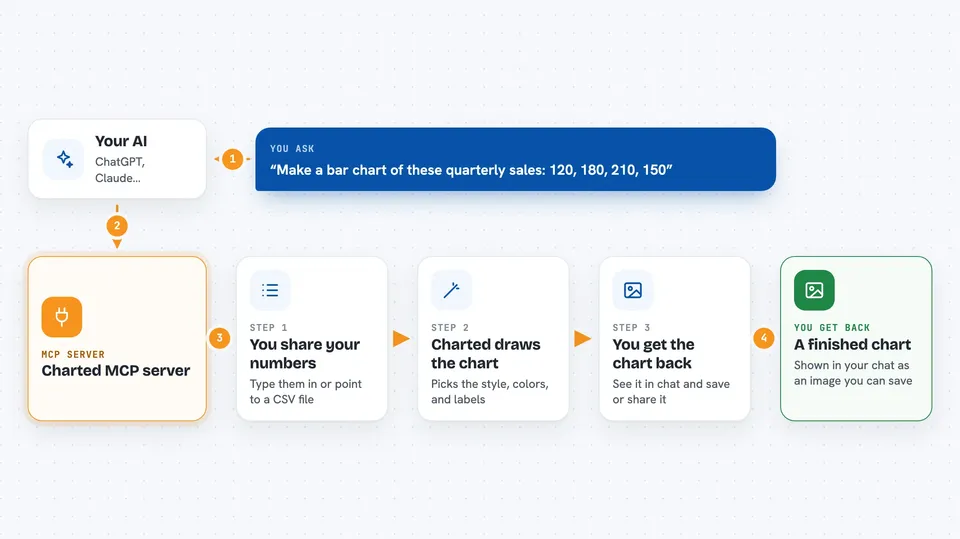
You tell your AI what data you have and what kind of chart you want, like a bar chart of quarterly sales. Your AI passes that to the Charted helper, which turns the numbers into a chart. Charted can read data you paste in, or pull it from a CSV file you point it to. It then draws the chart and gives it back to you as an image or a file. You see the result in your chat and can save or share it.
 Click to zoom
What you can do with it
- Make bar, line, pie, scatter, area, radar, histogram, heatmap, Gantt and other charts
- Turn a CSV file into a chart without writing any code
- Pick from built-in color themes or ask for a custom look
- Add a title, labels and dimensions to your chart
- Save the chart as an SVG or PNG image
- Get a ready-to-paste markdown snippet for your notes or docs
Try asking your AI
- “Make a bar chart of these quarterly sales numbers: 120, 180, 210, 150 with labels Q1 to Q4”
- “Turn my sales.csv file into a line chart of monthly revenue”
- “Draw a pie chart showing market share: 35, 28, 18, 12, 7 with labels Product A to Other”
- “Show me a heatmap of average temperature by city and month using this table”
What it gives back to you
You get back a chart image, usually as an SVG or PNG file, plus a short note about what was made. If you asked for a markdown snippet, you get text you can paste into a document. The chart appears right in your chat so you can look at it and download it. Nothing in your data is changed, only turned into a picture.
Before you start
What you need
- The uv tool installed on your computer (a small program that runs Python helpers)
- An AI app that supports MCP servers, like Claude Code, Cursor or Cline
Good to know
Charted only reads the data you give it and draws a picture, so it does not change or delete anything, but be careful about sharing private numbers with your AI.
Install it with your AI
Add Charted MCP server to your AI, no technical skills needed
You don't install anything by hand. You copy one prompt, paste it into an AI that can work on your computer, and it checks, installs and connects the server for you, asking you when it needs something.
Sign in to get the install prompt
Members get a ready-made prompt that lets the Claude desktop app check Charted MCP server, install it and connect it for them, step by step. You don't need any technical skills: you copy, paste and answer a few questions. Your connected AI can also find and install any of the 4,361 MCP servers here for you.
Who it's for
Anyone who works with numbers in a spreadsheet or report and wants a quick chart without learning a chart tool, like analysts, managers, students and office workers.


