
MCP server · Analytics · official
chartlink MCP server
by oscarleoo · official
Your AI can build charts, maps and tables from templates and hand you a link that updates when the data changes.
chartlink is a service that turns your numbers into charts, maps and sortable tables, and gives you a link you can paste anywhere. This MCP server is how your AI assistant connects to it. It is handy if you make reports, dashboards or slides and you would rather describe what you want than click around in a chart tool.
What is an MCP server? The 30-second version
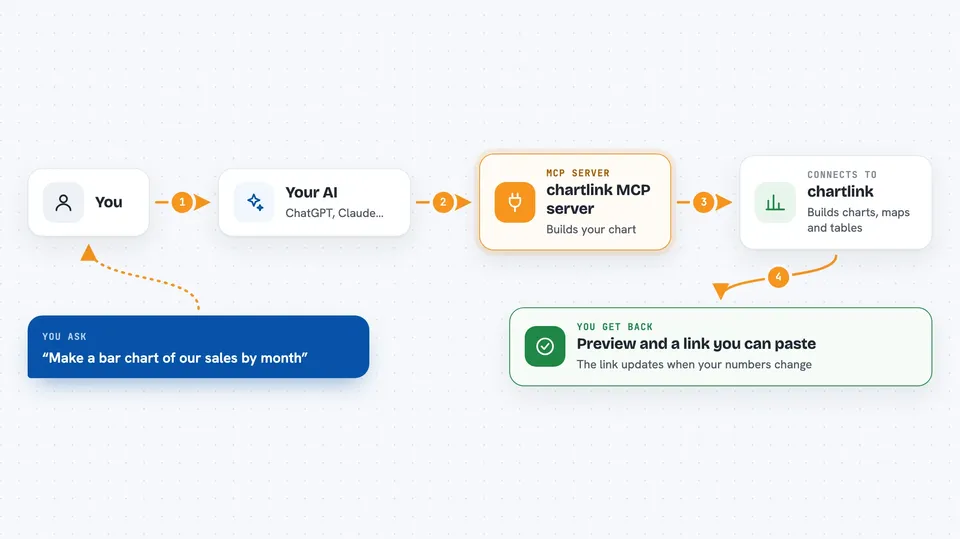
On its own, your AI can only chat with you. An MCP server is a small helper that gives your AI one extra skill or one extra connection. This helper connects your AI to chartlink, so when you ask for a chart, the AI can go to chartlink, pick a template, send your data and bring back a link. You never touch the helper yourself; your AI does.
What this MCP server does
You tell your AI what you want to show, for example a bar chart of monthly sales. The AI uses this helper to look through chartlink's templates and find one that fits. It sends your data and a few settings, like the theme and the labels. chartlink builds the chart and returns a preview and an embed link. Later, when your numbers change, you update the data and every place you pasted that link shows the new version.
 Click to zoom
What you can do with it
- Turn a list of numbers into a bar, line or pie chart
- Make a map from places or addresses
- Build a sortable table from a spreadsheet
- Preview a chart before you share it
- Get an embed link you can paste into a page or a doc
- Update the data behind a chart so the link shows the new numbers
- Pick a theme so the chart matches your slides or site
Try asking your AI
- “Make a bar chart of our sales by month from this list and give me a link I can paste into our report.”
- “Turn these addresses into a map and send me the embed link.”
- “Build a sortable table from this spreadsheet and show me a preview first.”
- “Update the chart I made last week with this month's numbers.”
What it gives back to you
You get back a preview of the chart, map or table, plus a link you can paste into a page, a doc or a slide. The AI usually shows the preview right in the chat and gives you the link next to it. If you ask it to update an existing chart, it tells you the change went through and the link stays the same.
Before you start
What you need
- A chartlink API key (a kind of password for apps; you can get one for free, no account needed)
- An AI tool that can connect to MCP servers, like Claude Code or Cursor
Good to know
The key is your whole workspace, so keep it private; anyone who has it can create and change charts in that workspace.
Install it with your AI
Add chartlink MCP server to your AI, no technical skills needed
You don't install anything by hand. You copy one prompt, paste it into an AI that can work on your computer, and it checks, installs and connects the server for you, asking you when it needs something.
Sign in to get the install prompt
Members get a ready-made prompt that lets the Claude desktop app check chartlink MCP server, install it and connect it for them, step by step. You don't need any technical skills: you copy, paste and answer a few questions. Your connected AI can also find and install any of the 4,361 MCP servers here for you.
Who it's for
People who make reports, dashboards or presentations and want charts without learning a chart tool.


