
MCP server · Research
SearchFetch MCP server
by maxylev
Let your AI search the web and read pages, then hand you clean text instead of messy web pages.
SearchFetch is a small helper that gives your AI the ability to search the web and open pages for you. It runs a real browser in the background, reads the page, and turns it into tidy text your AI can actually use. It is handy if you often ask your AI about things that change, like news, prices, or documentation.
What is an MCP server? The 30-second version
On its own, your AI can only chat with what it already knows. An MCP server is a small helper program you connect once, and it gives your AI a new skill. This one connects your AI to the web, so it can search and open pages when you ask. You do not install anything by hand; you paste a short setup block into your AI app and it runs itself.
What this MCP server does
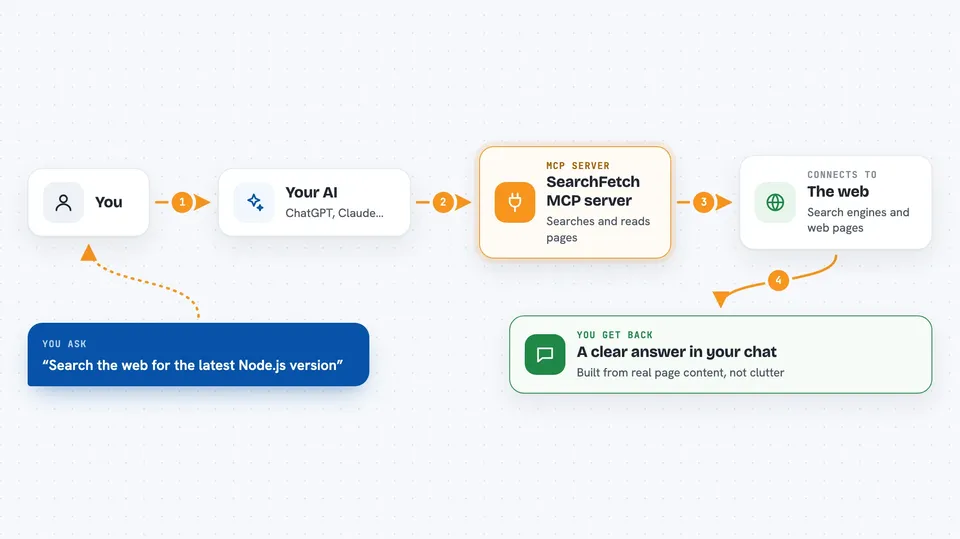
You ask your AI a question that needs current information. Your AI passes the search or the web address to SearchFetch. SearchFetch opens a hidden browser, visits the page, and waits for it to load. Then it strips out images, scripts, and clutter and turns what is left into clean text. Your AI reads that text and answers you in the chat.
 Click to zoom
What you can do with it
- Search the web with DuckDuckGo or Google and get a list of results
- Open a specific web page and read its main content
- Pull structured details from known sites like GitHub, npm, PyPI, Wikipedia, Reddit, and YouTube
- Get long pages in chunks so nothing gets cut off
- Skip images and videos to keep the answer short and focused
- Use a custom extraction template when you need a specific part of a page
Try asking your AI
- “Search the web for the latest version of Node.js and tell me what changed”
- “Open this GitHub repo page and summarize what the project does”
- “Fetch the npm page for searchfetch and list its main features”
- “Look up the Wikipedia page for the Eiffel Tower and give me the key facts”
What it gives back to you
You get answers in the chat, built from real page content. Search results come back as a list of titles, links, and short snippets. Fetched pages come back as clean text or Markdown, often trimmed to the main section. Long pages arrive in pieces you can ask for more of.
Before you start
What you need
- The Claude desktop app, Cursor, or another AI app that supports MCP servers
- Python 3.10 or newer if you use the uvx option
- Node.js 24 or newer if you use the npx option
- An internet connection, since it downloads a browser the first time
Good to know
It opens real web pages in the background, so some sites may block it or ask for a login, and pages that keep loading may come back only partly.
Install it with your AI
Add SearchFetch MCP server to your AI, no technical skills needed
You don't install anything by hand. You copy one prompt, paste it into an AI that can work on your computer, and it checks, installs and connects the server for you, asking you when it needs something.
Sign in to get the install prompt
Members get a ready-made prompt that lets the Claude desktop app check SearchFetch MCP server, install it and connect it for them, step by step. You don't need any technical skills: you copy, paste and answer a few questions. Your connected AI can also find and install any of the 4,609 MCP servers here for you.
Who it's for
Anyone who asks their AI about current information, like researchers, writers, analysts, developers, and students.


