
MCP server · Research
nab MCP server
Fetch any web page as clean text your AI can read, and turn audio or video files into transcripts.
nab is a small helper program that runs on your own computer. It lets your AI read web pages as tidy text instead of messy code, and it can also transcribe audio and video files. It is handy for anyone who does research online or works with recordings.
What is an MCP server? The 30-second version
On its own, your AI can only chat with you. An MCP server is a small helper program that gives your AI a new skill or a connection to something else. This one, nab, connects your AI to the web and to media files on your machine. So when you ask your AI to look something up online or transcribe a meeting, it can actually go and do it.
What this MCP server does
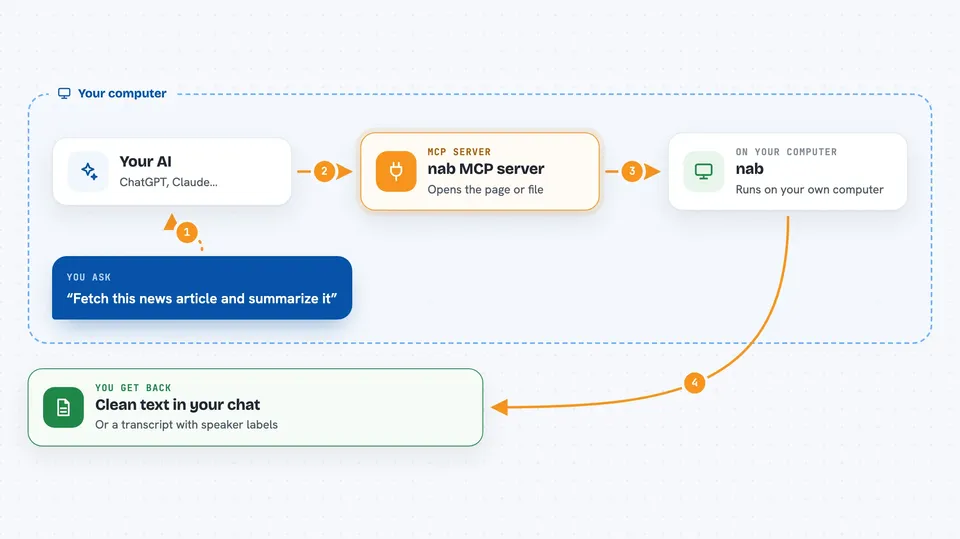
You ask your AI to fetch a web page or analyze a recording. The AI passes that request to nab, which runs quietly on your computer. nab opens the page, strips out the clutter, and hands back clean text. For audio or video, it listens to the file and writes out what was said. You see the result right in your chat, ready to use.
 Click to zoom
What you can do with it
- Fetch any web page and get it back as clean, readable text
- Use your existing browser logins to reach pages behind a sign-in
- Transcribe audio and video files into written text
- Identify who is speaking in a recording
- Watch a web page and get told when its content changes
- Read text out of images using built-in OCR
- Flag hidden instructions on web pages that were aimed at your AI
Try asking your AI
- “Fetch this news article and summarize the main points”
- “Transcribe this meeting recording and tell me who said what”
- “What changed on this status page since yesterday?”
- “Read this page and pull out only the parts about pricing”
What it gives back to you
You get clean text back in your chat, not raw web code. For recordings, you get a transcript, and if you ask, speaker labels and timestamps. For watched pages, you get a note when something changes. It can also save the result to a file if you want.
Before you start
What you need
- A computer running macOS, Linux, or Windows
- The nab program installed (the README shows a few ways to do this)
- For transcription on macOS Apple Silicon, a one-time model download of about 600 MB
Good to know
It can use your real browser logins to reach private pages, so only point it at sites you are comfortable having your AI read.
Install it with your AI
Add nab MCP server to your AI, no technical skills needed
You don't install anything by hand. You copy one prompt, paste it into an AI that can work on your computer, and it checks, installs and connects the server for you, asking you when it needs something.
Sign in to get the install prompt
Members get a ready-made prompt that lets the Claude desktop app check nab MCP server, install it and connect it for them, step by step. You don't need any technical skills: you copy, paste and answer a few questions. Your connected AI can also find and install any of the 4,361 MCP servers here for you.
Who it's for
People who do a lot of online research or work with recordings, like analysts, journalists, students, and assistants.


