MCP server · Developer tools
Raygun MCP server
by MindscapeHQ
Ask your AI to look into app crashes, slow pages, and customer sessions in Raygun.
This is a connection that lets your AI assistant read and work with your Raygun account. Raygun is a service that watches your apps for crashes and slow pages. If your team uses Raygun, this makes it easy to ask plain questions about what went wrong instead of clicking around dashboards.
What is an MCP server? The 30-second version
On its own, your AI can only chat with you. An MCP server is a small helper that gives your AI a new skill or a connection to another service. This one connects your AI to Raygun, so it can look up your errors, deployments, and performance numbers when you ask. You stay in the chat, and the AI does the digging for you.
What this MCP server does
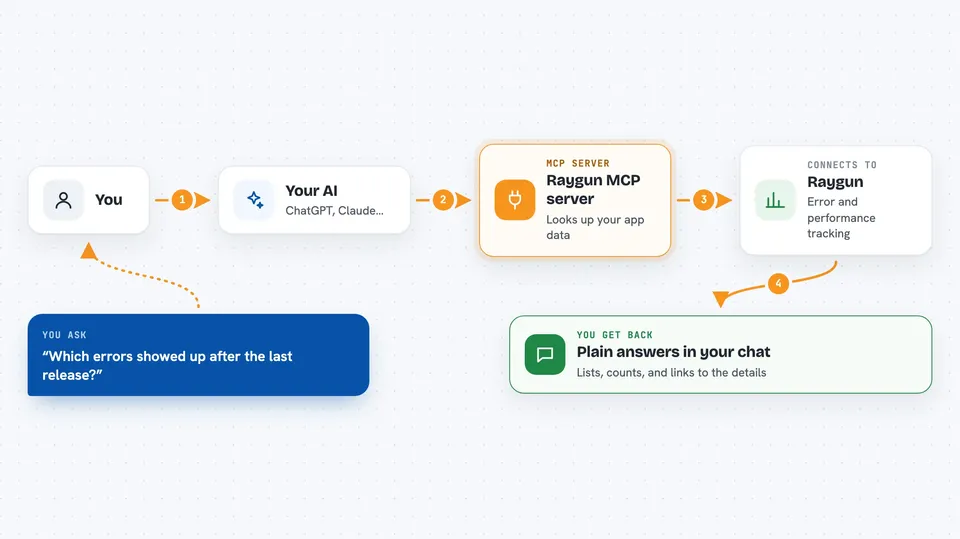
You ask your AI a question about your app, like which errors showed up after the last release. The AI uses this helper to talk to Raygun on your behalf. Raygun sends back the matching errors, stack traces, sessions, or performance numbers. Your AI then explains what it found in normal words. If you ask it to, it can also change things, like marking an error as resolved or adding a note.
 Click to zoom
What you can do with it
- List the errors in one of your apps
- Search errors by message, page, version, or user
- Show the full stack trace for a single error
- Mark an error as resolved, ignored, or active
- Add a note to an error so your team can see it
- See what changed after a deployment
- Look up a customer and their recent sessions
- Find slow backend calls and page load times
Try asking your AI
- “Find the errors that first appeared after the latest deployment of my checkout app.”
- “Show me the most common production error and a sample stack trace.”
- “Which backend methods took the most time in the last 24 hours?”
- “Show me the last session for user@example.com and explain where it went wrong.”
What it gives back to you
You get answers written in the chat, usually with short lists, error names, counts, and links to the details. For a single error you get the stack trace and the context around it. For performance questions you get numbers and trends, like page load times over the past week. If the AI changed something, like resolving an error, it tells you what it did.
Before you start
What you need
- A Raygun account with an active subscription
- An MCP client that supports signing in through your browser (OAuth), or a Raygun Personal Access Token
Good to know
Some actions change your Raygun data, like resolving errors, creating or deleting deployments, sending invitations, and rotating app keys, so check what the AI is about to do before you approve it.
Install it with your AI
Add Raygun MCP server to your AI, no technical skills needed
You don't install anything by hand. You copy one prompt, paste it into an AI that can work on your computer, and it checks, installs and connects the server for you, asking you when it needs something.
Sign in to get the install prompt
Members get a ready-made prompt that lets the Claude desktop app check Raygun MCP server, install it and connect it for them, step by step. You don't need any technical skills: you copy, paste and answer a few questions. Your connected AI can also find and install any of the 4,361 MCP servers here for you.
Who it's for
Developers, support engineers, and team leads who already use Raygun and want quick answers about crashes and performance without opening the dashboard.