
Learning path
Learning AI as a Law Student
Law students face heavy reading and tight deadlines. This path shows how to use AI to study smarter and build skills that matter in practice.

Your path
Everything in the Law Student AI kit, in the order that makes sense. Members tick off each step and see their progress.
Set up your AI
We guide you through each click.
Let skills do your everyday tasks
Connect your apps and pick your AI apps
Hand whole tasks to AI agents
Build your own tools
Keep growing
Everything for law students
All the courses, certifications, AI tools, MCP servers and apps for law students, most relevant first. Open any list to see more.
Take the prompt courses
A short framework course to learn how to ask, then 8 lessons with ready-to-use prompts for law students.
Start with this framework: how to talk to AI
TIDD-EC fits your law studies because its do, don't, and precise instructions help you draft case briefs without missing key elements.
Then your prompt course for law studentsWatch the video courses or add them to your Favorites for later
96 video courses our AI picked for law students, most useful first. Save the ones you want to watch later with the heart.
Favorites are saved to your account: sign in or get your AI kit first.
Show all 96 video courses
Get certified, or add certifications to your Favorites
Every course ends in an exam and a certificate you can add to LinkedIn. Save the certifications you are aiming for with the heart.
Favorites are saved to your account: sign in or get your AI kit first.
More certifications for law studentsShow all 24 certifications
Try the AI tools for law students
24 AI tools our AI matched to the work of law students, best fit first. Each review shows what it does, its alternatives and the jobs it suits.
Favorites are saved to your account: sign in or get your AI kit first.
Show all 24 AI tools
Connect your AI to the apps law students use
MCP servers let ChatGPT, Claude or Copilot look things up and get work done in other apps, like your email, calendar or bookkeeping software. These 12 fit the work of law students best, well-known apps first.

KitchenSink4Word MCP server
by nometalalchemistLet your AI edit real Word documents: text, tables, tracked changes, citations and more.
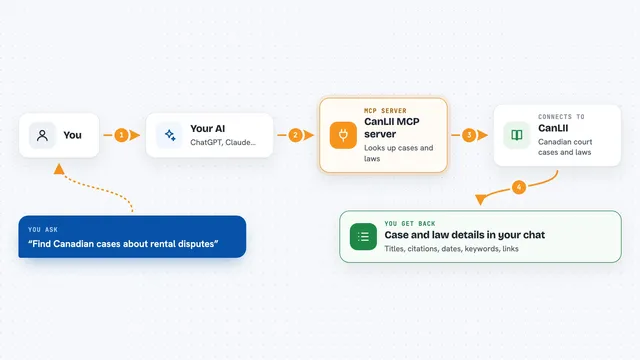
CanLII MCP server
by Vaquill-AILets your AI look up Canadian court cases and laws by title, citation, date, and keywords.
ResearchNo install
NotebookLM MCP server
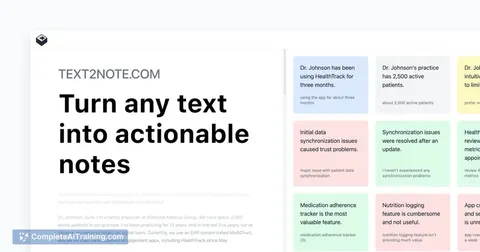
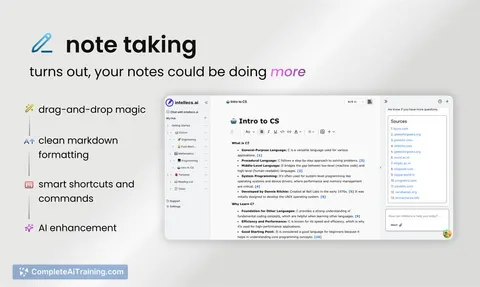
by roomi-fieldsAsk your own documents questions and get answers with citations, plus podcasts, videos, and study aids.

LibreJustice MCP server
by librejusticeSearch French and European case law and legal texts, and read any article as it stood on a given date.
Research Official
Web Researcher MCP server
by zoharbabinLets your AI search trusted sites, read full articles, and give you real, clickable sources.

Google Tasks MCP server
by A1-x-TechLets your AI read and manage your Google Tasks lists, tasks, due dates and subtasks for you.
Show all 12 MCP servers

DuckDuckGo Search MCP server
by zhsamaLets your AI search the web through DuckDuckGo and bring back results for you.

LexAPI MCP server
by Lex-APILook up EU laws, court cases, and citations from EUR-Lex right inside your AI chat.

Bing Search MCP server
by leehanchungLets your AI search the web, news, and images through Microsoft Bing while you chat.

Web Search MCP server
by pskill9Lets your AI search the web through Google and bring back titles, links, and short descriptions.

Google Drive MCP server
by A1-x-TechLet your AI search, organize, upload, download, export and share your Google Drive files for you.
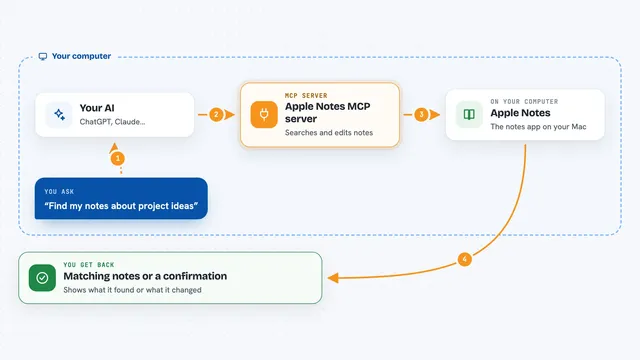
Apple Notes MCP server
by disco-trooperLets your AI search, read, create, update, and move your Apple Notes for you.































































































About this learning path
6 topicsHow Law Students Can Use AI Well
Law school asks a lot of you. You read hundreds of pages, outline doctrines, and practice writing under pressure. AI can help you keep up without cutting corners on understanding.
This path starts with simple setup questions, then shows you how to connect an AI tool and use it for the work you already do. You will learn prompts for case briefing, outlining, exam prep, and more, plus video courses chosen for law students.
Why AI Matters Now
Law firms and courts are slowly adopting AI tools for research, drafting, and document review. As a student, getting comfortable with these tools now means you are ready for internships and first jobs. It also helps you study more effectively today.
What the Path Includes
You start with setup questions to pick the right AI tool for your needs. Then you connect your AI, learn skills for law school work inside it, and take this prompt course. You also get video courses picked for law students and the certifications that come with them.
How It Saves Time
Reading cases, outlining, and drafting memos take hours. With good prompts, you can get a plain-English brief in minutes, spot gaps in your outline, and turn lecture notes into practice questions. That time goes back to deeper reading and rest.
How It Protects Your Career
AI will not replace lawyers, but lawyers who use AI well will have an edge. Learning to check AI output, protect client information, and use tools responsibly is part of being a professional. This path builds those habits early.
How to Start
Begin with the setup questions to choose a tool like ChatGPT, Claude, or Gemini. Then work through the prompt course in order. Each lesson gives you prompts you can use right away for your current classes.
Frequently asked questions
Do I need to be tech-savvy to use this path?
No. The path starts with simple setup questions and explains each step in plain language. If you can use a web browser, you can follow along.Will using AI count as cheating in law school?
That depends on your school's rules and your professor's instructions. Use AI to study and check your understanding, but always follow your honor code. When in doubt, ask before you use it for graded work.Which AI tool should I use?
ChatGPT, Claude, and Gemini all work well for the prompts in this course. The setup questions help you pick one based on what you need. You can also try more than one and see which fits your study style.How long does the path take?
You can move at your own pace. Most students finish the prompt course in a few weeks if they practice with their current classes. The video courses are short and can be watched when you have time.