MCP server · Research
Wellread MCP server
by mnlt
Lets your AI reuse research other developers already did, so it stops re-searching the same things.
Wellread is a shared research cache for AI coding assistants. Before your AI goes off to search the web for an answer, Wellread checks if another developer already researched the same thing. If they did, you get the answer instantly instead of paying for a whole new search.
What is an MCP server? The 30-second version
On its own, your AI can only chat with you using what it already knows. An MCP server is a small helper program that gives your AI a new skill or a connection to something outside the chat. Wellread is that helper, and its skill is looking up research that other developers have already saved. When you ask your AI a technical question, it can quietly check Wellread first before doing any searching.
What this MCP server does
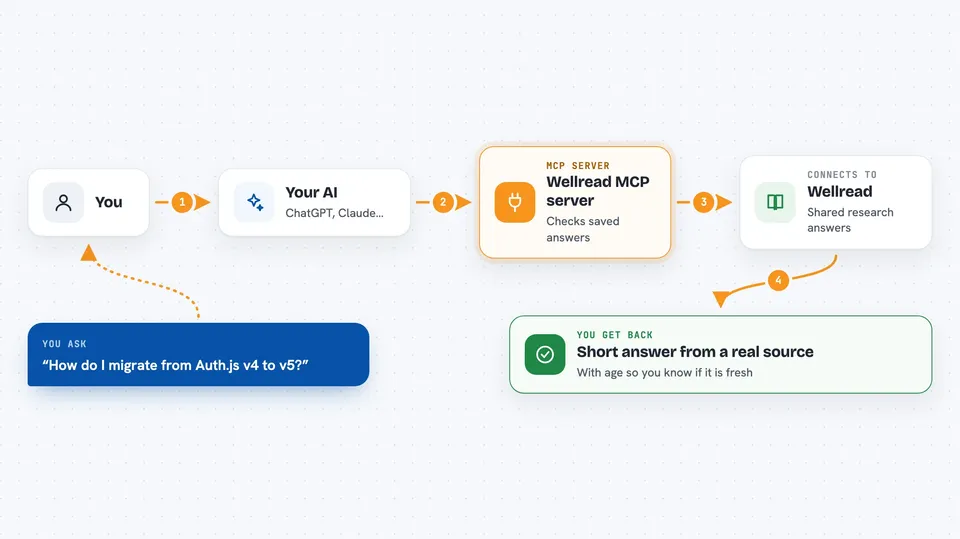
You ask your AI a technical question, like how to migrate to a new library. The AI asks Wellread if anyone has already researched that. If someone has, Wellread hands back a short summary from a real source, and your AI answers you right away. If nobody has, your AI does its normal research and then saves a summary into Wellread for the next person. Over time, the shared pile of answers grows and everyone's searches get faster.
 Click to zoom
What you can do with it
- Reuse research answers other developers already saved
- Save your own research so the next person skips the search
- Check how fresh a saved answer is before trusting it
- See your own stats, like tokens saved and how many people used your research
- Avoid answers that come from stale training data
- Work across sessions so you do not repeat yourself
Try asking your AI
- “Look up how to migrate from Auth.js v4 to v5 and check Wellread first”
- “Is there a saved answer about Bun and Drizzle not playing nicely together?”
- “Save this research about PostgreSQL connection pooling for the next developer”
- “Show me my wellread stats”
What it gives back to you
You get a short written answer in the chat, based on a real source that someone verified. If it is a fresh answer, it comes back in one turn with no web searching. If it is a saved answer, Wellread tells you how old it is so you know whether to trust it. When you save research, it just confirms it was stored.
Before you start
What you need
- Node.js installed on your computer (the free program that runs npx commands)
- An MCP client like Claude Code, Cursor, Windsurf, Gemini CLI, VS Code, or OpenCode
Good to know
Anything you save is public and shared with other developers, so never include project names, file paths, or private details in what you save.
Install it with your AI
Add Wellread MCP server to your AI, no technical skills needed
You don't install anything by hand. You copy one prompt, paste it into an AI that can work on your computer, and it checks, installs and connects the server for you, asking you when it needs something.
Sign in to get the install prompt
Members get a ready-made prompt that lets the Claude desktop app check Wellread MCP server, install it and connect it for them, step by step. You don't need any technical skills: you copy, paste and answer a few questions. Your connected AI can also find and install any of the 4,609 MCP servers here for you.
Who it's for
Developers and technical teams who ask their AI coding assistant a lot of research questions and want to stop paying for the same searches over and over.