
MCP server · Developer tools
Git MCP server
Lets your AI read, search and change the files and history inside a local Git project for you.
This is a small helper that connects your AI assistant to a Git project stored on your own computer. Git is the tool many teams use to keep track of changes to files over time. If you work with a project that lives in Git and you find the commands fiddly, this lets you just ask in plain words.
What is an MCP server? The 30-second version
On its own, your AI can only chat. An MCP server is a small helper program that gives your AI a new skill or a connection to something, in this case to a Git project on your machine. Once it is connected, your AI can look inside that project and do things there when you ask. You do not need to learn the Git commands yourself; the helper runs them for you.
What this MCP server does
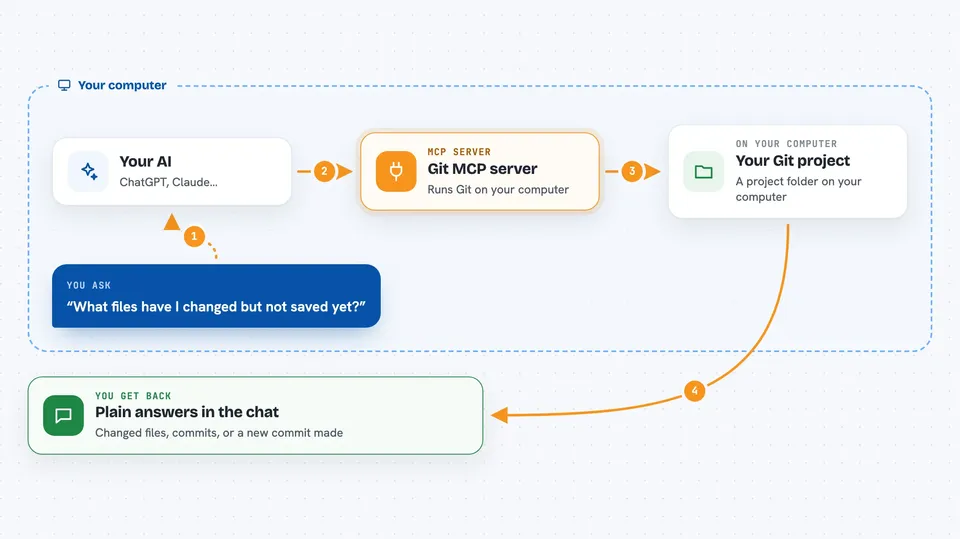
You ask your AI something about your project, like what changed today or what is in a certain commit. Your AI passes that request to this helper program. The helper runs the matching Git command on your computer, inside the project folder you pointed it at. It sends the result back to your AI, which explains it to you in normal language. If you ask it to, it can also make changes, like staging files or creating a commit.
 Click to zoom
What you can do with it
- See which files have changed and are not saved yet
- Read the differences between your current files and the last saved version
- Look through the history of commits, filtered by date or number
- Show what a particular commit changed
- Create a new branch or switch to another one
- Stage files and save a commit with a message you give it
- List the branches in the project
Try asking your AI
- “What files have I changed in this project but not saved yet?”
- “Show me the last 5 commits and what they were about”
- “What changed in the commit from yesterday afternoon?”
- “Make a new branch called fix-login and switch to it”
What it gives back to you
You get answers in the chat, written in normal language. That can be a list of changed files, a summary of recent commits, or an explanation of what a commit did. When it makes a change for you, like saving a commit, it tells you it worked and gives you the new commit reference.
Before you start
What you need
- A Git project already on your computer
- The path to that project folder
- A tool that can run this helper, such as uv (the recommended way) or Python with pip
- An AI app that supports MCP servers, like the Claude desktop app or VS Code
Good to know
It can save commits and switch branches in your project, so check with your AI before letting it make changes, and keep a backup of anything important.
Install it with your AI
Add Git MCP server to your AI, no technical skills needed
You don't install anything by hand. You copy one prompt, paste it into an AI that can work on your computer, and it checks, installs and connects the server for you, asking you when it needs something.
Sign in to get the install prompt
Members get a ready-made prompt that lets the Claude desktop app check Git MCP server, install it and connect it for them, step by step. You don't need any technical skills: you copy, paste and answer a few questions. Your connected AI can also find and install any of the 4,609 MCP servers here for you.
Who it's for
People who work with a project kept in Git but would rather ask questions in plain words than remember commands, especially writers, designers and less technical team members.


