MCP server · Research
Smithsonian MCP server
by molanojustin
Search over 3 million Smithsonian museum objects and get details, images info, and exhibit status.

This is a small helper that connects your AI assistant to the Smithsonian's public collection of over 3 million museum objects. Once it is set up, you can ask your AI about art, history, aircraft, and more, and it will look things up in the Smithsonian's own records. It is handy for teachers, researchers, writers, or anyone curious about museum collections.
What is an MCP server? The 30-second version
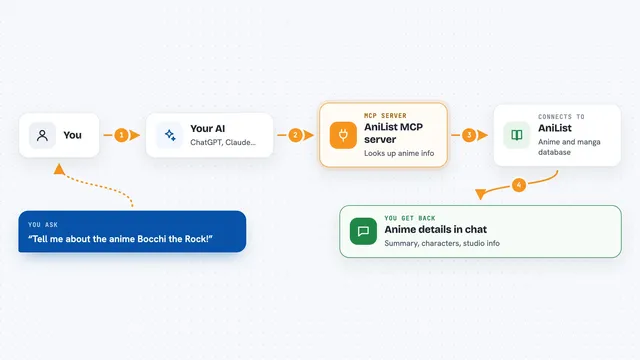
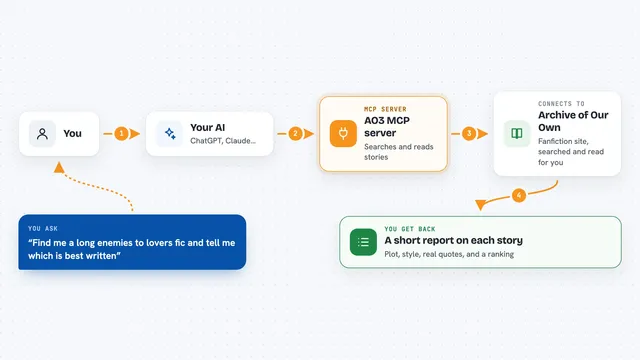
On its own, your AI can only chat with you using what it already knows. An MCP server is a small helper program that gives your AI a new skill or a connection to an outside service. This one connects your AI to the Smithsonian Institution's Open Access collections, so it can search real museum records and bring back answers for you. You just ask in normal words, and the helper does the looking up.
What this MCP server does
You ask your AI a question about something in a museum, like a painting, a plane, or an old invention. The AI sends your request to this helper program. The helper talks to the Smithsonian's public data service and searches its collection records. It brings back matching objects with details like the creator, date, materials, and whether the item is currently on display. Your AI then shows you a tidy answer in the chat.
 Click to zoom
What you can do with it
- Search across 3 million objects in 19 Smithsonian museums
- Get full details for a specific object, like who made it and when
- Find out which objects are currently on physical exhibit
- Browse what kinds of objects each museum holds
- Get collection statistics with a breakdown per museum
- Find a valid web link to an object's page
- Explore a topic with a diverse sample of results from many museums
Try asking your AI
- “Show me paintings by Georgia O'Keeffe in the Smithsonian collections”
- “What aircraft from the Air and Space Museum are on display right now?”
- “Find objects related to the American Civil War in the National Museum of American History”
- “Give me a link to the Smithsonian record for this object”
What it gives back to you
You get back a list of matching objects with short descriptions, or full details for one object, including creator, date, materials, and museum. It can also tell you whether an item is currently on view and give you a working web link to its page. Statistics come back as numbers, sometimes marked as estimates. Everything appears as normal text in your chat.
Before you start
What you need
- A free API key from api.data.gov (a kind of password for apps; the site gives you one for free)
- Node.js 16 or newer, or Python 3.10 or newer, depending on how you install it
- The Claude desktop app or another AI tool that supports MCP servers
- An internet connection
Good to know
It only reads public Smithsonian data, so it will not change or delete anything, but image links are often missing because of a current limit in the Smithsonian's own data service.
Install it with your AI
Add Smithsonian MCP server to your AI, no technical skills needed
You don't install anything by hand. You copy one prompt, paste it into an AI that can work on your computer, and it checks, installs and connects the server for you, asking you when it needs something.
Sign in to get the install prompt
Members get a ready-made prompt that lets the Claude desktop app check Smithsonian MCP server, install it and connect it for them, step by step. You don't need any technical skills: you copy, paste and answer a few questions. Your connected AI can also find and install any of the 4,361 MCP servers here for you.
Who it's for
Teachers, students, researchers, writers, and museum fans who want to explore Smithsonian collections without digging through websites.