
MCP server · Developer tools
MCP Server Toolkit
Give your AI helper a set of tools to search your code, query your database, and read your docs.
This is a bundle of small helper programs that give your AI assistant new skills for working with developer stuff. Instead of just chatting, your AI can look things up in your code, your database, or your documentation when you ask. It is handy for anyone who works with code or technical documents and wants their AI to actually check things instead of guessing.
What is an MCP server? The 30-second version
On its own, your AI can only chat with you using what it already knows. An MCP server is a small helper program you connect to your AI that gives it one new skill or one new connection. This toolkit is a collection of such helpers, each one connecting your AI to something different like your code files, your database, or a docs site. Once connected, your AI can use those helpers to look things up or do things for you when you ask.
What this MCP server does
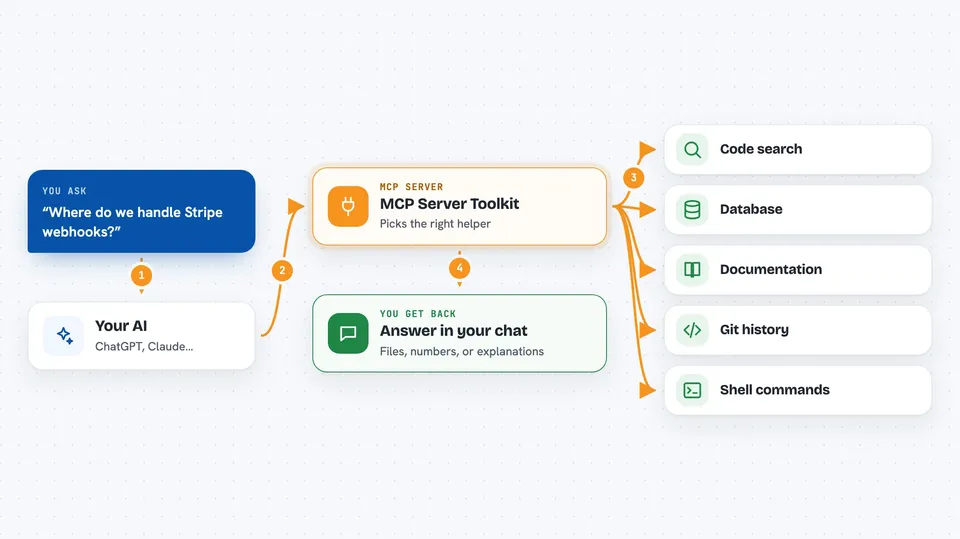
You ask your AI a question in plain words, like where a certain piece of code lives or how many users signed up last week. Your AI picks the right helper from this toolkit, for example the code search one or the database one. That helper then looks through your files or runs a query against your database. The result comes back to your AI, which explains it to you in the chat. You never have to copy and paste anything or switch between apps.
 Click to zoom
What you can do with it
- Search your whole codebase for a function, file, or pattern
- Ask questions about your database in plain English and get answers
- Look up what your documentation says about a topic
- Browse and call endpoints from an API description file
- Check your Git history for commits, diffs, and who changed what
- Run safe, approved shell commands in a sandbox
- Build your own custom helper server for a tool you use
Try asking your AI
- “Where do we handle Stripe webhooks?”
- “How many users signed up in the last 7 days?”
- “What does our docs say about rate limiting?”
- “Show me the last 5 commits that touched the auth folder”
What it gives back to you
You get answers in plain language right in your chat, like a list of matching files, a number, or a short explanation. For database questions you also see the query that was run and the result. For code searches you get file names and line matches. For docs you get the relevant snippet and where it came from.
Before you start
What you need
- Node.js 18 or newer, or Python 3.10 or newer
- An OpenAI API key for the code search helper (a kind of password for apps; you get one from OpenAI)
- A connection string for your database if you want to use the database helper (a line of text that tells the helper where your database lives and how to log in)
- The Claude Code app or another AI tool that supports MCP servers
Good to know
The database and shell helpers can change things if you turn on write access, so keep them read-only unless you really need to make changes.
Install it with your AI
Add MCP Server Toolkit to your AI, no technical skills needed
You don't install anything by hand. You copy one prompt, paste it into an AI that can work on your computer, and it checks, installs and connects the server for you, asking you when it needs something.
Sign in to get the install prompt
Members get a ready-made prompt that lets the Claude desktop app check MCP Server Toolkit, install it and connect it for them, step by step. You don't need any technical skills: you copy, paste and answer a few questions. Your connected AI can also find and install any of the 4,609 MCP servers here for you.
Who it's for
Developers, data analysts, and technical writers who want their AI assistant to look things up in their code, database, or docs without copy-pasting.




