
MCP server · Notes
PinRAG MCP server
by ndjordjevic
Ask questions across your PDFs, YouTube videos, GitHub repos and Discord exports, and get answers with citations.
PinRAG is a helper that lets your AI read your own study materials and answer questions about them. You feed it PDFs, YouTube videos, GitHub repos, Discord chats, or web docs, and then you just ask. It is handy if you learn from many scattered sources and want one place to ask questions.
What is an MCP server? The 30-second version
On its own, your AI can only chat with what it already knows. An MCP server is a small helper program that gives your AI a new skill or a connection to something. PinRAG is that helper, and it connects your AI to your own documents and links. Once it is set up, your AI can look things up in your materials and answer you with sources.
What this MCP server does
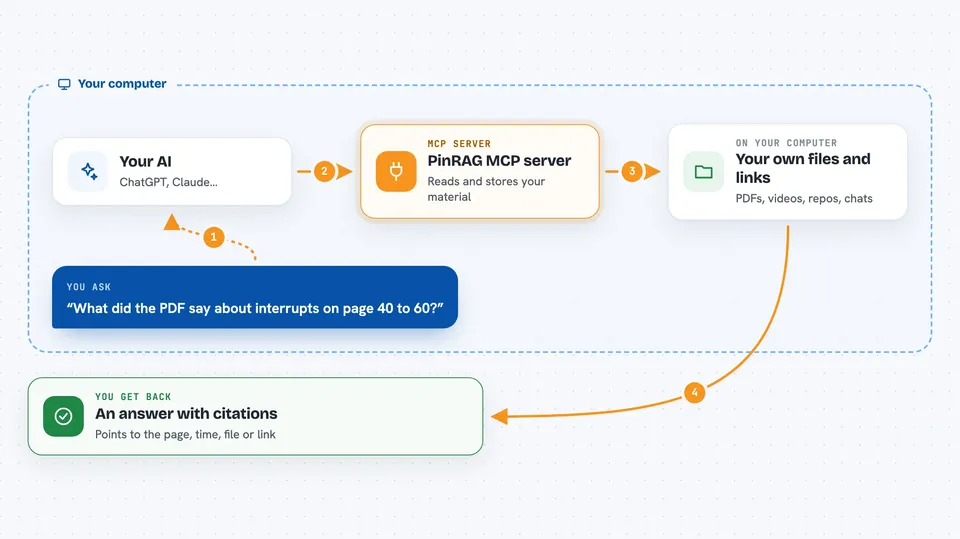
You tell your AI to add some material, like a PDF path or a YouTube link. The AI passes that to PinRAG, which reads the file or link and stores it in a searchable index on your computer. Later, when you ask a question, the AI sends it to PinRAG, which finds the most relevant parts of your material. PinRAG hands those parts back to the AI, and the AI writes an answer for you with citations pointing to the page, timestamp, file, or URL.
 Click to zoom
What you can do with it
- Index a PDF, a folder of text files, or a Discord export
- Index a YouTube video or playlist and ask what it covers
- Index a GitHub repo and ask about the code
- Index a documentation website and ask about its features
- Tag documents so you can search only one topic
- List everything you have indexed so far
- Remove a document you no longer need
Try asking your AI
- “Add /Users/me/books/amiga-book.pdf with tag AMIGA”
- “Index https://youtu.be/xyz and tell me what it says about memory”
- “Index https://github.com/owner/repo and explain how the config works”
- “What did the PDF say about interrupts on page 40 to 60?”
What it gives back to you
You get a written answer in the chat, based on your own material. Each answer includes citations, like a PDF page number, a YouTube timestamp such as t. 1:23, a file name, a chunk label for GitHub, or a source URL for web docs. When you index or list, you get short confirmations and a list of document IDs and chunk counts.
Before you start
What you need
- The uv tool installed, with uvx on your PATH
- An OpenRouter API key (a kind of password for apps; OpenRouter gives you one, and there is a free option)
- An editor that supports MCP, like Cursor or VS Code with GitHub Copilot
- A stable absolute folder path for PinRAG to store its data
Good to know
PinRAG reads the files and links you point it at, so only index material you are comfortable sending to your chosen AI provider, and remember that indexing a repo or site can take a while and use API credits.
Install it with your AI
Add PinRAG MCP server to your AI, no technical skills needed
You don't install anything by hand. You copy one prompt, paste it into an AI that can work on your computer, and it checks, installs and connects the server for you, asking you when it needs something.
Sign in to get the install prompt
Members get a ready-made prompt that lets the Claude desktop app check PinRAG MCP server, install it and connect it for them, step by step. You don't need any technical skills: you copy, paste and answer a few questions. Your connected AI can also find and install any of the 4,361 MCP servers here for you.
Who it's for
People who learn from many sources at once, like developers, students, and researchers who want to ask questions across PDFs, videos, repos, and chats.





