MCP server · Productivity
Docweave MCP server
Let your AI turn HTML, a web page, or a template into a PDF, and read text out of PDFs.

Docweave is a small helper that gives your AI two document skills: making PDFs and reading PDFs. You can ask it to build a PDF from a web page, from HTML you paste in, or from a template plus your data, and you can ask it to pull the text out of a PDF you already have. It is handy if you deal with documents all day and want your AI to handle the back and forth.
What is an MCP server? The 30-second version
On its own, your AI can only chat. An MCP server is a small helper program that gives your AI a new skill or a connection to another service. This one connects your AI to Docweave, a document service. Once it is set up, your AI can ask Docweave to make a PDF or read a PDF for you, and then tell you what came back.
What this MCP server does
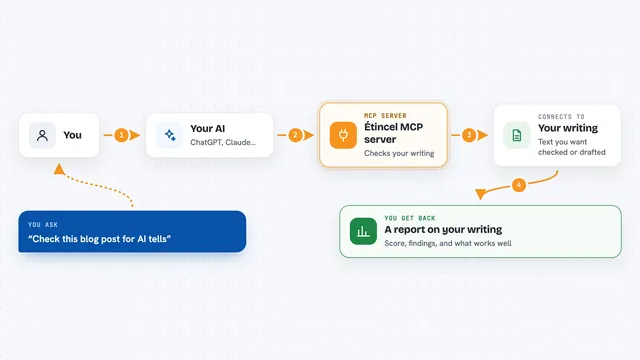
You ask your AI for something like a PDF of a web page or the text inside a PDF you have. Your AI passes that request to this helper. The helper talks to Docweave, which does the actual work of building or reading the document. Then the result comes back into your chat, either as a finished PDF or as clean text you can read and copy.
 Click to zoom
What you can do with it
- Turn a public web page into a PDF
- Turn HTML you paste in into a PDF
- Build a PDF from a template plus your own data
- Choose page size, landscape mode, and margins
- Read a PDF from a link and get its text back
- Read a PDF you paste in and get clean markdown
- Spot scanned PDFs that need OCR instead of text
Try asking your AI
- “Make a PDF of this web page and give me the link”
- “Turn this HTML into a PDF on A4 paper”
- “Read this PDF and give me the text as markdown”
- “Use my invoice template with this data and make a PDF”
What it gives back to you
For making a PDF, you get a finished PDF back, ready to open or download. For reading a PDF, you get the text or markdown plus the number of pages. If the PDF is a scan or an image, it tells you that OCR is needed instead of giving you empty text. Everything shows up right in your chat.
Before you start
What you need
- A Docweave API key (a kind of password for apps; you get one free at docweave.dev/signup, 50 documents a month, no card)
- Node.js installed if you run it with npx
- An MCP client like Claude Desktop, Cursor, or Windsurf
Good to know
Making and reading documents uses your Docweave account and counts against your monthly limit, so keep an eye on how many you run.
Install it with your AI
Add Docweave MCP server to your AI, no technical skills needed
You don't install anything by hand. You copy one prompt, paste it into an AI that can work on your computer, and it checks, installs and connects the server for you, asking you when it needs something.
Sign in to get the install prompt
Members get a ready-made prompt that lets the Claude desktop app check Docweave MCP server, install it and connect it for them, step by step. You don't need any technical skills: you copy, paste and answer a few questions. Your connected AI can also find and install any of the 4,361 MCP servers here for you.
Who it's for
Anyone who works with documents a lot, like admin staff, writers, analysts, or support teams who want their AI to make and read PDFs.