
MCP server · Notes
Local FAISS MCP server
by nonatofabio
Let your AI search your own documents and PDFs on your computer, then answer questions from them.
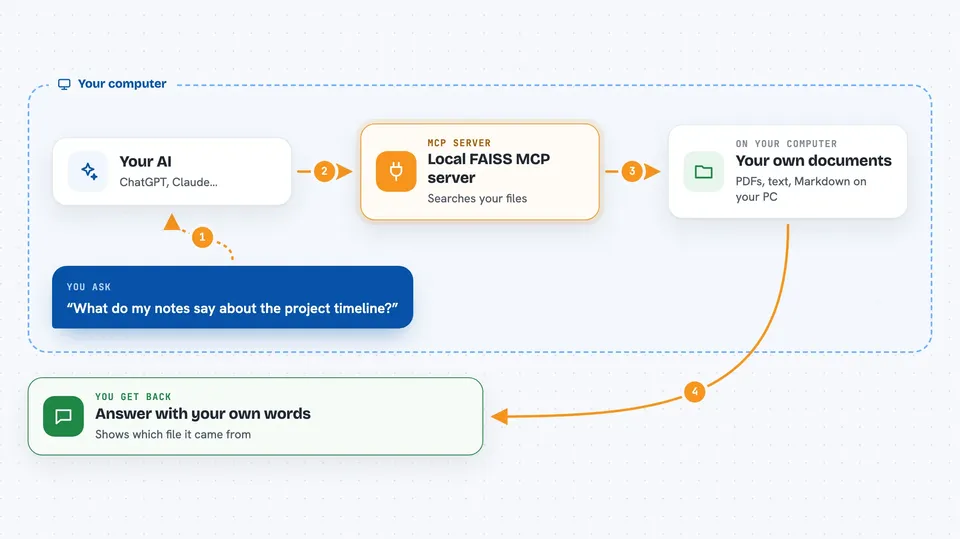
This is a small helper that lets your AI assistant read your own files and answer questions about them. You feed it documents like PDFs, text files, or Word files, and later you ask questions in plain language. It is handy for anyone who has a pile of reports, manuals, or notes and wants quick answers without uploading anything to the internet.
What is an MCP server? The 30-second version
On its own, your AI can only chat with what it already knows. An MCP server is a small helper program that gives your AI a new skill, in this case a connection to a searchable library of your own documents stored on your computer. Once it is connected, your AI can look things up in that library when you ask. This one keeps everything local, so your files stay on your machine.
What this MCP server does
You point this helper at your documents, and it reads them, splits them into small pieces, and stores them in a searchable index on your computer. When you ask your AI a question, the AI uses this helper to find the most relevant pieces from your files. The helper hands those pieces back, and your AI writes an answer based on them. If you turn on re-ranking, it does a second pass to put the best matches first. Everything is saved to disk, so you only need to add each document once.
 Click to zoom
What you can do with it
- Add PDFs, text files, and Markdown files to a searchable library
- Ask questions in plain language and get answers based on your own documents
- Search across many files at once instead of opening them one by one
- Add Word, HTML, or EPUB files if you also install pandoc
- Get a short summary of what your documents say about a topic
- Get answers with the source file named, so you can check where it came from
- Index a whole folder of documents from the command line
Try asking your AI
- “Add the file ./reports/annual_review.pdf to my document store”
- “Search my documents for how our refund policy works”
- “What do my notes say about the project timeline?”
- “Summarize what my documents say about onboarding new staff”
What it gives back to you
You get back short pieces of text from your own documents, along with the file they came from and a relevance score. Your AI then turns those pieces into a written answer in the chat, often with the source file mentioned. If you use the built-in prompts, it can also give you a clean answer with citations or a short summary. Nothing is changed in your original files.
Before you start
What you need
- Python installed on your computer
- The local-faiss-mcp package installed with pip
- Optional: pandoc if you want to add Word, HTML, or EPUB files
- An MCP-compatible app like Claude Code or Claude Desktop
Good to know
It reads the files you point it at and stores a copy of their text in an index on your disk, so avoid adding anything you would not want saved locally.
Install it with your AI
Add Local FAISS MCP server to your AI, no technical skills needed
You don't install anything by hand. You copy one prompt, paste it into an AI that can work on your computer, and it checks, installs and connects the server for you, asking you when it needs something.
Sign in to get the install prompt
Members get a ready-made prompt that lets the Claude desktop app check Local FAISS MCP server, install it and connect it for them, step by step. You don't need any technical skills: you copy, paste and answer a few questions. Your connected AI can also find and install any of the 4,609 MCP servers here for you.
Who it's for
Anyone who works with a lot of documents, like researchers, analysts, writers, or support staff, and wants quick answers from their own files without sending them anywhere.





