MCP server · Design tools
drawspec MCP server
by nuncaeslupus
Your AI writes a diagram description in plain JSON and drawspec turns it into a clean SVG or PNG picture for you.
drawspec is a small tool that turns a written description of a diagram into an actual picture. You tell it what the diagram means, like the boxes, the arrows and the labels, and it works out all the positions and colours for you. It is handy if you write documentation, specs or README files and want a diagram that looks tidy without fighting a drawing program.
What is an MCP server? The 30-second version
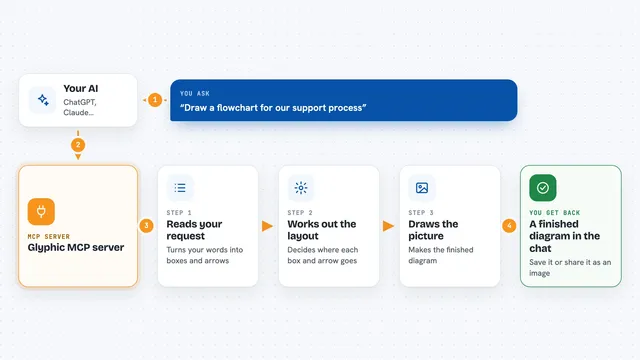
On its own, your AI can only chat and write text. An MCP server is a small helper program that gives your AI a new skill or a connection to an app. This one connects your AI to drawspec, a diagram maker. So when you ask for a diagram, your AI writes the description, drawspec draws it, and you get a real picture back instead of a wall of code.
What this MCP server does
You ask your AI for a diagram, for example a flowchart of your support process. The AI writes a short JSON document describing the boxes, the arrows and the labels. It sends that to the drawspec helper. drawspec checks the description, then draws it as an SVG picture with everything lined up nicely. You get the finished picture back in the chat, ready to drop into your document.
What you can do with it
- Draw a flowchart from a few sentences you type
- Turn your process notes into a clean picture
- Make a timeline, chart, mind map or swimlane diagram
- Check a diagram description for mistakes before drawing it
- List all the diagram kinds drawspec can draw
- Render the same diagram as a PNG or as plain text
Try asking your AI
- “Draw a flowchart of our customer refund process”
- “Make a timeline diagram of our project phases from March to August”
- “Turn these support ticket numbers into a bar chart”
- “Draw a simple mind map for our onboarding topic”
What it gives back to you
You get a picture in the chat, usually an SVG you can copy into your document. If you ask for PNG instead, you get an image file. If a description has a problem, you get a short list of what is wrong and where. For diagrams meant for text places, you can also get a plain text version you can paste into a code block.
Before you start
What you need
- Python installed on your computer
- The drawspec package installed, easy with pip install drawspec
- An MCP client like Claude Desktop or another app that supports MCP servers
Install it with your AI
Add drawspec MCP server to your AI, no technical skills needed
You don't install anything by hand. You copy one prompt, paste it into an AI that can work on your computer, and it checks, installs and connects the server for you, asking you when it needs something.
Sign in to get the install prompt
Members get a ready-made prompt that lets the Claude desktop app check drawspec MCP server, install it and connect it for them, step by step. You don't need any technical skills: you copy, paste and answer a few questions. Your connected AI can also find and install any of the 4,361 MCP servers here for you.
Who it's for
Anyone who writes documentation, specs or reports and needs a clean diagram without using a drawing program.