
MCP server · Developer tools
DNS MCP server
by ofershap
Lets your AI look up DNS records, reverse DNS, WHOIS and domain details for any website.
This is a small helper that lets your AI assistant look up internet address details for a domain or an IP address. You ask a question in plain words, and it goes and checks the public records for you. It is handy for anyone who works with websites, email setup, or just wants to know who owns a domain.
What is an MCP server? The 30-second version
On its own, your AI can only chat with you from what it already knows. An MCP server is a small helper program that gives your AI a new skill or a connection to something outside the chat. This one connects your AI to the public internet address system, called DNS, and to WHOIS, which is the public record of who owns a domain. Once it is connected, your AI can look these things up for you whenever you ask.
What this MCP server does
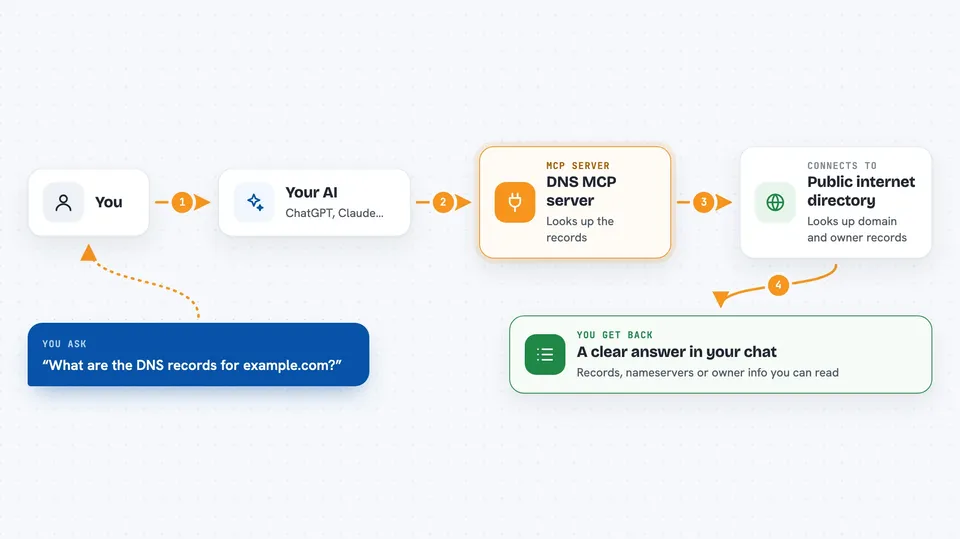
You type a question like "what are the DNS records for example.com?" and your AI understands what you mean. It then uses this helper, which quietly asks the public internet address system for the answer. The helper collects the records, like where the website points, where email goes, or which nameservers are in charge, and hands them back to your AI. Your AI then shows you the answer in the chat in a readable way. For WHOIS, it asks the public ownership records and follows the trail to the company that registered the domain.
 Click to zoom
What you can do with it
- Look up DNS records for any domain, like A, AAAA, MX, TXT, NS, CNAME, SOA, SRV and PTR
- Do a reverse DNS lookup on an IP address to see what name it points to
- Resolve several record types for a domain in one go
- Check which nameservers a domain uses
- Look up WHOIS information to see who registered a domain
- Check email routing by looking at MX records
- Investigate a suspicious link by checking its domain details
Try asking your AI
- “What are the DNS records for example.com?”
- “Do a reverse DNS lookup on 8.8.8.8”
- “Show me the WHOIS info for github.com”
- “What nameservers does cloudflare.com use?”
- “Check the MX records for my-company.com”
What it gives back to you
You get back a clear answer in the chat, usually a list of records with their values, like which server a domain points to or where its email goes. For WHOIS, you get a summary of who registered the domain and when. For reverse DNS, you get the name that belongs to an IP address. Everything shows up as normal text you can read and copy.
Before you start
What you need
- Node.js installed on your computer (the free program that runs this helper)
- An MCP client like Claude Desktop, Cursor, or VS Code Copilot
Good to know
It only reads public records, so it cannot change anything, but WHOIS results can be out of date or hidden behind privacy services.
Install it with your AI
Add DNS MCP server to your AI, no technical skills needed
You don't install anything by hand. You copy one prompt, paste it into an AI that can work on your computer, and it checks, installs and connects the server for you, asking you when it needs something.
Sign in to get the install prompt
Members get a ready-made prompt that lets the Claude desktop app check DNS MCP server, install it and connect it for them, step by step. You don't need any technical skills: you copy, paste and answer a few questions. Your connected AI can also find and install any of the 4,361 MCP servers here for you.
Who it's for
Developers, IT support people, and anyone who sets up websites or email and needs to check domain details quickly.



