
MCP server · Developer tools
Docker MCP server
by ofershap
Let your AI list, start, stop, and read logs from your Docker containers without leaving the chat.
This is a small helper that connects your AI assistant to Docker on your own computer. Docker is the tool many developers use to run apps inside little boxes called containers. If you already use Docker, this lets you ask your AI to check on those containers instead of typing commands in a terminal.
What is an MCP server? The 30-second version
On its own, your AI can only chat. An MCP server is a small helper program that gives your AI a new skill or a connection to another app. This one connects your AI to Docker running on your machine, so it can look up your containers and do things with them when you ask. You do not need to be technical to use it, but you do need Docker already running on your computer.
What this MCP server does
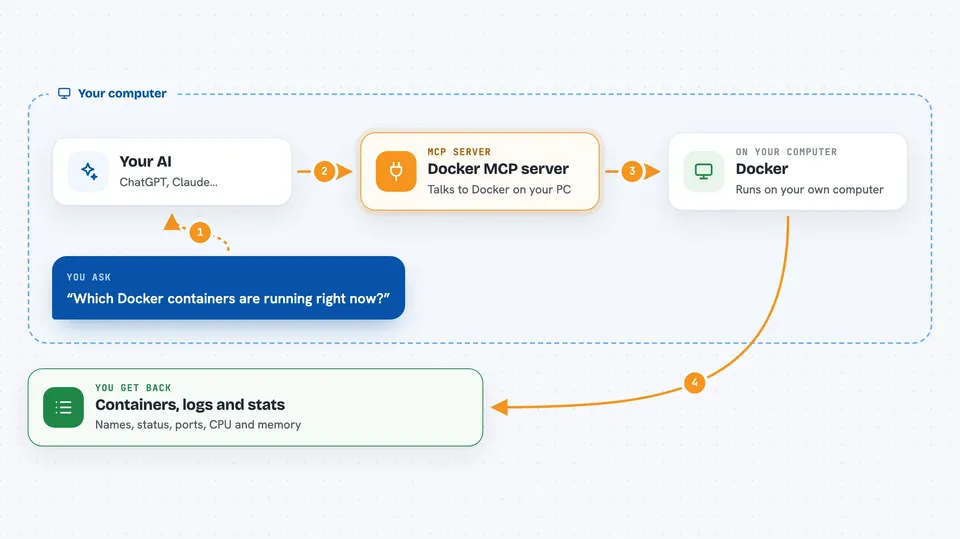
You ask your AI something like which containers are running. The AI passes that request to this helper. The helper talks to Docker on your computer through a local connection. Docker sends back the answer, and the helper hands it to your AI, which explains it to you in the chat. If you ask it to restart or stop something, the helper tells Docker to do that too.
 Click to zoom
What you can do with it
- List your running containers with their status and ports
- Read recent logs from a container
- Start, stop, or restart a container
- Run a command inside a running container
- Check live CPU, memory, and network usage of a container
- List your Docker images and their sizes
- Remove a container or an image
Try asking your AI
- “List all running Docker containers”
- “Show me the logs from the nginx container”
- “Restart the api-server container”
- “What is the CPU and memory usage of my postgres container”
What it gives back to you
You get answers in plain chat: a list of containers with their names, status, and ports, or the last lines of a container's logs. For stats, you get numbers for CPU, memory, and network use. When you ask it to start, stop, restart, or remove something, it tells you what it did.
Before you start
What you need
- Docker installed and running on your computer
- An AI app that supports MCP servers, such as Claude Desktop, Cursor, or VS Code Copilot
- Node.js installed (the helper runs through npx)
Good to know
Stopping, restarting, or removing containers and images can break or delete things, so be careful with anything important and confirm before letting your AI change a live service.
Install it with your AI
Add Docker MCP server to your AI, no technical skills needed
You don't install anything by hand. You copy one prompt, paste it into an AI that can work on your computer, and it checks, installs and connects the server for you, asking you when it needs something.
Sign in to get the install prompt
Members get a ready-made prompt that lets the Claude desktop app check Docker MCP server, install it and connect it for them, step by step. You don't need any technical skills: you copy, paste and answer a few questions. Your connected AI can also find and install any of the 4,609 MCP servers here for you.
Who it's for
Developers and anyone who already runs Docker on their machine and wants to check or manage containers without switching to a terminal.



