MCP server · Research
MediaWiki MCP server
by olgasafonova
Let your AI search, read, and edit any wiki, like Wikipedia or your company wiki, for you.
This is a small helper that connects your AI assistant to a wiki. A wiki is a website where pages are written and edited together, like Wikipedia or the internal wiki your company uses. If you read or update wiki pages often, this saves you a lot of clicking around.
What is an MCP server? The 30-second version
On its own, your AI can only chat with you. An MCP server is a small helper program that gives your AI a new skill or a connection to an app or service. This one connects your AI to a MediaWiki wiki, so it can look things up or make changes there when you ask. You just type a normal question, and the helper does the work behind the scenes.
What this MCP server does
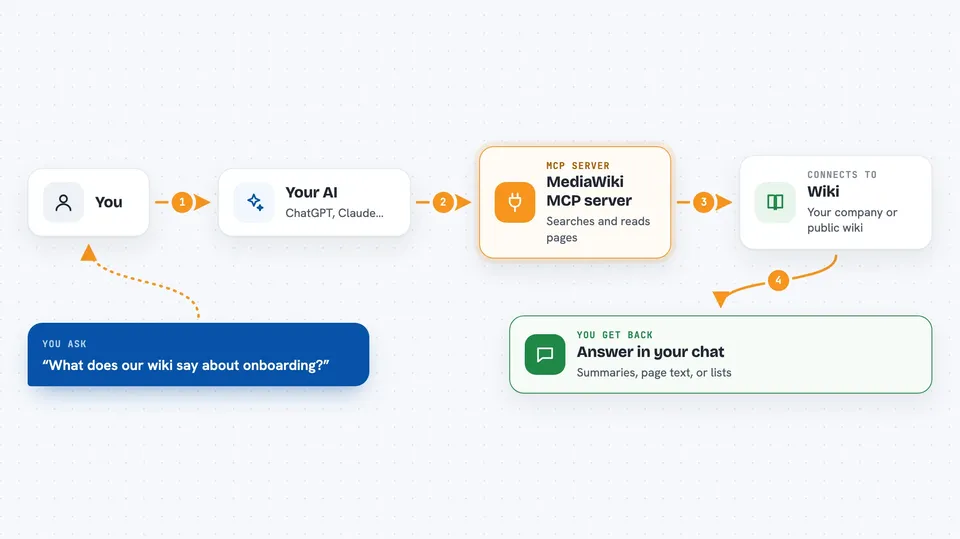
You ask your AI something about a wiki, like what a page says or which pages are out of date. The AI passes your request to this helper. The helper talks to the wiki through its normal web address and fetches or changes what you asked for. Then the AI shows you the answer in plain language in your chat. If you have permission to edit, it can also make changes like renaming a page or fixing text.
 Click to zoom
What you can do with it
- Search a wiki for any topic and get a summary
- Read one page or several pages at once
- Check a page for broken links
- Find pages that have not been updated in a while
- See who edited what and when
- Rename a page or replace text on it (needs login)
- Upload a file or image to the wiki (needs login)
- Convert a Markdown file into wiki formatting
Try asking your AI
- “What does our wiki say about onboarding?”
- “Show me the Getting Started page.”
- “Are there broken links on the Docs page?”
- “Which pages haven't been updated in 90 days?”
- “Rename Old Guide to Updated Guide.”
What it gives back to you
You get answers in your chat: summaries, page text, lists of pages, lists of broken links, or a list of recent edits. When it makes a change, it tells you what it changed. You can also ask for the raw details if you want to copy them somewhere.
Before you start
What you need
- The web address of your wiki, usually ending in /api.php
- A bot password if you want to edit or read a private wiki (the wiki settings give you one)
- The desktop app or tool you use for your AI, like Claude Desktop or Cursor
Good to know
If you connect it with editing rights, it can change or rename pages on your wiki, so double-check before you say yes.
Install it with your AI
Add MediaWiki MCP server to your AI, no technical skills needed
You don't install anything by hand. You copy one prompt, paste it into an AI that can work on your computer, and it checks, installs and connects the server for you, asking you when it needs something.
Sign in to get the install prompt
Members get a ready-made prompt that lets the Claude desktop app check MediaWiki MCP server, install it and connect it for them, step by step. You don't need any technical skills: you copy, paste and answer a few questions. Your connected AI can also find and install any of the 4,609 MCP servers here for you.
Who it's for
Anyone who reads or edits a company wiki, documentation site, or Wikipedia and wants their AI to do the digging for them.