
MCP server · Notes
OMEGA memory MCP server
by omega-memory
Give your AI a long-term memory that stays on your computer, so it remembers decisions across sessions.
OMEGA is a memory helper for your AI assistant. It lets your AI remember things you told it before, like decisions, preferences, and lessons, even after you close the chat and start a new one. It is handy for anyone who uses an AI coding assistant and is tired of explaining the same background every single time.
What is an MCP server? The 30-second version
On its own, your AI can only chat. It forgets everything the moment you close the window. An MCP server is a small helper program that gives your AI a new skill or a connection to something. OMEGA is that helper here: it gives your AI a memory that lives in a file on your own machine, so your AI can look things up later when you ask.
What this MCP server does
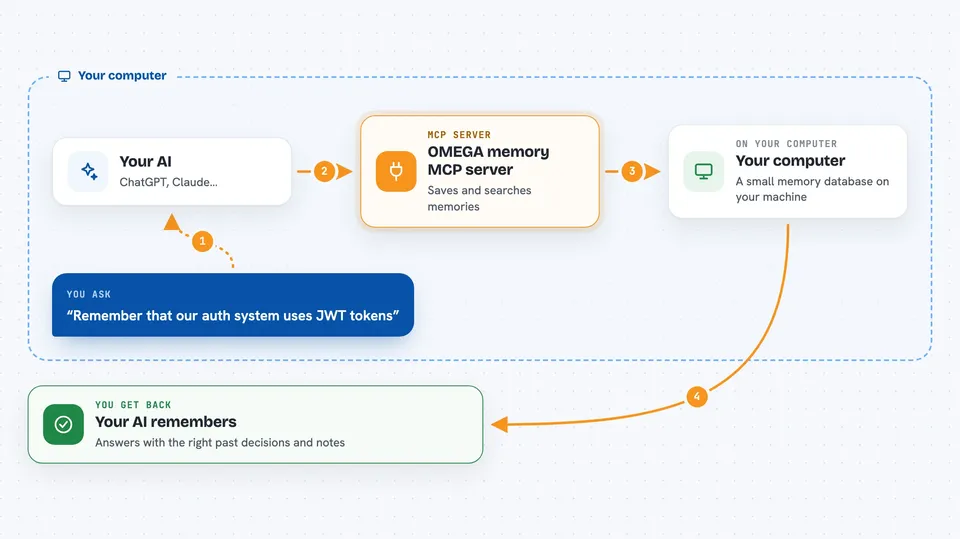
You tell your AI something worth remembering, like a decision about your project or a preference you have. Your AI passes that to OMEGA, which saves it in a small database on your computer. Later, in a new chat, when you ask about that topic, your AI asks OMEGA to search its memory. OMEGA finds the closest matches and hands them back, so your AI can answer with the right context. It also quietly captures useful things from your conversations if you use it with Claude Code.
 Click to zoom
What you can do with it
- Store decisions, lessons, and preferences so your AI remembers them
- Search your past memories by meaning, not just exact words
- Get a short briefing at the start of a new session
- Save the state of a task and resume it later
- Set reminders for things you want your AI to bring up again
- Review your code changes against conventions you saved earlier
- Clean up and merge duplicate memories over time
Try asking your AI
- “Remember that our auth system uses JWT tokens, not session cookies”
- “What did I decide about authentication last week?”
- “Show me everything I've saved about database choices”
- “Set a reminder to check the deploy script tomorrow”
What it gives back to you
You get back short answers in the chat, often with the matching memory quoted and a note about when it was saved. Searches return a list of relevant memories, sometimes with tags and dates. Some commands give you a summary or a count, like how many memories you have or how your memory has grown this week. If you ask it to change or delete something, it tells you what it did.
Before you start
What you need
- Python 3.11 or newer on your computer
- The pipx, uv, or venv tool to install Python packages
- About 220 MB of free space for the small AI models it downloads
Good to know
It saves what you tell it into a file on your computer, so avoid storing passwords, secret keys, or private information you would not want sitting in a local database.
Install it with your AI
Add OMEGA memory MCP server to your AI, no technical skills needed
You don't install anything by hand. You copy one prompt, paste it into an AI that can work on your computer, and it checks, installs and connects the server for you, asking you when it needs something.
Sign in to get the install prompt
Members get a ready-made prompt that lets the Claude desktop app check OMEGA memory MCP server, install it and connect it for them, step by step. You don't need any technical skills: you copy, paste and answer a few questions. Your connected AI can also find and install any of the 4,609 MCP servers here for you.
Who it's for
Developers and anyone who uses an AI coding assistant daily and wants it to stop forgetting their project context.





