
MCP server · Research
Parallel Search MCP server
by parallel-web
Give your AI a free web search and page reader so it can look things up and cite sources.
This is a free web search helper for your AI. Once it is connected, your AI can search the web for you and read web pages, then answer with links to where the information came from. It is handy for anyone who wants their AI to check facts or find current documentation instead of guessing.
What is an MCP server? The 30-second version
On its own, your AI can only chat with what it already knows. An MCP server is a small helper program that gives your AI a new skill or a connection to a service. This one connects your AI to Parallel's web search service, so it can look things up online and read pages for you. You just ask a question, and your AI uses this helper behind the scenes.
What this MCP server does
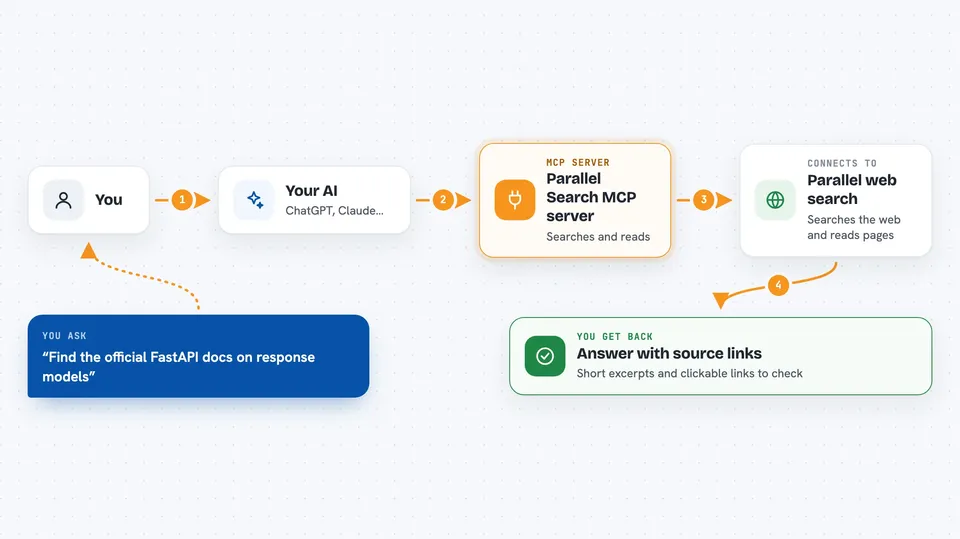
You ask your AI a question that needs current information. Your AI uses this helper to search the web through Parallel. The helper sends back short excerpts from matching pages along with their source links. If the excerpts are not enough, your AI can ask the helper to open a specific page and read its content. Then your AI puts it together and answers you in the chat, usually with links you can click.
 Click to zoom
What you can do with it
- Search the web for current information and get source links
- Read a specific web page and pull out what it says
- Check facts and find official documentation
- Look up the latest release notes for a tool or library
- Find a small example and the page it came from
- Read a page you paste in and explain it back to you
Try asking your AI
- “Use Parallel to find the official FastAPI docs for response models. Show me a small example and link to the source.”
- “Use Parallel to check the latest stable Node.js release and its release notes. Cite the official sources.”
- “Use Parallel to read https://modelcontextprotocol.io/introduction and explain how MCP connects an agent to tools.”
- “Use Parallel to find out when a recent software update came out and give me a link.”
What it gives back to you
You get answers in the chat, usually with short excerpts and clickable source links. When your AI reads a page for you, it gives you a summary of what that page says. You also get the links so you can check the sources yourself. Nothing is changed anywhere; it only looks things up and reads.
Before you start
What you need
- An AI app that supports MCP servers, such as Cursor, VS Code, Codex, or Gemini CLI
- The server URL https://search.parallel.ai/mcp added to that app
- No account or API key needed for free use
Good to know
Your search words and the page addresses you ask it to open are sent to Parallel, so avoid pasting private or sensitive information into your searches.
Install it with your AI
Add Parallel Search MCP server to your AI, no technical skills needed
You don't install anything by hand. You copy one prompt, paste it into an AI that can work on your computer, and it checks, installs and connects the server for you, asking you when it needs something.
Sign in to get the install prompt
Members get a ready-made prompt that lets the Claude desktop app check Parallel Search MCP server, install it and connect it for them, step by step. You don't need any technical skills: you copy, paste and answer a few questions. Your connected AI can also find and install any of the 4,609 MCP servers here for you.
Who it's for
Anyone who wants their AI to search the web and cite sources, especially people checking facts, reading docs, or doing light research.


