MCP server · Health and learning
Signs of AI Writing MCP server
by peopleworks
Your AI can check text for AI-writing signs, copied passages, hidden characters, and citation mistakes.
This is a helper that plugs into your AI so it can look at a piece of writing and tell you how much it reads like AI wrote it. It also compares documents for copying, checks reference lists, and spots sneaky invisible characters. It is handy for teachers, editors, and anyone who has to review text.
What is an MCP server? The 30-second version
On its own, your AI can only chat with you. An MCP server is a small helper program that gives your AI a new skill or a connection to a service. This one connects your AI to the Signs of AI Writing engine, so when you ask about a document, the AI can actually run the analysis and bring back real findings instead of guessing.
What this MCP server does
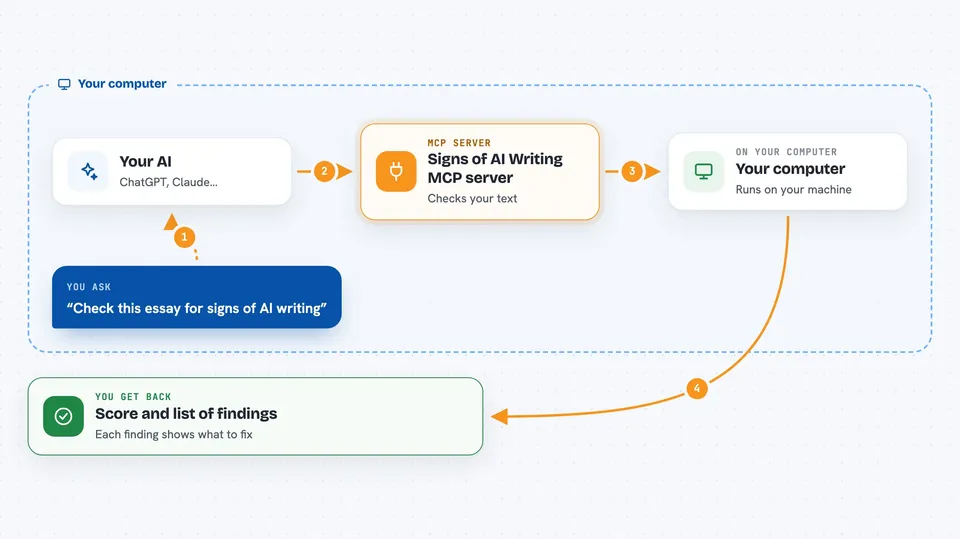
You paste a piece of text into your chat and ask your AI to check it. Your AI passes the text to this helper, which runs the Signs of AI Writing engine on your computer. The engine looks for overused words, rhetorical habits, sentence patterns, and other tells, and gives each one a score and a suggested fix. Your AI then shows you the results in the chat, in plain language.
 Click to zoom
What you can do with it
- Score a piece of writing from 0 to 100 for AI-writing signs
- Compare two or more documents to find copied passages
- Search a catalog of AI-writing signs in English and Spanish
- Pull out distinctive phrases with ready-made web-search links
- Find hidden characters like zero-width spaces and lookalike letters
- Check a reference list for cited-but-missing sources and odd dates
- Compare a new piece to the same person's earlier writing
Try asking your AI
- “Check this essay for signs of AI writing and tell me what to fix”
- “Compare these two reports and show me any copied passages”
- “Look at this document for hidden characters and tell me where they are”
- “Check the citations in this paper against its reference list”
What it gives back to you
You get back a score, a short verdict, and a list of findings. Each finding points to the exact words or lines and suggests a fix. Some tools return tables of shared passages, lists of distinctive phrases, or a full report you can save and share.
Before you start
What you need
- The .NET 10 SDK (a free download from Microsoft)
- The Claude desktop app or another app that supports MCP servers
Good to know
Eight of the ten tools run only on your computer, but measure_predictability and check_paraphrase send your text to the SignsOfAI server, so only use those with text you are allowed to share.
Install it with your AI
Add Signs of AI Writing MCP server to your AI, no technical skills needed
You don't install anything by hand. You copy one prompt, paste it into an AI that can work on your computer, and it checks, installs and connects the server for you, asking you when it needs something.
Sign in to get the install prompt
Members get a ready-made prompt that lets the Claude desktop app check Signs of AI Writing MCP server, install it and connect it for them, step by step. You don't need any technical skills: you copy, paste and answer a few questions. Your connected AI can also find and install any of the 4,361 MCP servers here for you.
Who it's for
Teachers, editors, admissions staff, and anyone who reviews written work and wants a second pair of eyes.