
MCP server · API
Semantic API MCP server
Ask your AI to find an API for a task and get back endpoints, auth details and code snippets.
This is a small helper that lets your AI search for APIs using plain English. An API is a way for one piece of software to talk to another, and finding the right one usually means digging through docs. If you ever need to connect two tools together, or you are just curious what is out there, this makes that search a normal conversation.
What is an MCP server? The 30-second version
On its own, your AI can only chat with you. An MCP server is a small helper program that gives your AI a new skill or a connection to a service. This one connects your AI to Semantic API, a service that keeps a catalogue of APIs. Once it is connected, your AI can look things up there for you when you ask, instead of guessing.
What this MCP server does
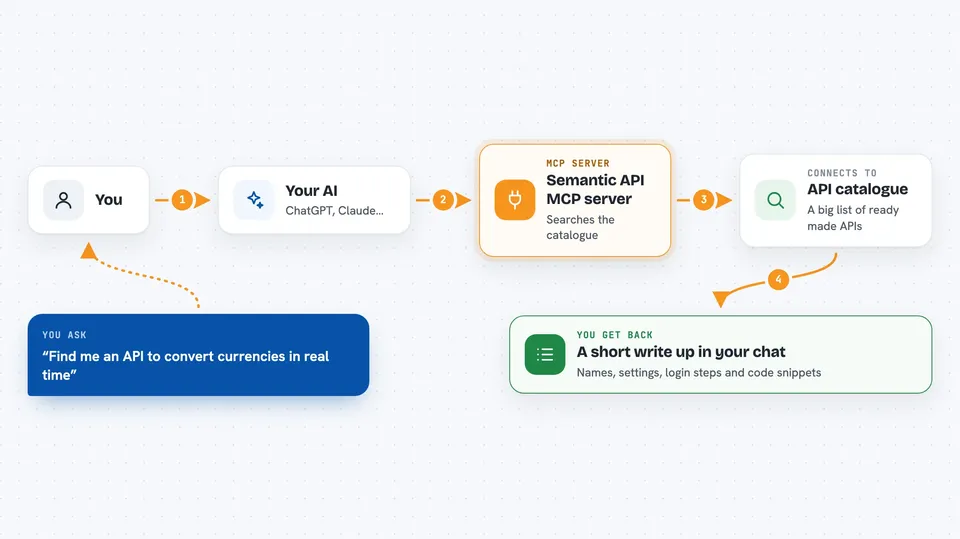
You describe what you want to do, like send an email or convert currencies. Your AI passes that request to this helper, which asks the Semantic API service to search its catalogue. The service finds matching APIs and sends back the details. Your AI then shows you the endpoints, what settings they need, how to log in, and a small code example. It can also look up one specific provider by name, or read a documentation page you give it.
 Click to zoom
What you can do with it
- Search for an API by describing your task in plain English
- Get endpoint details and the parameters each one expects
- See what kind of login or key an API needs
- Get short code snippets you can hand to a developer
- Look up a specific provider by name, like Stripe or Twilio
- Analyse an API from its documentation web address
- Let the service discover new APIs it has not seen before
Try asking your AI
- “Find me an API to convert currencies in real time”
- “What can Stripe do for processing a refund?”
- “I need an API that sends text messages, what are my options?”
- “Look at https://docs.example.com/api and tell me how to use it”
What it gives back to you
You get back a short write-up in the chat: the API names that matched, what each endpoint does, the settings it needs, and how to authenticate. There are usually small code snippets too. It is a starting point you or a developer can act on, not a live connection to the API itself.
Before you start
What you need
- A Semantic API account and API key from semanticapi.dev (an API key is a kind of password for apps)
- Python installed, or the uvx tool
- The Claude desktop app or another AI app that supports MCP servers
Good to know
The results are suggestions from a catalogue, so check the details before you build anything on them, and keep your API key private.
Install it with your AI
Add Semantic API MCP server to your AI, no technical skills needed
You don't install anything by hand. You copy one prompt, paste it into an AI that can work on your computer, and it checks, installs and connects the server for you, asking you when it needs something.
Sign in to get the install prompt
Members get a ready-made prompt that lets the Claude desktop app check Semantic API MCP server, install it and connect it for them, step by step. You don't need any technical skills: you copy, paste and answer a few questions. Your connected AI can also find and install any of the 4,361 MCP servers here for you.
Who it's for
Handy for developers, technical writers, product people and anyone who needs to find or compare APIs without reading docs for hours.


