
MCP server · Research
Pexafy MCP server
by Pexafy
Lets your AI find free stock photos by describing a scene, and shows them right in the chat.
Pexafy is a helper that lets your AI assistant find free stock photos for you. You describe the picture you want in normal words, and it comes back with matching images from sites like Unsplash, Pexels and Pixabay. It is handy for anyone who needs a picture for a slide, a post or a document but does not want to hunt through stock photo sites.
What is an MCP server? The 30-second version
On its own, your AI can only chat with you. An MCP server is a small helper program that gives your AI a new skill or a connection to another service. This one connects your AI to Pexafy, a stock photo search service. Once it is connected, your AI can look up photos for you and show them in the conversation when you ask.
What this MCP server does
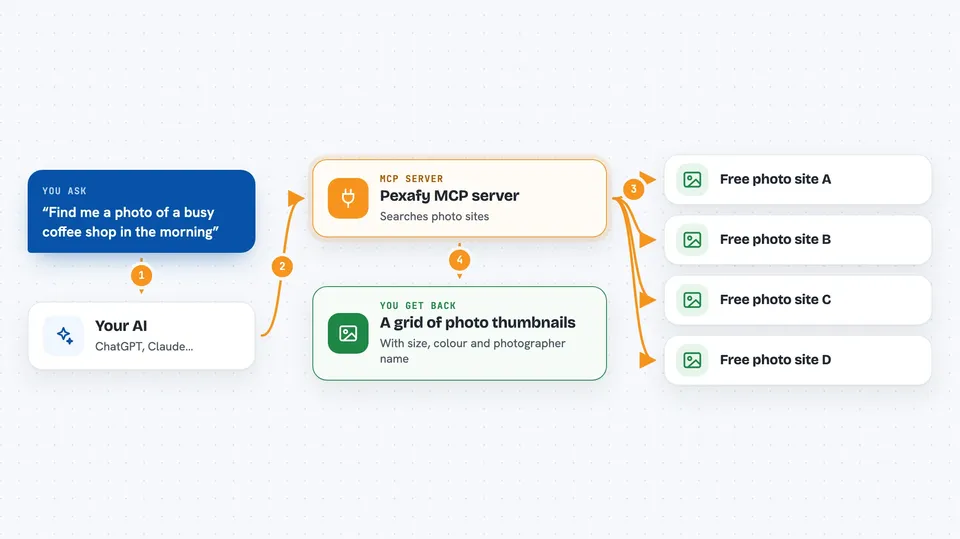
You ask your AI for a photo, for example a sunny kitchen with a bowl of fruit. Your AI sends that request to the Pexafy helper, which searches a library of free-license images across several stock photo sites. The helper sends back matching photos with details like size, colour and photographer. Your AI then shows them to you as a grid of thumbnails right inside the chat. You can also give it a picture you already have and ask for more like it.
 Click to zoom
What you can do with it
- Find free stock photos by describing a scene in a sentence
- Search by colour, shape (wide or tall) or which photo site it comes from
- Upload or link an example image and ask for similar ones
- Ask for more photos like one you already found
- See thumbnails and details without leaving the chat
- Get the photographer credit to use with the image
Try asking your AI
- “Find me a photo of a busy coffee shop in the morning, wide format”
- “Show me blue photos of the ocean at sunset”
- “Here is a picture of a dog in a park, find me more like this but in winter”
- “Find more photos like number 3 from the last results”
What it gives back to you
You get a numbered grid of photo thumbnails inside the chat, so you can point at one and say number 3. Each photo comes with its size, main colour, which site it is from, its licence and the photographer's name. In some apps, clicking a thumbnail opens a panel with all the details. If you hit your monthly limit, the assistant tells you in the chat instead of showing an error.
Before you start
What you need
- A Pexafy account (the free plan covers 5,000 searches a month, no card needed)
- An AI app that supports connectors, like Claude or ChatGPT
Good to know
It only searches and shows photos, it does not change or delete anything, but always check the licence and keep the photographer credit when you use an image.
Install it with your AI
Add Pexafy MCP server to your AI, no technical skills needed
You don't install anything by hand. You copy one prompt, paste it into an AI that can work on your computer, and it checks, installs and connects the server for you, asking you when it needs something.
Sign in to get the install prompt
Members get a ready-made prompt that lets the Claude desktop app check Pexafy MCP server, install it and connect it for them, step by step. You don't need any technical skills: you copy, paste and answer a few questions. Your connected AI can also find and install any of the 4,361 MCP servers here for you.
Who it's for
Anyone who needs free pictures for slides, posts or documents, like marketers, teachers, students and small business owners.


