
MCP server · Developer tools
PlanetScale MCP server
by planetscale
Lets your AI look things up in your PlanetScale databases and help with branches and deploy requests.
PlanetScale is a database service, and this MCP server is a way to connect your AI assistant to it. Instead of clicking around the PlanetScale website, you can just ask your AI in plain words. It is handy if you already keep your data in PlanetScale and want a little help with everyday database tasks.
What is an MCP server? The 30-second version
On its own, your AI can only chat. It cannot see your PlanetScale account or your databases. An MCP server is a small helper that gives your AI a new connection, here to PlanetScale. Once it is connected, your AI can look things up in PlanetScale and do some tasks there for you when you ask.
What this MCP server does
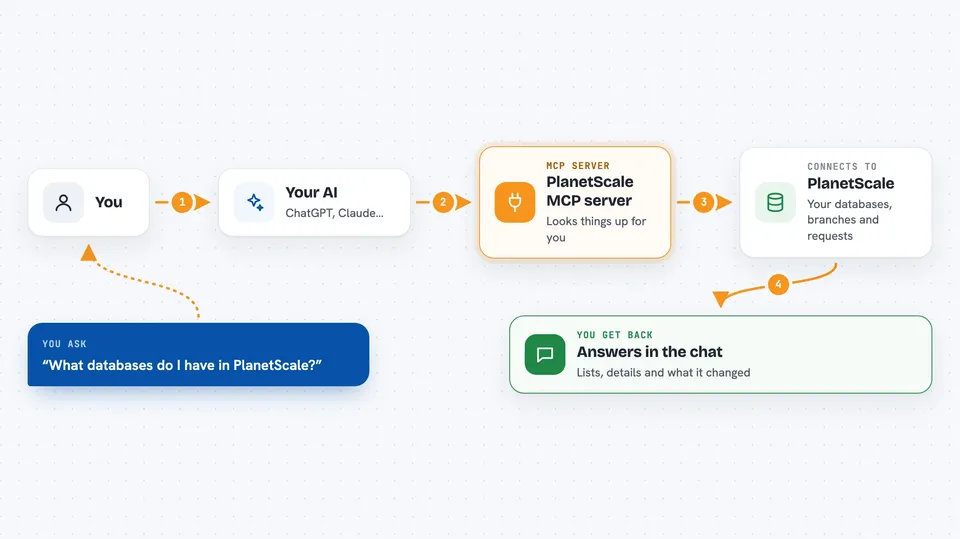
You ask your AI a question about your PlanetScale databases. The AI passes your request to this helper. The helper talks to PlanetScale on your behalf. PlanetScale sends back the answer, and your AI shows it to you in the chat. For some tasks, the helper can also make changes, like creating a branch.
 Click to zoom
What you can do with it
- List your PlanetScale databases and branches
- Check the status of deploy requests
- Look up schema details for a database
- Ask questions about your data in plain words
- Create or manage branches for testing changes
- Get a summary of recent activity in your account
Try asking your AI
- “What databases do I have in PlanetScale?”
- “Show me the branches for my main database.”
- “Are there any open deploy requests right now?”
- “What tables are in the production branch of my shop database?”
What it gives back to you
You get answers in the chat, in plain words. Lists of databases, branches, or deploy requests come back as simple bullet points or tables. If you ask about a schema or a specific record, the AI shows you the details it found. When it makes a change, it tells you what it did.
Before you start
What you need
- A PlanetScale account
- A PlanetScale service token (a kind of password for apps; you create it in your PlanetScale settings)
- An AI assistant that supports MCP servers, like the Claude desktop app
Good to know
This helper can make changes in your PlanetScale account, like creating branches, so be careful with what you ask it to do.
Install it with your AI
Add PlanetScale MCP server to your AI, no technical skills needed
You don't install anything by hand. You copy one prompt, paste it into an AI that can work on your computer, and it checks, installs and connects the server for you, asking you when it needs something.
Sign in to get the install prompt
Members get a ready-made prompt that lets the Claude desktop app check PlanetScale MCP server, install it and connect it for them, step by step. You don't need any technical skills: you copy, paste and answer a few questions. Your connected AI can also find and install any of the 4,609 MCP servers here for you.
Who it's for
Developers, data people, and anyone who already uses PlanetScale and wants quick answers without opening the website.


