
MCP server · Customer communication
Hostaway MCP server
Lets your AI look up your Hostaway listings, reservations, calendar, guest messages and owner statements.
This is a small helper that connects your AI assistant to your Hostaway vacation rental account. Once it is set up, you can simply ask your AI questions about your properties and bookings in normal words. It is handy if you manage short-term rentals and spend a lot of time clicking around Hostaway to check things.
What is an MCP server? The 30-second version
On its own, your AI can only chat with you. An MCP server is a small helper program that gives your AI a new skill, in this case a connection to your Hostaway account. Once it is connected, your AI can look things up in Hostaway for you when you ask. You do not need to understand how it works under the hood.
What this MCP server does
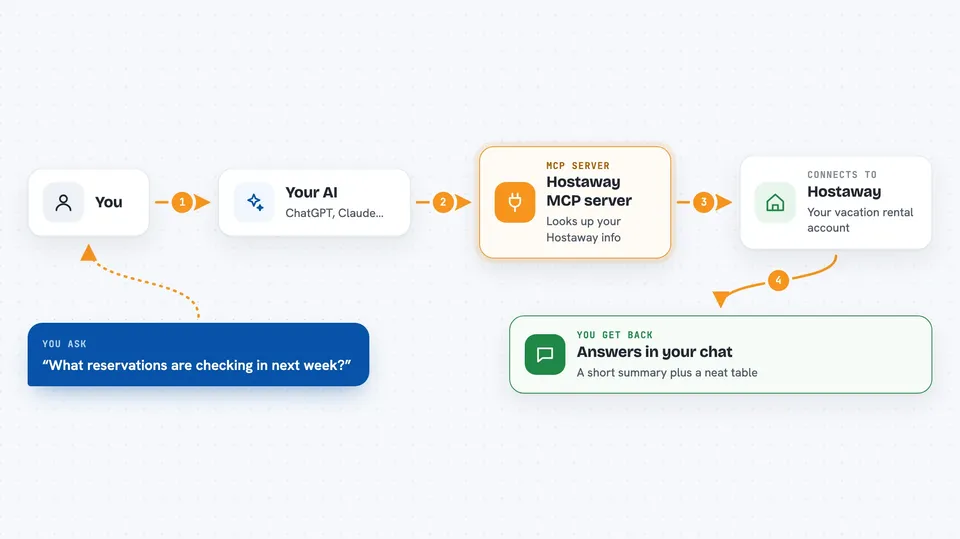
You ask your AI a question in plain English, like which reservations are arriving next week. Your AI sends that request to this helper program. The helper talks to Hostaway using your account credentials and fetches the answer. Then your AI shows you the result in the chat, often as a neat table or a short summary. Everything here is read-only, so it only looks things up and never changes your data.
 Click to zoom
What you can do with it
- List all your Hostaway properties with their basic details
- Check which reservations are arriving in a given date range
- See if a specific property is free between two dates
- Find guest conversations that have unread messages
- Read the full message history of a guest conversation
- Look up owner financial statements on the account
- Run a quick health check to confirm the connection works
Try asking your AI
- “Run whoami to confirm Hostaway is connected.”
- “List my Hostaway listings.”
- “What reservations are checking in next week?”
- “Is listing 12345 available May 10 to 17?”
- “Do I have any unread guest messages?”
What it gives back to you
You get answers written in the chat, usually as a short summary plus a table. For example, a list of listings shows ID, name, location, beds, baths, capacity and status. A calendar check shows each day with available or reserved, the price and minimum stay. Conversations come back as threads with unread state and last activity.
Before you start
What you need
- A Hostaway operator account
- Your Hostaway Account ID and API Key, found in Settings then Hostaway API
- Node.js installed on your computer (the free program that runs the helper)
Good to know
This version is read-only, so it cannot change or delete anything in Hostaway, but it can read private guest and financial information, so keep your API key safe and only connect it to accounts you are allowed to view.
Install it with your AI
Add Hostaway MCP server to your AI, no technical skills needed
You don't install anything by hand. You copy one prompt, paste it into an AI that can work on your computer, and it checks, installs and connects the server for you, asking you when it needs something.
Sign in to get the install prompt
Members get a ready-made prompt that lets the Claude desktop app check Hostaway MCP server, install it and connect it for them, step by step. You don't need any technical skills: you copy, paste and answer a few questions. Your connected AI can also find and install any of the 4,609 MCP servers here for you.
Who it's for
Vacation rental operators, property managers and hospitality teams who already use Hostaway and want to ask their AI quick questions about bookings and guests.




