MCP server · Productivity
Final Notice MCP server
by ptrinh
Turn a few details into a ready-to-print debt collection letter and matching envelope as a PDF.
This is a small helper that lets your AI write a formal debt collection letter for you. You give it the basics, like who owes money and how much, and it hands back a finished letter and envelope as a PDF you can print. It is handy if you run a small business, handle invoices, or work in an office that chases unpaid bills.
What is an MCP server? The 30-second version
On its own, your AI can only chat with you. An MCP server is a small helper program that gives your AI a new skill or a connection to another service. This one connects your AI to Final Notice, a free service that formats and renders debt collection letters. So when you ask for a letter, your AI passes your details to that service and brings the finished PDF back to you.
What this MCP server does
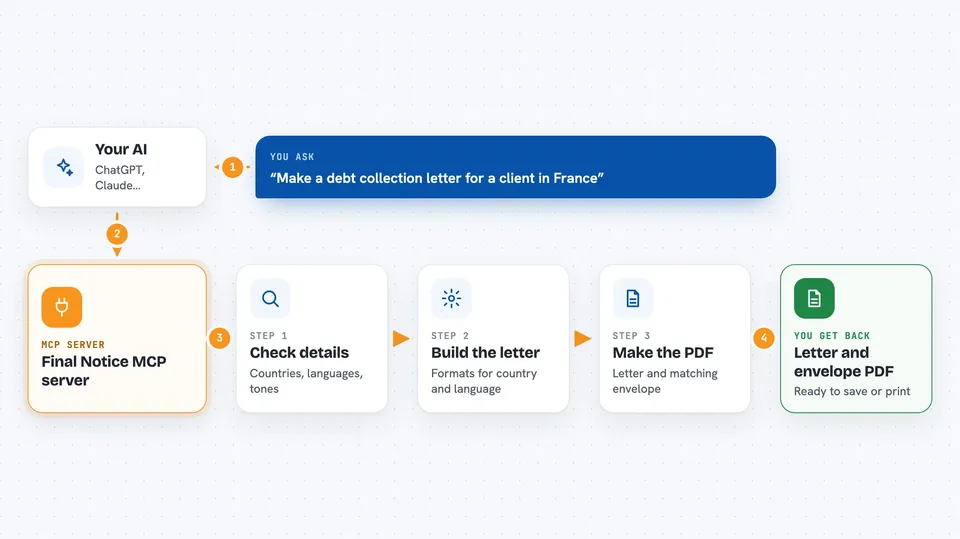
You tell your AI the details of the debt, like the sender, the person who owes, the amount, and the currency. Your AI uses this helper to check which countries, languages, and tones are supported. Then it asks the Final Notice service to build the letter. The service formats it correctly for the country and language you picked, and returns the finished letter and envelope as a PDF. You get that PDF in your chat, ready to save or print.
 Click to zoom
What you can do with it
- Check which countries, currencies, languages, and tones are supported
- Preview the wording of a letter before making the PDF
- Generate a finished demand letter as a PDF
- Get a matching envelope PDF alongside the letter
- Write the letter in one of 33 languages, including right-to-left scripts
- Apply consumer protection rules for individual debtors where they exist
What it gives back to you
You get back the finished letter and envelope as a PDF file you can open, save, or print. If you ask for a preview first, you get the letter text as a simple list of parts, like the title, subject, body, amount, legal reference, and closing, so you can check the wording. The PDF comes back as a file inside the chat. Nothing is sent to the debtor by the tool itself; you decide what to do with the file.
Before you start
What you need
- An AI app that supports MCP servers, like the Claude desktop app
- The details of the debt: sender name and address, debtor name and address, and the amount
- Nothing else. The service is free and needs no account or API key
Good to know
This is not legal advice, and the letters are factual templates, so check the wording and the rules for your country before you send anything.
Install it with your AI
Add Final Notice MCP server to your AI, no technical skills needed
You don't install anything by hand. You copy one prompt, paste it into an AI that can work on your computer, and it checks, installs and connects the server for you, asking you when it needs something.
Sign in to get the install prompt
Members get a ready-made prompt that lets the Claude desktop app check Final Notice MCP server, install it and connect it for them, step by step. You don't need any technical skills: you copy, paste and answer a few questions. Your connected AI can also find and install any of the 4,361 MCP servers here for you.
Who it's for
Small business owners, bookkeepers, office managers, and anyone who has to send formal payment reminders or demand letters.