MCP server · Research
Oorlogsbronnen MCP server
by r-huijts
Search Dutch World War II archives for documents, photos and records right from your AI chat.
This is a small helper that lets your AI search the Oorlogsbronnen archive, a big Dutch collection of World War II material from 1940 to 1945. It holds records, photographs, articles and personal accounts. It is handy if you are curious about the war, doing family history, or planning a trip to a historical site in the Netherlands.
What is an MCP server? The 30-second version
On its own, your AI can only chat with you. An MCP server is a small helper program that gives your AI a new skill or a connection to an app or service. This one connects your AI to the Oorlogsbronnen archive, so it can look things up there for you when you ask. You stay in the chat, and the helper does the fetching behind the scenes.
What this MCP server does
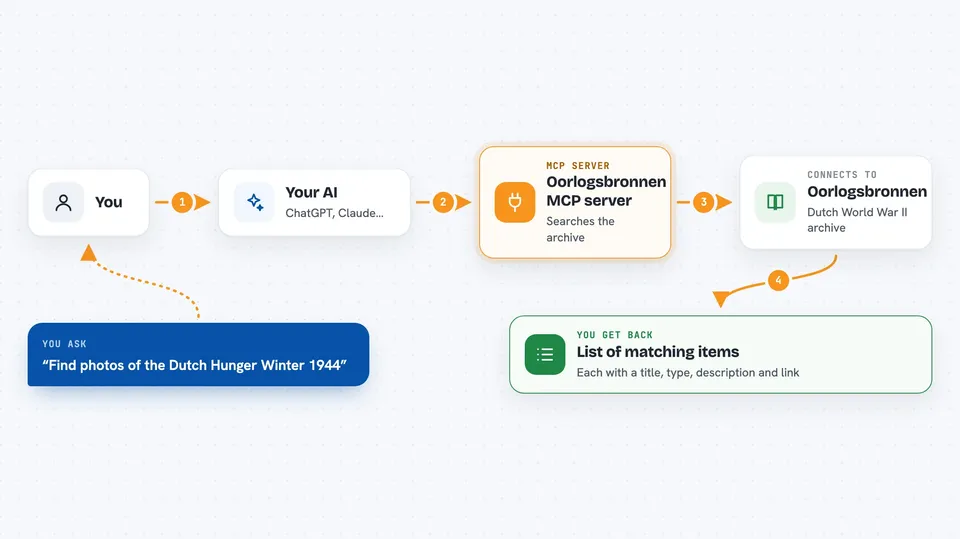
You type a question in plain words, like a name, a place or an event. Your AI passes that question to this helper. The helper talks to the Oorlogsbronnen archive and asks it for matching items. Then it hands the results back to your AI, which shows them to you in the chat. You can also narrow things down by type, such as photos or people, and say how many results you want.
 Click to zoom
What you can do with it
- Search the Dutch WWII archives by name, place, date or event
- Filter results to photos, people, articles, videos, objects, locations or books
- Limit how many results come back, from 1 to 100
- Find records about a family member or a specific person
- Look up photographs from a certain city or year
- Research events like the bombing of Rotterdam or Operation Market Garden
- Get direct links to view each item on the Oorlogsbronnen site
Try asking your AI
- “What happened during the bombing of Rotterdam in May 1940?”
- “Show me photographs of the Dutch Hunger Winter of 1944 to 1945.”
- “Find records about resistance activities in Utrecht during the occupation.”
- “Search the Dutch WW2 archives for documents about Anne Frank's time in Amsterdam.”
What it gives back to you
You get a list of matching items, each with a title, a type, a short description when one is available, and a link to view it on the Oorlogsbronnen site. Your AI usually writes a short summary around that list, so you can read the highlights first and then click through. It does not change anything in the archive. It only reads and shows you what it finds.
Before you start
What you need
- The Claude desktop app (the setup in the instructions is written for it)
- Node.js installed on your computer, so the npx command can run
Good to know
It only reads the public archive and does not change anything, but results are historical records, so check the original source before treating details as certain.
Install it with your AI
Add Oorlogsbronnen MCP server to your AI, no technical skills needed
You don't install anything by hand. You copy one prompt, paste it into an AI that can work on your computer, and it checks, installs and connects the server for you, asking you when it needs something.
Sign in to get the install prompt
Members get a ready-made prompt that lets the Claude desktop app check Oorlogsbronnen MCP server, install it and connect it for them, step by step. You don't need any technical skills: you copy, paste and answer a few questions. Your connected AI can also find and install any of the 4,609 MCP servers here for you.
Who it's for
History fans, students, teachers, genealogists and anyone researching Dutch World War II history or family roots.