MCP server · Productivity
Jira & Confluence MCP server
Lets your AI read and update Jira issues, sprints, comments and Confluence pages for you.
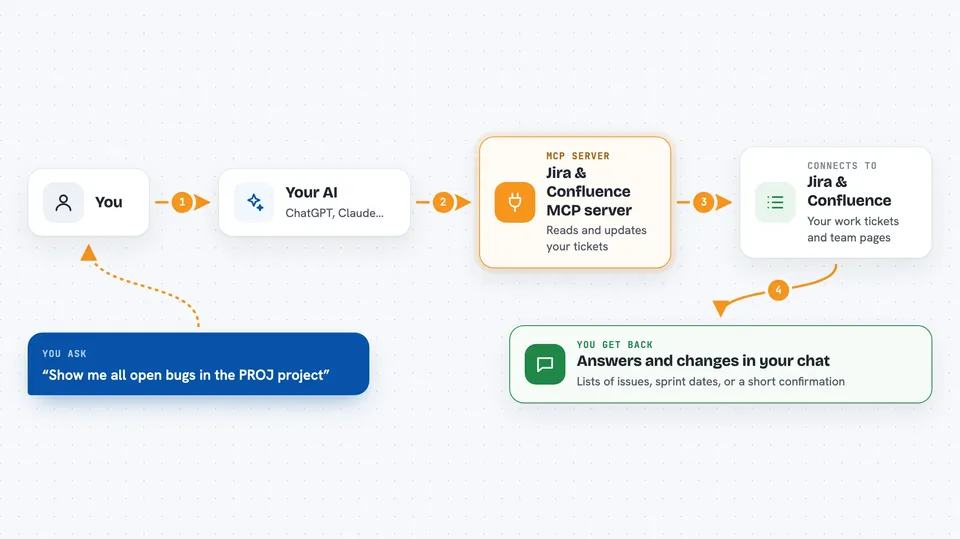
This is a helper that connects your AI assistant to your Jira and Confluence account. Once it is set up, you can ask your AI in plain words to look up a ticket, add a comment, or move a task along, and it does it for you. It is handy for anyone who spends part of their day in Jira, like project managers, team leads, developers and support staff.
What is an MCP server? The 30-second version
On its own, your AI can only chat with you. An MCP server is a small helper program that gives your AI a new skill or a connection to an app. This one connects your AI to Jira and Confluence, so it can look things up and make changes there when you ask. You stay in the chat, and the helper does the clicking in the background.
What this MCP server does
You type a request in your AI chat, like asking about a ticket or telling it to add a comment. Your AI passes that request to this helper. The helper then talks to your Jira or Confluence account using your login details. It brings the answer back and shows it in the chat, or it makes the change you asked for. You never have to open Jira yourself for these small jobs.
 Click to zoom
What you can do with it
- List your Jira projects and the issue types in them
- Create, read, update and delete Jira issues
- Add, edit and delete comments on an issue
- Move an issue to a new status, like In Progress or Done
- Assign issues to people on your team
- Search for users and see your own account details
- Manage sprints: create, update, close or delete them, and move issues in
- Read Confluence pages by their link
Try asking your AI
- “Show me all open bugs in the PROJ project”
- “Create a task in PROJ called Update the login page, assign it to me”
- “Add a comment to PROJ-123 saying the fix is ready for review”
- “Move PROJ-123 to In Progress”
- “What sprints are active on my board right now”
What it gives back to you
You get answers in the chat: lists of issues, project names, user details, sprint dates, or the text of a Confluence page. When you ask it to change something, it replies with a short confirmation, like Issue PROJ-123 updated successfully. Comments come back as a neat list with the author, the date and the text. Everything is shown in the chat window, so you can read it right there.
Before you start
What you need
- A Jira Cloud account (the address looks like your-domain.atlassian.net)
- Your Jira email address
- A Jira API token, which is a kind of password for apps; you create one for free in your Atlassian account settings
- An AI app that supports MCP servers, like Claude Desktop or Cursor
Good to know
It can change and delete real Jira issues, comments and sprints, so check before you confirm anything that removes or closes work.
Install it with your AI
Add Jira & Confluence MCP server to your AI, no technical skills needed
You don't install anything by hand. You copy one prompt, paste it into an AI that can work on your computer, and it checks, installs and connects the server for you, asking you when it needs something.
Sign in to get the install prompt
Members get a ready-made prompt that lets the Claude desktop app check Jira & Confluence MCP server, install it and connect it for them, step by step. You don't need any technical skills: you copy, paste and answer a few questions. Your connected AI can also find and install any of the 4,361 MCP servers here for you.
Who it's for
Project managers, team leads, developers, testers and support staff who work in Jira and Confluence every day.