
MCP server · Analytics
Scherlok data quality MCP server
by rbmuller
Lets your AI check your database tables for strange changes, like sudden row drops or NULL surges.
Scherlok is a tool that watches your database tables and tells you when something looks off. This MCP server is the piece that lets your AI assistant run those checks for you, right from your chat. It is handy if you work with data and want a quick health check without learning a new tool.
What is an MCP server? The 30-second version
On its own, your AI can only chat with you. An MCP server is a small helper program that gives your AI a new skill or a connection to another app. This one connects your AI to Scherlok, which watches your database tables. So when you ask your AI to check your data, it can actually look things up and report back.
What this MCP server does
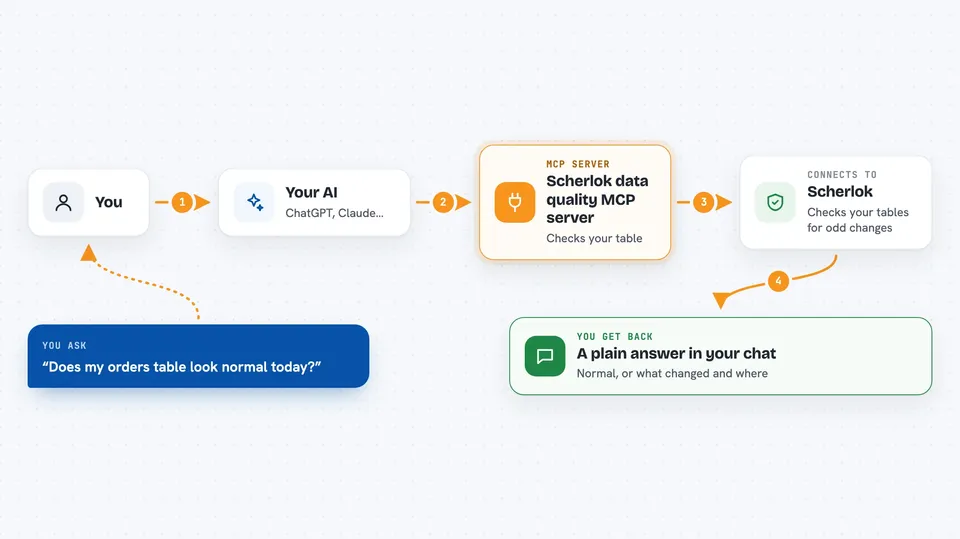
You ask your AI something like whether your orders table looks normal today. Your AI passes that request to this helper program. The helper talks to Scherlok, which compares your table against patterns it learned earlier. Scherlok then tells your AI what changed, if anything, and your AI explains it back to you in plain words.
 Click to zoom
What you can do with it
- List the tables Scherlok is watching in your database
- Learn the normal patterns of your tables so it has a baseline
- Check your tables for anomalies like row drops or NULL surges
- Show a quick health status of your data
- Look back at past anomalies over a number of days
- Run a single check on one table when you want a fast answer
Try asking your AI
- “Which tables is Scherlok watching right now?”
- “Check my orders table for anything strange today.”
- “Show me the anomalies from the last 7 days.”
- “Give me a quick health status of my data.”
What it gives back to you
You get back plain answers in your chat. That can be a list of tables, a short status summary, or a description of any anomalies found, with the table name and what changed. If nothing is wrong, it just tells you things look normal.
Before you start
What you need
- Python installed on your computer (the README uses pip to install Scherlok)
- A connection string for your database (a line of text with your database address, username, and password)
- The Scherlok package installed, which includes this MCP server since version 0.7.0
Good to know
Every operation is read-only on your database, so it will not change or delete your data, but it does read your table contents to profile them.
Install it with your AI
Add Scherlok data quality MCP server to your AI, no technical skills needed
You don't install anything by hand. You copy one prompt, paste it into an AI that can work on your computer, and it checks, installs and connects the server for you, asking you when it needs something.
Sign in to get the install prompt
Members get a ready-made prompt that lets the Claude desktop app check Scherlok data quality MCP server, install it and connect it for them, step by step. You don't need any technical skills: you copy, paste and answer a few questions. Your connected AI can also find and install any of the 4,609 MCP servers here for you.
Who it's for
Data analysts, data engineers, and anyone who checks database tables and wants a quick way to spot problems from their AI chat.



