MCP server · Analytics
Data Exploration MCP server
Let your AI open a CSV file and explore it for you, finding patterns and insights.
This is a small helper that lets your AI assistant dig into a spreadsheet-style file (a CSV) and tell you what is inside it. You point it at a file on your computer, give it a topic, and it explores the data on its own. It is handy for anyone who has a big table of numbers and does not want to do the digging by hand.
What is an MCP server? The 30-second version
On its own, your AI can only chat. An MCP server is a small helper program that gives your AI a new skill or a connection to something else. This one gives your AI the ability to open and explore CSV data files. So when you ask a question about your data, the AI can actually go look at the file instead of just guessing.
What this MCP server does
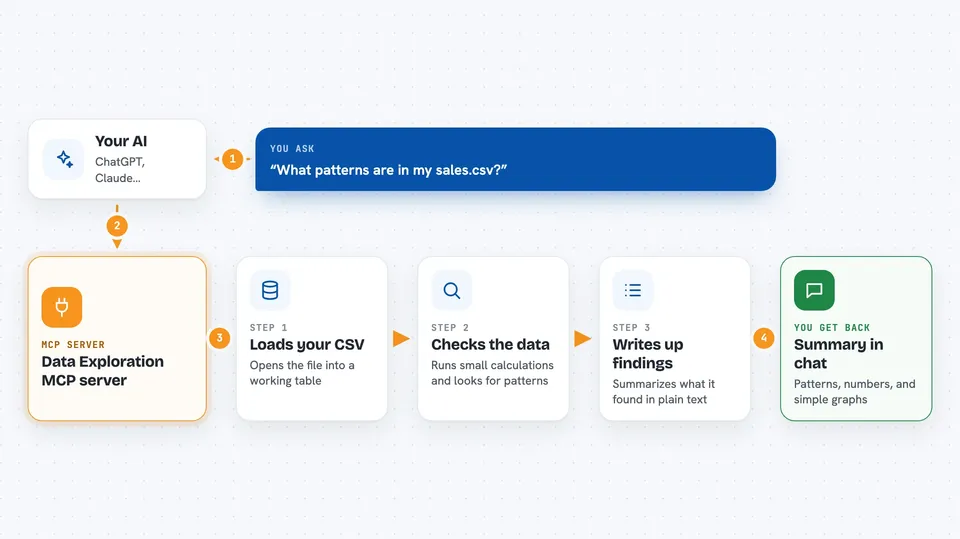
You tell your AI where your CSV file lives and what you want to know about it. The AI uses this helper to load the file into a working table. Then it runs small calculations and checks on that table to look for patterns, trends, and odd values. Finally it writes up what it found and shows it to you in the chat.
 Click to zoom
What you can do with it
- Explore a CSV file and summarize what is in it
- Find trends and patterns in your data
- Compare numbers across different groups or time periods
- Spot unusual values or gaps in the data
- Answer plain questions about your dataset
- Load more than one CSV file and work with them
What it gives back to you
You get back a written summary of what the AI found in your data, in normal chat text. It can include lists of patterns, numbers, and comparisons it noticed. In the examples, it also produced reports and simple graphs. Everything shows up right in the conversation.
Before you start
What you need
- The Claude desktop app
- Python installed on your computer
- A CSV file saved somewhere on your computer
Good to know
It can run Python code on your computer, so only use it with files and setups you trust.
Install it with your AI
Add Data Exploration MCP server to your AI, no technical skills needed
You don't install anything by hand. You copy one prompt, paste it into an AI that can work on your computer, and it checks, installs and connects the server for you, asking you when it needs something.
Sign in to get the install prompt
Members get a ready-made prompt that lets the Claude desktop app check Data Exploration MCP server, install it and connect it for them, step by step. You don't need any technical skills: you copy, paste and answer a few questions. Your connected AI can also find and install any of the 4,609 MCP servers here for you.
Who it's for
Anyone who has a spreadsheet or CSV file and wants quick insights without learning a data tool, especially analysts, students, and small business owners.