
MCP server · Notes
Roampal memory server
by roampal-ai
Gives your AI a memory that remembers what worked and forgets what did not.
Roampal is a memory helper for your AI coding assistant. It quietly remembers your past chats, your preferences, and the fixes that actually worked, then reminds your AI of them the next time you ask something. It is handy if you use Claude Code or OpenCode and you are tired of repeating yourself.
What is an MCP server? The 30-second version
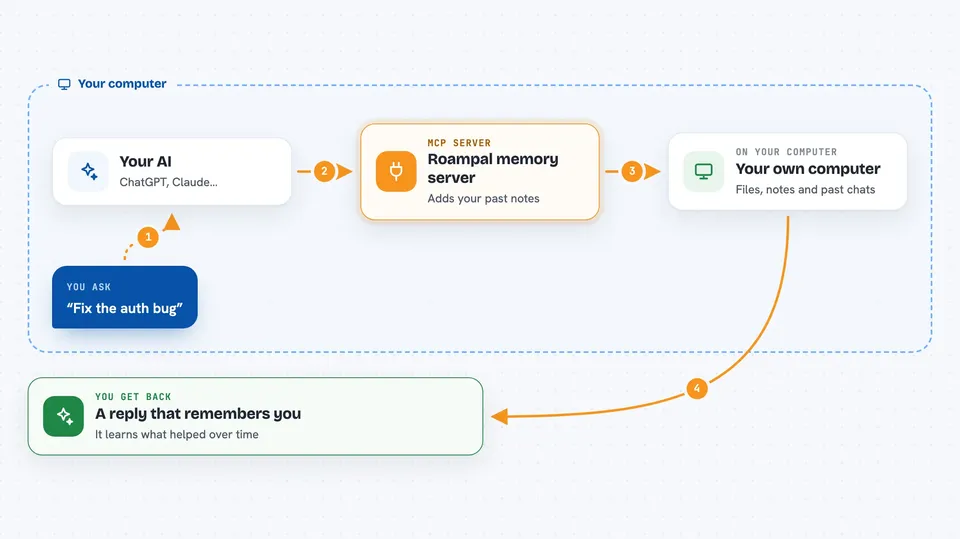
On its own, your AI can only chat about what is in front of it right now. An MCP server is a small helper program that gives your AI a new skill, and here that skill is memory. Roampal runs on your own computer, watches your conversations, and stores the useful bits so your AI can look them up later. When you ask something, Roampal slips the relevant memories into the chat before your AI answers.
What this MCP server does
You type a message like you always do. Before your AI sees it, Roampal adds a short block of context: past fixes, your preferences, things you said before. Your AI answers with that context in mind. Afterwards, Roampal scores how useful that exchange turned out to be. Memories that helped get promoted and kept longer, and ones that misled get demoted or dropped.
 Click to zoom
What you can do with it
- Remember your coding preferences so you do not repeat them
- Recall fixes and patterns from earlier sessions
- Keep a permanent note of your goals and identity
- Store reference documents you upload as books
- Score each exchange so good advice sticks and bad advice fades
- Show you statistics about what it has stored
- Summarize long memories so they stay short and useful
Try asking your AI
- “Fix the auth bug”
- “What did we decide about the database schema last week”
- “Remember that I never want you to stage git changes”
- “Add this PDF to my books collection”
What it gives back to you
Mostly you will not see Roampal working, because it adds context quietly before your AI answers. When you ask directly, it can show you lists of stored memories, statistics about collections, or a summary of recent exchanges. If you upload a document, it confirms it was added and lets you list or remove books later.
Before you start
What you need
- Python installed on your computer
- Claude Code or OpenCode installed
- A terminal where you can run two commands
Good to know
Roampal reads your conversations and stores them on your computer, so do not use it on a shared machine if your chats are private.
Install it with your AI
Add Roampal memory server to your AI, no technical skills needed
You don't install anything by hand. You copy one prompt, paste it into an AI that can work on your computer, and it checks, installs and connects the server for you, asking you when it needs something.
Sign in to get the install prompt
Members get a ready-made prompt that lets the Claude desktop app check Roampal memory server, install it and connect it for them, step by step. You don't need any technical skills: you copy, paste and answer a few questions. Your connected AI can also find and install any of the 4,609 MCP servers here for you.
Who it's for
Developers and anyone who uses Claude Code or OpenCode daily and wants their assistant to remember past work.





