
MCP server · Developer tools · official
Rootly MCP server
by Rootly-AI-Labs · official
Ask your AI about your Rootly incidents, on-call schedules, alerts, and services without leaving the chat.
This is a helper made by Rootly, the incident management platform. It lets your AI assistant look things up in Rootly and, if you allow it, make changes there for you. It is handy for anyone who spends part of their day dealing with incidents, alerts, or on-call rotas.
What is an MCP server? The 30-second version
On its own, your AI can only chat with you. An MCP server is a small helper program that gives your AI a new skill or a connection to an app or service. This one connects your AI to Rootly, so it can look up incidents, schedules, and alerts there, and do things for you when you ask. You do not need to understand how it works inside; you just add it once and then talk to your AI like normal.
What this MCP server does
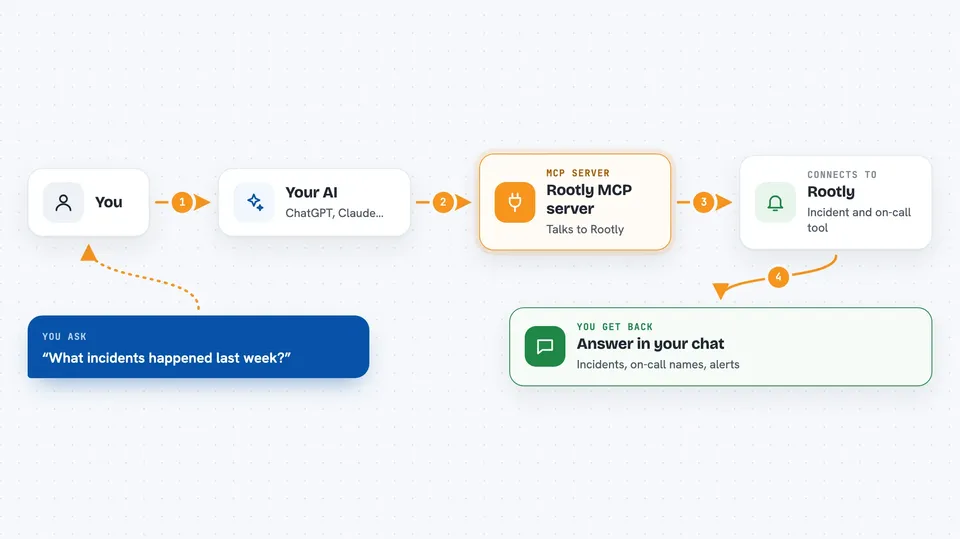
You ask your AI a question in plain words, like which incidents happened last week. Your AI passes that request to this helper, which talks to Rootly on your behalf. Rootly sends back the details, and the helper hands them to your AI. Your AI then writes the answer for you in the chat. If you turn on the write option, the same path also lets your AI create or update things in Rootly when you ask it to.
 Click to zoom
What you can do with it
- List recent incidents and see their status
- Look up details of one specific incident
- Check who is on call for a schedule right now
- Search incidents by keyword or service
- See alerts and alert groups
- Find related incidents and suggested solutions
- Create or update an incident if write tools are turned on
Try asking your AI
- “What incidents happened in the last 24 hours?”
- “Who is on call for the platform team right now?”
- “Show me the details of incident 1234”
- “Are there any open alerts for the payments service?”
What it gives back to you
You get answers written in the chat, based on what Rootly knows. That can be a list of incidents with their titles and statuses, a summary of one incident, the name of the person on call, or a set of alerts. If your AI makes a change in Rootly, it tells you what it changed.
Before you start
What you need
- A Rootly account
- An MCP client that can connect to a hosted server, such as Cursor, Windsurf, Claude, or Claude Desktop
- Either OAuth2 login (your client opens a browser window) or a Rootly API token
Good to know
If write tools are turned on, your AI can create or change things in Rootly, so check what it is about to do before you say yes.
Install it with your AI
Add Rootly MCP server to your AI, no technical skills needed
You don't install anything by hand. You copy one prompt, paste it into an AI that can work on your computer, and it checks, installs and connects the server for you, asking you when it needs something.
Sign in to get the install prompt
Members get a ready-made prompt that lets the Claude desktop app check Rootly MCP server, install it and connect it for them, step by step. You don't need any technical skills: you copy, paste and answer a few questions. Your connected AI can also find and install any of the 4,361 MCP servers here for you.
Who it's for
People who handle incidents, on-call schedules, or alerts at work, such as support engineers, SREs, and incident managers.



