
MCP server · Research
Grounder MCP server
by rozetyp
Lets your AI search the live web, read real pages, and bring back short, cited answers.
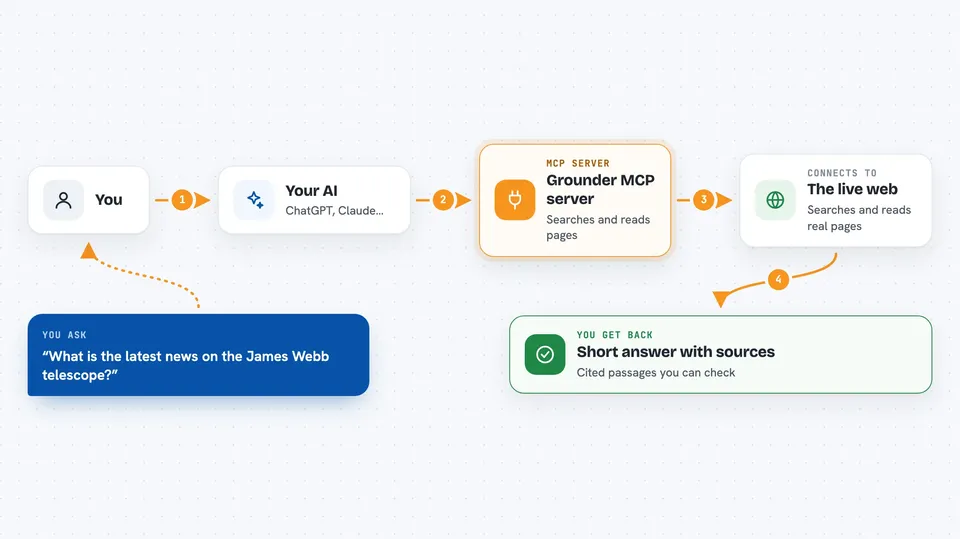
Grounder is a helper that connects your AI to the current web. It runs quietly in the background and gives your AI four new abilities: searching, reading pages, gathering cited evidence, and researching open questions. It is handy if you use ChatGPT, Claude, or a local model and want answers based on today's pages, not just what the model learned long ago.
What is an MCP server? The 30-second version
On its own, your AI can only chat with what it already knows. An MCP server is a small helper program that gives your AI a new skill or a connection to an app or service. This one connects your AI to Grounder, a web grounding service. Once it is set up, your AI can search the web and read pages for you when you ask, without you copying and pasting links.
What this MCP server does
You ask your AI a question that needs current information. The AI passes your request to the Grounder helper. Grounder searches the web, reads the pages it finds, and picks out the parts that matter. It sends back short, cited passages that fit your AI's memory limits. Your AI then uses that to answer you in the chat.
 Click to zoom
What you can do with it
- Search Google and see top results, related searches, and knowledge graph facts
- Fetch any web page as clean text, trimmed to fit your AI's memory
- Run a deep search that reads several pages and returns a cited evidence pack
- Research an open question by planning, reading sources, and reasoning to a conclusion
- Get answers that include the actual web pages used as sources
- Use it with small local models because results are kept short
Try asking your AI
- “What is the latest news about the James Webb telescope?”
- “Find recent studies on sleep and memory and summarize what they say.”
- “Fetch this page and tell me the main points: https://example.com/article”
- “Research whether electric cars are cheaper to own than gas cars over five years.”
What it gives back to you
You get back short, cited passages, lists of search results, or a full answer with sources. For a fetch, you get the page's main text in clean markdown, plus the final web address after any redirects. For deep search or research, you get a pack of evidence with citations, and sometimes a grounded answer. It all shows up in your chat like a normal reply.
Before you start
What you need
- Python installed on your computer (the tool runs with uvx or pip)
- An MCP client like Claude Desktop, Cursor, LM Studio, or Continue.dev
- Optional: a free Grounder API key from grounder.dev for more pages per month (the shared demo key works without signing up)
Good to know
It reads live web pages, so the information can change or be wrong, and it uses your page quota when you search or fetch.
Install it with your AI
Add Grounder MCP server to your AI, no technical skills needed
You don't install anything by hand. You copy one prompt, paste it into an AI that can work on your computer, and it checks, installs and connects the server for you, asking you when it needs something.
Sign in to get the install prompt
Members get a ready-made prompt that lets the Claude desktop app check Grounder MCP server, install it and connect it for them, step by step. You don't need any technical skills: you copy, paste and answer a few questions. Your connected AI can also find and install any of the 4,609 MCP servers here for you.
Who it's for
Anyone who uses an AI assistant and needs up-to-date web information, especially people working with local models or small context windows.


