
MCP server · Generative art
RunAPI MCP server
by runapi-ai
Let your AI browse AI models, check prices, and create image, video, music, and audio tasks for you.
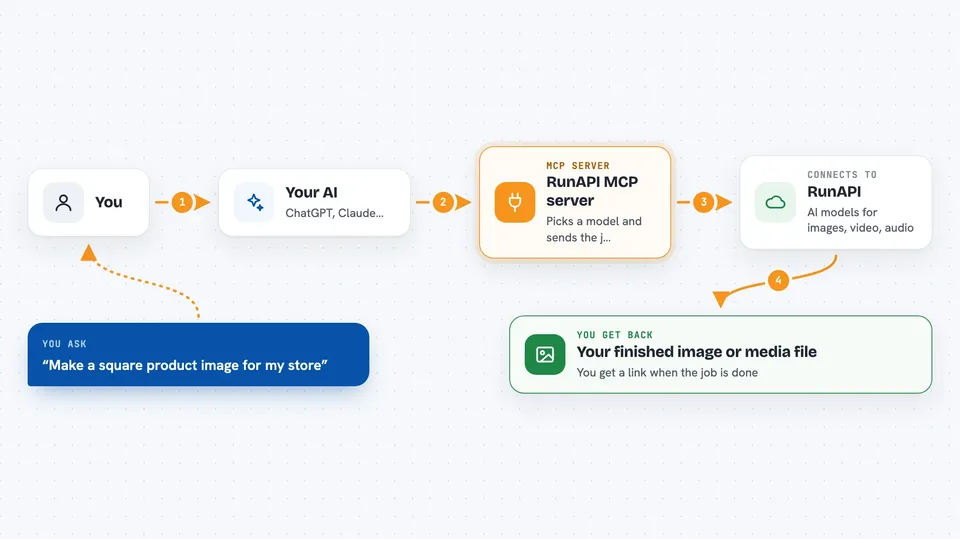
RunAPI is an online service that runs many AI models for making pictures, videos, music, and voice. This MCP server connects that service to your AI assistant, so you can just ask for what you want in plain words. It is handy if you make media with AI but do not want to juggle lots of different websites and accounts.
What is an MCP server? The 30-second version
On its own, your AI can only chat. An MCP server is a small helper program that gives your AI a new skill or a connection to an outside service. This one connects your AI to RunAPI, so the AI can look up models, check prices, and start media jobs there for you. You ask in normal words, and the helper does the back-and-forth behind the scenes.
What this MCP server does
You ask your AI something like which image models are available or how much a certain model costs. The AI uses this helper to look that up in the RunAPI catalog and comes back with a short answer. When you want to actually make something, the AI picks a suitable model, checks what information it needs, and sends the job to RunAPI. RunAPI does the work, and the AI tells you the job ID and, when it is done, the links to your finished files.
 Click to zoom
What you can do with it
- Browse available image, video, audio, and music models
- Check the current price of a specific model before you use it
- Search ready-made prompt examples by topic or tag
- Look up what settings and inputs a model needs
- Create a media task like an image or a voice clip
- Check the status of a task you started earlier
- See your RunAPI account balance and spending
Try asking your AI
- “What RunAPI image models are available?”
- “Find image prompt examples for a logo.”
- “Show me the required parameters for this model slug: flux-schnell”
- “Generate a square product image with RunAPI. Pick a suitable image model.”
- “Check my RunAPI balance.”
What it gives back to you
You get short answers in the chat: lists of model names, prices, required settings, or prompt ideas. When you start a task, you get a task ID and its status, and once it finishes you get links to the finished image, video, or audio file. Balance checks come back as a number and some spending details.
Before you start
What you need
- A RunAPI account (free to browse the catalog, needed to create tasks)
- An MCP-compatible app such as Claude Code, Cursor, VS Code, or Windsurf
- Node.js if you install it locally, or nothing extra if you use the hosted version
Good to know
Creating tasks spends money from your RunAPI balance, so check the price first and confirm before starting anything big or long.
Install it with your AI
Add RunAPI MCP server to your AI, no technical skills needed
You don't install anything by hand. You copy one prompt, paste it into an AI that can work on your computer, and it checks, installs and connects the server for you, asking you when it needs something.
Sign in to get the install prompt
Members get a ready-made prompt that lets the Claude desktop app check RunAPI MCP server, install it and connect it for them, step by step. You don't need any technical skills: you copy, paste and answer a few questions. Your connected AI can also find and install any of the 4,361 MCP servers here for you.
Who it's for
People who make images, videos, music, or voice with AI and want to do it from inside their AI assistant instead of many separate websites.




