
MCP server · Notes
Engram MCP server
by rwnalds
Give your AI a shared, long-term memory it can read and write, stored as plain markdown notes you own.
Engram is a memory server for your AI. It keeps notes in a folder of plain markdown files, like an Obsidian vault, and your AI can search, read, and write those notes. It is handy if you use an AI assistant for work and are tired of re-explaining the same project every time you start a new chat.
What is an MCP server? The 30-second version
On its own, your AI can only chat. It forgets everything when the conversation ends, and it cannot look anything up. An MCP server is a small helper program that gives your AI a new skill or a connection to something outside the chat. Engram is that helper for your notes: it connects your AI to a folder of markdown files, so the AI can search them, read them, and add to them when you ask.
What this MCP server does
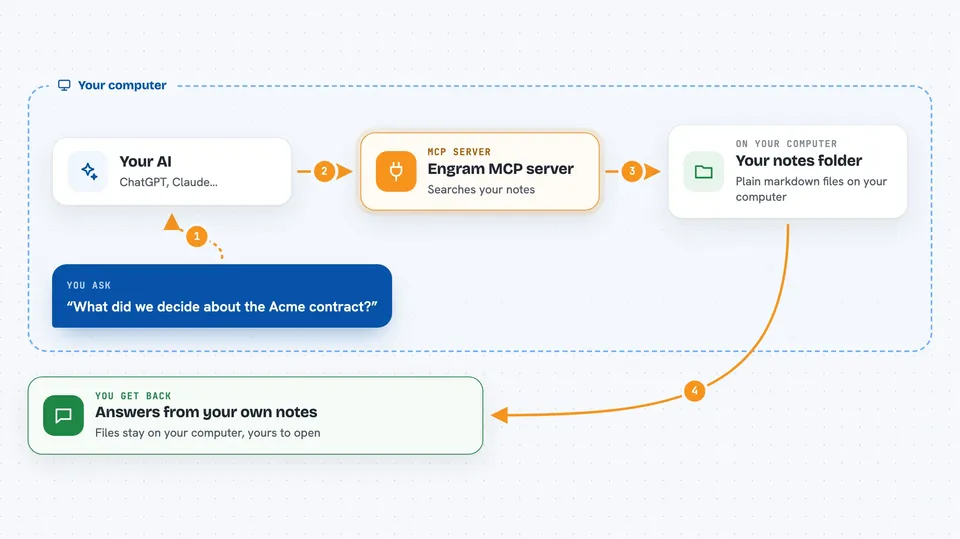
You ask your AI something, like what your team decided about pricing. The AI uses Engram to search your notes folder. Engram looks through the markdown files and returns the most relevant ones, ranking notes that are still current above ones that were retired. Your AI then reads those notes and answers you. If you ask it to save something, it writes a new note or edits an existing one, and Engram keeps a record of who changed what.
 Click to zoom
What you can do with it
- Search your notes and get back the most relevant, still-current ones
- Read a specific note by name and see its full contents
- Write a new note or edit an existing one
- Mark an old note as replaced by a newer one, so it stops showing up
- List recent notes or browse your folder structure
- See which notes link to a given note
- Move or archive notes you no longer need
Try asking your AI
- “Search my notes for our retainer pricing and tell me what we currently charge”
- “Save a note about today's client call under meetings”
- “What did we decide about the Acme contract? Check my notes.”
- “That old pricing note is out of date. Mark it as replaced by the new one.”
What it gives back to you
You get back answers in the chat, built from your own notes. When your AI searches, it shows you the matching notes and can tell you which ones it skipped because they were retired or expired. When it writes or edits, it confirms what it changed. Everything stays in your markdown files, so you can open them yourself any time.
Before you start
What you need
- A folder of markdown notes, or an Obsidian vault, that you want your AI to use
- A place to run Engram, such as a small server or a Docker container with storage
- A token from the Engram dashboard to connect your AI (the dashboard shows you how to create one)
Good to know
Your AI can change and delete notes in your vault, so give it a read-only token unless you actually want it to write.
Install it with your AI
Add Engram MCP server to your AI, no technical skills needed
You don't install anything by hand. You copy one prompt, paste it into an AI that can work on your computer, and it checks, installs and connects the server for you, asking you when it needs something.
Sign in to get the install prompt
Members get a ready-made prompt that lets the Claude desktop app check Engram MCP server, install it and connect it for them, step by step. You don't need any technical skills: you copy, paste and answer a few questions. Your connected AI can also find and install any of the 4,066 MCP servers here for you.
Who it's for
People who work with AI assistants every day and want them to remember project details, decisions, and notes across sessions, especially small teams running more than one AI agent.




