
MCP server · Security
54ch10 MCP server
by sachio222
Ask your AI to check a link, wallet address or token and get a simple risk score before you click or send.
This is a small helper that lets your AI look up whether a web link, a wallet address or a token looks risky. You ask in normal words, and it comes back with a score, some warning flags and where the information came from. It is handy for anyone who gets links from strangers or checks crypto addresses before sending money.
What is an MCP server? The 30-second version
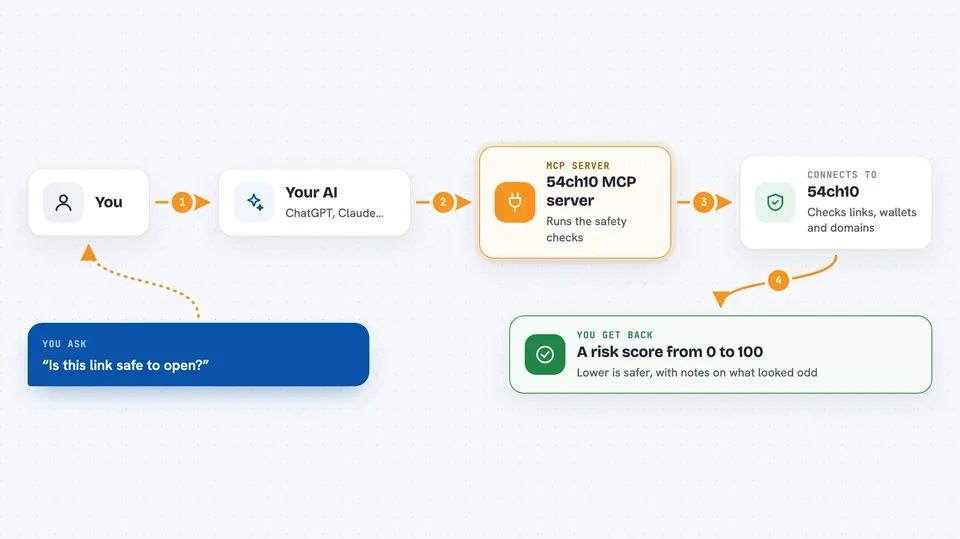
On its own, your AI can only chat with you using what it already knows. An MCP server is a small helper program that gives your AI one extra skill, in this case a connection to the 54ch10 checking service. Once it is connected, your AI can send a link or address to that service and bring the answer back into your chat. You never touch the service yourself, you just ask your AI.
What this MCP server does
You paste a link, a wallet address or a token into your chat and ask your AI to check it. Your AI passes it to this helper, which sends it to the 54ch10 service. The service runs its checks, things like phishing lists, scam signals and URL reputation, and returns a score from 0 to 100 where lower is better, plus flags and sources. Your AI reads that back to you in the chat in plain words. There are also smaller helpers for looking up who owns a domain, its DNS records and its security certificate.
 Click to zoom
What you can do with it
- Check a link before you click it and get a risk score
- Check a wallet address or token for warning signs
- Check up to 25 links at once in one batch
- Look up who registered a domain and when
- See the DNS records and security certificate of a site
- Fetch a web page as readable text
- Save and read short notes on the service
Try asking your AI
- “Is this link safe to open: hxxps://some-short-link.example”
- “Check this wallet address for scam signals: 0x1234...abcd”
- “Look up who owns example.com and when it was registered”
- “Check these five links for me before I click any of them”
What it gives back to you
You get a short risk brief in the chat: a score from 0 to 100 where lower means safer, a few flags explaining what looked odd, and the sources behind those flags. For domain lookups you get things like the owner details, name servers and certificate dates. Batch checks come back as a list, one line per link. It is information to help you decide, not a yes or no clearance.
Before you start
What you need
- The Claude desktop app or another AI app that supports MCP servers
- Node.js 18 or newer installed on your computer
- Nothing else for a free taste; a paid stack or key is only needed for heavier use
Good to know
The scores are rough signals, not proof, so a low score does not guarantee a link or address is safe, and paid checks cost a small amount each.
Install it with your AI
Add 54ch10 MCP server to your AI, no technical skills needed
You don't install anything by hand. You copy one prompt, paste it into an AI that can work on your computer, and it checks, installs and connects the server for you, asking you when it needs something.
Sign in to get the install prompt
Members get a ready-made prompt that lets the Claude desktop app check 54ch10 MCP server, install it and connect it for them, step by step. You don't need any technical skills: you copy, paste and answer a few questions. Your connected AI can also find and install any of the 4,361 MCP servers here for you.
Who it's for
Anyone who receives links from strangers or handles crypto addresses, such as support staff, community managers and people doing quick safety checks before they click or send.




