MCP server · Research
Weather MCP server
by SaintDoresh
Lets your AI look up current weather, forecasts, air quality and past weather for any place you name.
This is a small helper that connects your AI assistant to live weather information from OpenWeatherMap. Once it is set up, you can just ask about the weather anywhere in the world and get a real answer instead of a guess. It is handy for anyone who plans around the weather, like people who travel, work outdoors, or organize events.
What is an MCP server? The 30-second version
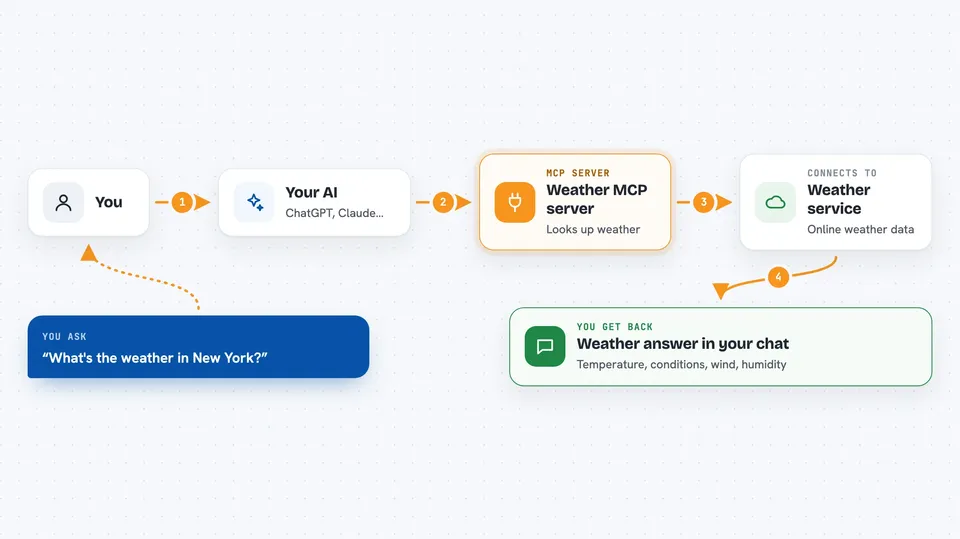
On its own, your AI can only chat with you using what it already learned. An MCP server is a small helper program that gives your AI a new skill or a connection to an outside service. This one connects your AI to OpenWeatherMap, a weather data service. So when you ask about the weather, your AI asks this helper, the helper fetches the real data, and you get the answer in your chat.
What this MCP server does
You ask your AI a weather question in plain words, like the forecast for a city. Your AI passes that request to this helper program running on your computer. The helper talks to OpenWeatherMap over the internet and pulls back the current conditions, forecast, air quality, or past weather. Then your AI turns that data into a normal reply for you. You never have to visit a weather website or read raw numbers yourself.
 Click to zoom
What you can do with it
- Check the current weather in any city
- Get a forecast up to 5 days ahead
- Look up air quality for a place
- See historical weather for a recent date
- Search for a location by name
- Check weather alerts and warnings
- Compare weather across several cities at once
Try asking your AI
- “What's the current weather in New York?”
- “Show me the 5-day forecast for London”
- “What's the air quality like in Beijing today?”
- “How was the weather in Paris on March 14th?”
What it gives back to you
You get a written answer in your chat, like a short weather summary with temperature, conditions, wind, and humidity. If you ask for a forecast, you get a day-by-day or hour-by-hour rundown. For air quality, you get a level and the main pollutant numbers explained in plain words. If a location cannot be found, you get a short error message instead.
Before you start
What you need
- Python 3.10 or newer installed on your computer
- An API key from OpenWeatherMap (a kind of password for apps; the site gives you one for free)
- The Claude desktop app
- The project files from the GitHub page
Good to know
The free OpenWeatherMap plan allows up to 60 requests per minute, so very frequent asking may be slowed down, and new keys can take up to a day to activate.
Install it with your AI
Add Weather MCP server to your AI, no technical skills needed
You don't install anything by hand. You copy one prompt, paste it into an AI that can work on your computer, and it checks, installs and connects the server for you, asking you when it needs something.
Sign in to get the install prompt
Members get a ready-made prompt that lets the Claude desktop app check Weather MCP server, install it and connect it for them, step by step. You don't need any technical skills: you copy, paste and answer a few questions. Your connected AI can also find and install any of the 4,361 MCP servers here for you.
Who it's for
Anyone who plans around the weather, like travelers, event planners, outdoor workers, or people who just want quick weather answers without opening a website.