MCP server · Coding
Google Colab MCP server
Let your AI open a Google Colab notebook, add and run code cells, and pick a GPU for you.
This is a helper that connects your AI assistant to Google Colab, the free online notebook where you run Python code in your browser. Once it is set up, you can ask your AI to add code, run it, and even switch on a faster GPU, without clicking around yourself. It is handy for anyone who uses Colab for data work, learning, or quick experiments and wants their AI to do the fiddly parts.
What is an MCP server? The 30-second version
On its own, your AI can only chat with you. An MCP server is a small helper program that gives your AI a new skill or a connection to an app or service. This one connects your AI to Google Colab, so it can open a notebook, add cells, run them, and read the results back for you. You just ask in plain words, and the helper does the clicking and typing in Colab.
What this MCP server does
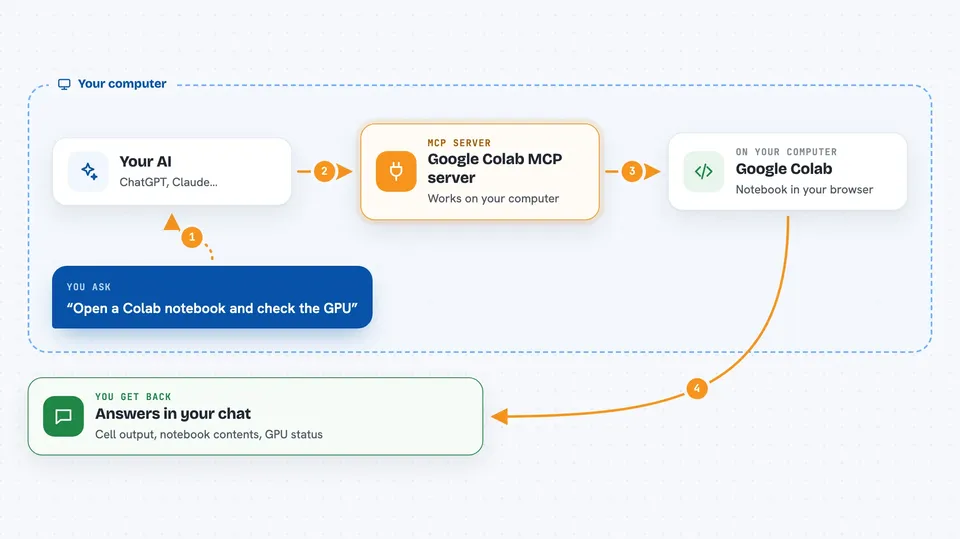
You ask your AI something like "open a Colab notebook and check the GPU." Your AI passes that to this helper program running on your computer. The helper opens a Colab tab in your browser and talks to it. It can add code cells, run them, read what is in the notebook, edit or delete cells, and move them around. If you set up the extra Google login step, it can also switch the notebook to a T4, L4, or A100 GPU for you.
 Click to zoom
What you can do with it
- Open a Google Colab notebook in your browser
- Add code cells and text cells to the notebook
- Run a code cell and see its output
- Read the current notebook, including cells and their results
- Edit, delete, or move existing cells
- Assign a GPU like T4, L4, or A100 (needs the extra Google login setup)
Try asking your AI
- “Open a Colab notebook and add a cell that prints hello world, then run it”
- “Switch this notebook to a T4 GPU and run nvidia-smi”
- “Show me all the cells in my notebook and their outputs”
- “Delete the last cell and add a new one that loads pandas”
What it gives back to you
You get answers and results right in your chat. For example, when a cell runs, you see its output, like the text it printed or an error message. When you ask to read the notebook, you get a list of cells with their contents and outputs. When you ask to change the GPU, you get a short confirmation that it worked.
Before you start
What you need
- A Google account (for Colab)
- The uv tool installed on your computer (the README shows the one-line install)
- This project downloaded from GitHub
- For GPU switching only: a Google Cloud OAuth setup, which takes about 5 minutes once
Good to know
It can change your notebook by adding, editing, deleting, or running cells, so check what your AI did before trusting the results.
Install it with your AI
Add Google Colab MCP server to your AI, no technical skills needed
You don't install anything by hand. You copy one prompt, paste it into an AI that can work on your computer, and it checks, installs and connects the server for you, asking you when it needs something.
Sign in to get the install prompt
Members get a ready-made prompt that lets the Claude desktop app check Google Colab MCP server, install it and connect it for them, step by step. You don't need any technical skills: you copy, paste and answer a few questions. Your connected AI can also find and install any of the 4,609 MCP servers here for you.
Who it's for
People who use Google Colab for coding, data work, or learning and want their AI assistant to handle the notebook for them.