MCP server · Health and learning
Learn Shell MCP server
by sf-shenfeng
Give your AI a classroom that remembers your lessons, flashcards, and progress between chats.
Learn Shell is a teaching system you run on your own computer. It gives your AI a place to keep courses, lessons, flashcards, and graded exercises, so your teacher does not forget you every time you open a new chat. It is handy if you use one AI as a long-term tutor or study companion.
What is an MCP server? The 30-second version
On its own, your AI can only chat. It cannot save a lesson, track what you studied last week, or grade your answer and remember the score. An MCP server is a small helper program that gives your AI a new skill or a connection to another app. Here, that helper is Learn Shell, running on your machine, so your AI can look up your learning history, write new lessons, and check your flashcards when you ask.
What this MCP server does
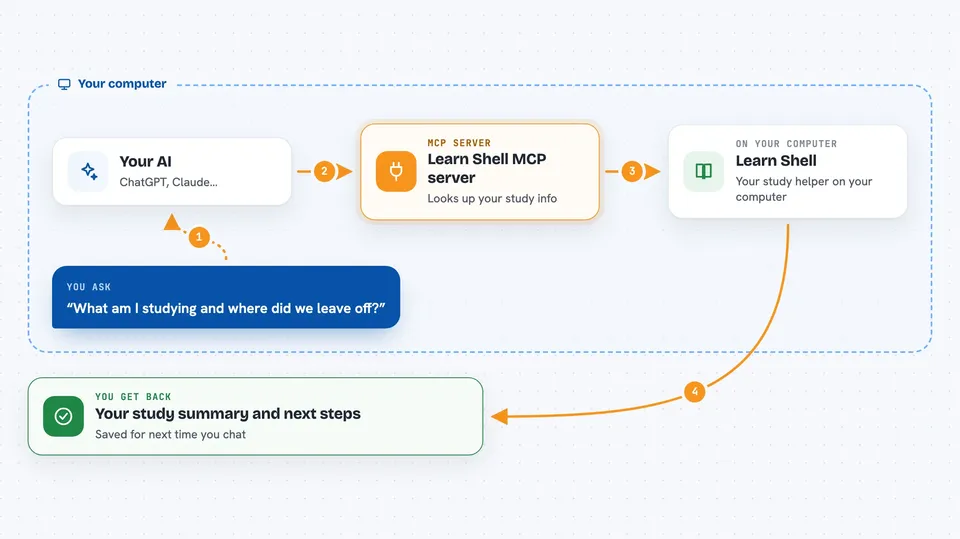
You talk to your AI like normal. When you ask about your studies, the AI calls Learn Shell through this helper. Learn Shell looks up your courses, lessons, flashcard schedule, and past answers in its own database. It sends that information back to your AI, which then explains it to you or uses it to teach the next lesson. When the AI creates or grades something, Learn Shell saves it so it is still there tomorrow.
 Click to zoom
What you can do with it
- Start a new course with a learning goal
- Write and save lessons with exercises
- Grade your exercise answers and keep the feedback
- Schedule flashcards for review using spaced repetition
- Show your learning history on a timeline
- Run a live back-and-forth teaching session
- Remember what you struggled with across sessions
Try asking your AI
- “What am I studying right now and where did we leave off?”
- “Create a new lesson on the time value of money with three practice questions.”
- “Grade my answer to exercise 2 and tell me what I got wrong.”
- “Which flashcards are due for review today?”
What it gives back to you
You get answers in the chat, like a summary of your current course, a list of due flashcards, or feedback on an exercise. When the AI creates or updates something, Learn Shell saves it and confirms what changed. The next time you talk to your AI, it can pick up exactly where you stopped.
Before you start
What you need
- A computer where you can run Docker and Node.js
- The Learn Shell code from its GitHub page
- An AI app that supports MCP, like the Claude desktop app
Good to know
It stores your learning history on your computer and has no login, so keep it on your own machine and do not open it to the internet.
Install it with your AI
Add Learn Shell MCP server to your AI, no technical skills needed
You don't install anything by hand. You copy one prompt, paste it into an AI that can work on your computer, and it checks, installs and connects the server for you, asking you when it needs something.
Sign in to get the install prompt
Members get a ready-made prompt that lets the Claude desktop app check Learn Shell MCP server, install it and connect it for them, step by step. You don't need any technical skills: you copy, paste and answer a few questions. Your connected AI can also find and install any of the 4,361 MCP servers here for you.
Who it's for
People who use one AI as a long-term tutor or study partner and want it to remember their progress.