MCP server · Analytics
Sifter MCP server
by sifter-ai
Ask your AI questions about your documents and get exact numbers, lists and totals back.
Sifter is a tool that reads your documents, such as invoices, contracts or CVs, and pulls out the important details into a neat table. Once that table exists, you can ask questions about it in plain English and get exact answers. It is handy if you deal with lots of similar documents and want totals, counts or filtered lists instead of reading them one by one.
What is an MCP server? The 30-second version
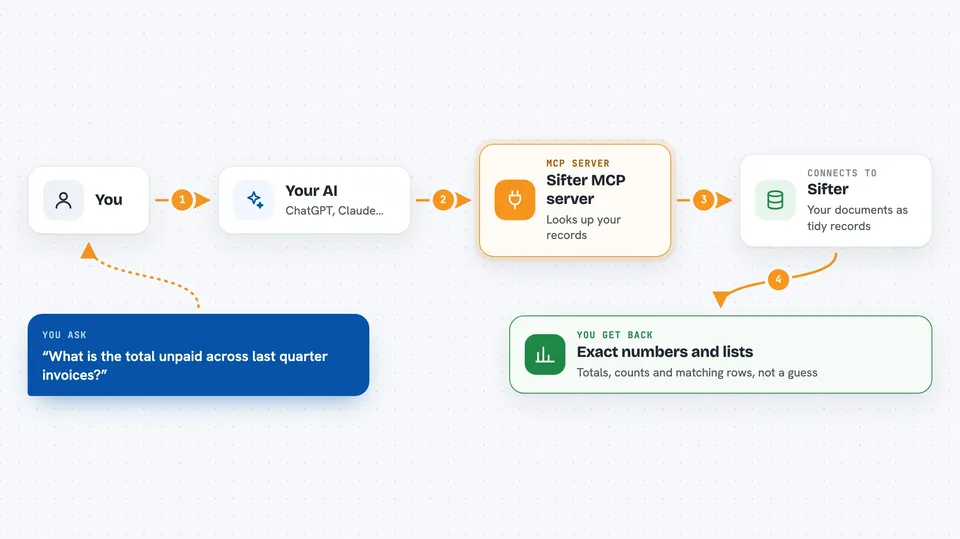
On its own, your AI can only chat with you. An MCP server is a small helper program that gives your AI a new skill or a connection to another service. This one connects your AI to Sifter, so when you ask a question about your documents, the AI can go and look things up there for you. You do not need to write any code or copy data around by hand.
What this MCP server does
You upload your documents to Sifter and describe what to pull out, for example client name, date and total amount. Sifter reads each document and turns those details into typed records, like rows in a spreadsheet. When you ask your AI a question, the AI sends it to this helper, the helper asks Sifter, and Sifter runs a real database query over those records. You get back exact rows, counts and sums, not a vague text summary. The whole loop happens inside your chat.
 Click to zoom
What you can do with it
- Ask for totals and counts across many documents at once
- Filter records by date, name, amount or any field you extracted
- List documents that match a condition, like contracts expiring soon
- Create new sifts and upload documents through the AI
- Look up a single record by its details
- Build simple dashboards from a plain language description
- Inspect the query Sifter ran, so you can see how the answer was produced
Try asking your AI
- “What's the total unpaid across all invoices from last quarter?”
- “Show me all contracts expiring in the next 90 days.”
- “Which candidates have Python and more than 5 years experience?”
- “List every invoice from Acme Corp above 1000.”
What it gives back to you
You get back structured answers: exact numbers, filtered lists of records, or a small table of rows with the fields you asked about. For example, a total amount, a count, or a list of client names with dates. If the AI created or changed something, like a new sift or an upload, it tells you what it did. The answers are reproducible, because they come from a database query rather than a guess.
Before you start
What you need
- A running Sifter instance, either self-hosted with Docker or the hosted Sifter Cloud
- An API key for Sifter (a kind of password for apps; the setup gives you one)
- The uvx tool installed, which comes with the uv Python package manager
- An AI app that supports MCP, such as Claude Desktop or Cursor
Good to know
The helper can create new sifts, upload documents and change records in your Sifter instance, so be careful when you ask it to write or delete things.
Install it with your AI
Add Sifter MCP server to your AI, no technical skills needed
You don't install anything by hand. You copy one prompt, paste it into an AI that can work on your computer, and it checks, installs and connects the server for you, asking you when it needs something.
Sign in to get the install prompt
Members get a ready-made prompt that lets the Claude desktop app check Sifter MCP server, install it and connect it for them, step by step. You don't need any technical skills: you copy, paste and answer a few questions. Your connected AI can also find and install any of the 4,361 MCP servers here for you.
Who it's for
Anyone who handles lots of similar documents, like finance teams, recruiters, legal and operations staff, and wants quick exact answers without building a database.