MCP server · Research
Stadia Maps MCP server
by stadiamaps
Let your AI look up addresses, time zones, routes, and make maps for you.
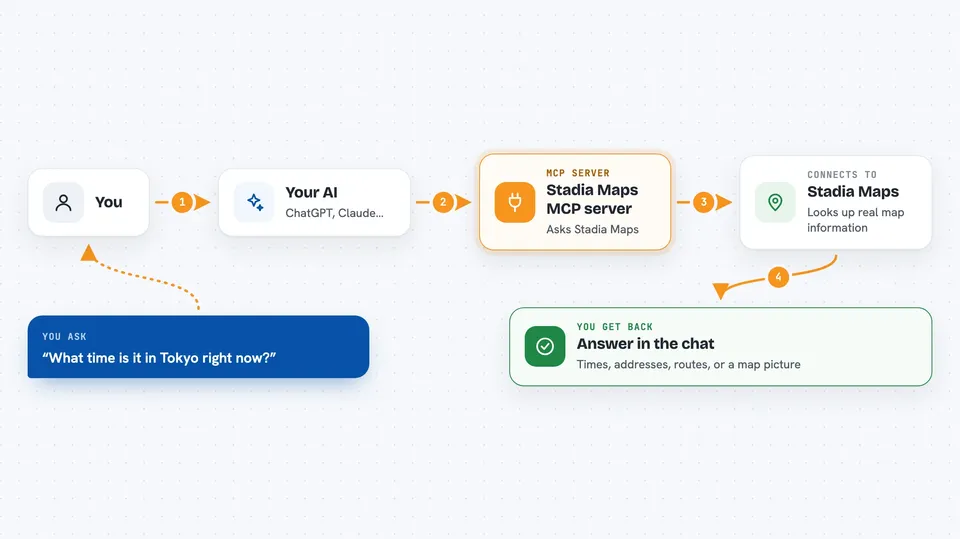
This is a small helper that connects your AI assistant to Stadia Maps, a service that knows about places, addresses, and travel routes. Once it is set up, you can ask your AI things like what time it is in another city or how long a walk takes, and it will go find the answer. It is handy for anyone who works with locations, travel plans, or lists of addresses.
What is an MCP server? The 30-second version
On its own, your AI can only chat with you using what it already learned. An MCP server is a small helper program that gives your AI a new skill or a connection to another service. This one connects your AI to Stadia Maps, so it can look up addresses, time zones, and routes for you. You just ask in normal words, and the AI uses this helper behind the scenes.
What this MCP server does
You ask your AI a question about a place, an address, or a trip. The AI passes your request to this helper program. The helper talks to Stadia Maps, which looks up the real information. Then the answer comes back and your AI explains it to you in the chat. Sometimes it can even make a map picture for you.
 Click to zoom
What you can do with it
- Find the current time and time zone for any city or place
- Look up an address and get its coordinates
- Search for places like restaurants or cafes
- Work out a route and how long the trip takes
- Make a static map image with markers or a route drawn on it
- Show which areas you can reach within a certain time or distance
Try asking your AI
- “What time is it in Tokyo right now?”
- “Make me a map showing the walking route from my hotel to the conference center.”
- “Geocode the addresses in this spreadsheet and add latitude and longitude columns.”
- “Is the Põhjala Tap Room open right now? Use Stadia Maps to check.”
What it gives back to you
You get answers in plain words in the chat, like the time in a city or the coordinates of an address. For routes, you get travel time and distance. For maps, you get an image you can look at or download. If you asked it to change a spreadsheet, it may give you a new file or a link to one.
Before you start
What you need
- A Stadia Maps API key (a kind of password for apps; you can get a free one from their website)
- An AI assistant that supports MCP, like the Claude desktop app
Good to know
This server uses your Stadia Maps API key, and heavy use might use up your free quota or cost money if you go over it.
Install it with your AI
Add Stadia Maps MCP server to your AI, no technical skills needed
You don't install anything by hand. You copy one prompt, paste it into an AI that can work on your computer, and it checks, installs and connects the server for you, asking you when it needs something.
Sign in to get the install prompt
Members get a ready-made prompt that lets the Claude desktop app check Stadia Maps MCP server, install it and connect it for them, step by step. You don't need any technical skills: you copy, paste and answer a few questions. Your connected AI can also find and install any of the 4,361 MCP servers here for you.
Who it's for
Anyone who deals with addresses, travel plans, or location questions, like office workers, researchers, or people planning trips.