
MCP server · Productivity
IdeaLift MCP server
Let your AI turn rough notes into tidy ideas, score them, and track decisions for your product backlog.
IdeaLift is a helper that connects your AI assistant to your product backlog. It takes messy feedback and turns it into clean feature requests, bug reports, or tasks, and it keeps a record of who decided what and why. It is handy if you work on a product team and spend a lot of time sorting ideas and feedback.
What is an MCP server? The 30-second version
On its own, your AI can only chat with you. An MCP server is a small helper program that gives your AI a new skill or a connection to an app or service. This one connects your AI to IdeaLift, a decision and idea tracking service. Once connected, your AI can look things up and do things in IdeaLift for you when you ask.
What this MCP server does
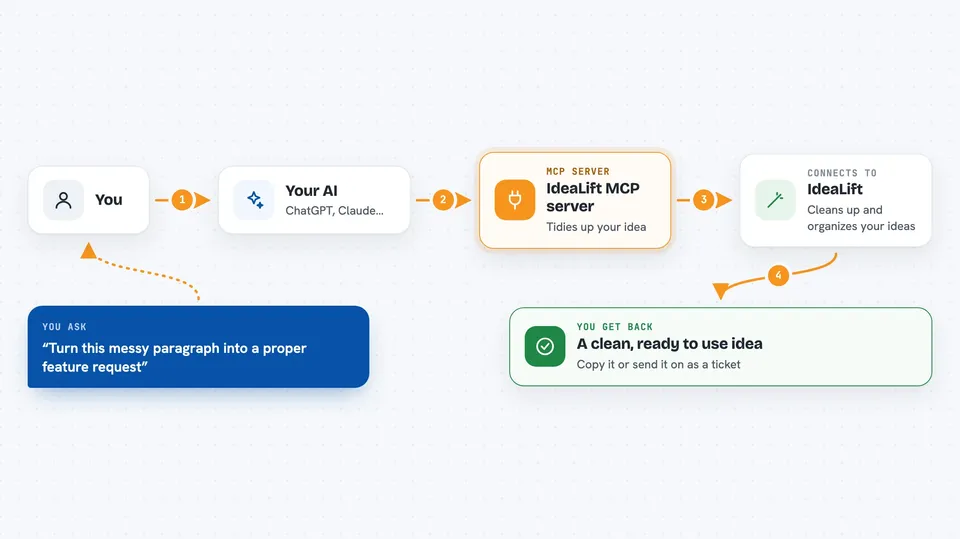
You type a request to your AI, like turning a messy paragraph into a proper feature request. Your AI passes that to this helper, which talks to IdeaLift. IdeaLift cleans up the text, gives it a structure, and can score it or save it. Then the answer comes back to you in the chat, ready to copy or push onward to a tool like GitHub, Jira, or Linear.
 Click to zoom
What you can do with it
- Turn rough notes into a structured feature request, bug report, or task
- Collect product feedback coming from Slack, Teams, Discord, and GitHub
- Score ideas with RICE (Reach, Impact, Confidence, Effort)
- Keep a record of who decided what, when, and why
- Create tickets in GitHub Issues, Jira, or Linear
- See which projects you can send tickets to
- Connect a new destination system to your IdeaLift account
Try asking your AI
- “Turn this paragraph into a proper feature request: customers keep asking for a dark mode in the mobile app”
- “Score this idea with RICE: add a weekly summary email to all paying users”
- “Create a GitHub issue from this idea and put it in the mobile app project”
- “What decisions did we record about the checkout redesign last month”
What it gives back to you
You get back clean, structured text: a tidy idea with a title, a type, and a short description. You can also get scores with numbers for reach, impact, confidence, and effort. When you ask for a ticket, it tells you the ticket was created and where. For decisions, it gives you a short list with who decided, when, and why.
Before you start
What you need
- An IdeaLift account
- Your AI assistant connected to this MCP server (the hosted version is available from IdeaLift)
- If you run it yourself: Node.js, a SQL Server database, and an OpenAI API key (a kind of password for apps; the site gives you one)
Good to know
It can create tickets and record decisions in your real tools, so check what it is about to do before you say yes.
Install it with your AI
Add IdeaLift MCP server to your AI, no technical skills needed
You don't install anything by hand. You copy one prompt, paste it into an AI that can work on your computer, and it checks, installs and connects the server for you, asking you when it needs something.
Sign in to get the install prompt
Members get a ready-made prompt that lets the Claude desktop app check IdeaLift MCP server, install it and connect it for them, step by step. You don't need any technical skills: you copy, paste and answer a few questions. Your connected AI can also find and install any of the 4,609 MCP servers here for you.
Who it's for
Product managers, founders, and team leads who collect feedback and make prioritization decisions all day.





