
MCP server · Research
arXiv LaTeX MCP server
Let your AI read the original LaTeX of arXiv papers so it can handle equations and math correctly.
This is a small helper that connects your AI assistant to arXiv, the big online library of research papers. It fetches the original LaTeX source of a paper instead of a PDF, so the math and equations come through cleanly. It is handy for anyone who reads technical papers, especially in maths, computer science, or engineering.
What is an MCP server? The 30-second version
On its own, your AI can only chat with you using what it already knows. An MCP server is a small helper program that gives your AI a new skill or a connection to an app or service. This one connects your AI to arXiv, so it can go and fetch a paper's LaTeX source for you when you ask. You just talk normally, and the helper does the fetching behind the scenes.
What this MCP server does
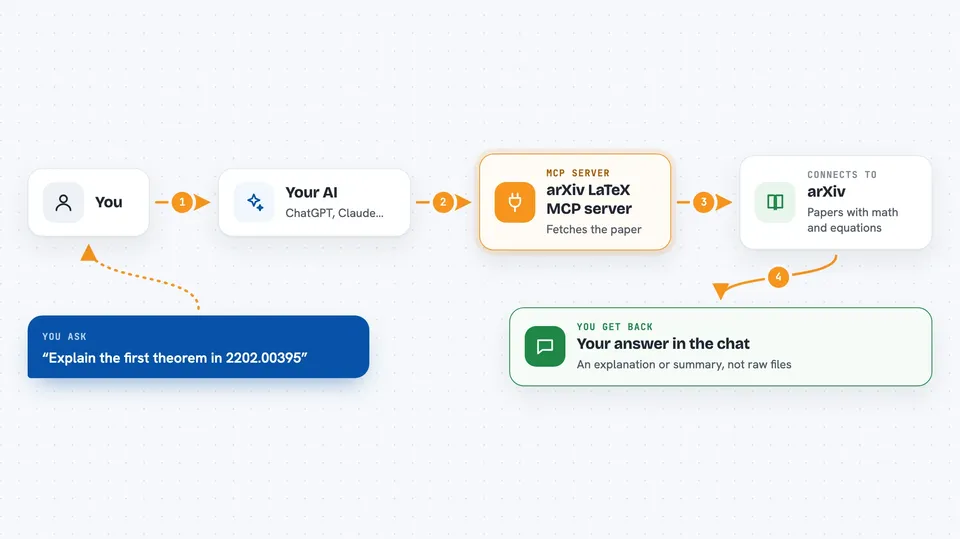
You ask your AI something about an arXiv paper, for example to explain a theorem in it. Your AI uses this helper to download the paper's LaTeX source from arXiv. The helper cleans it up into plain text the AI can read, keeping the equations intact. Then your AI reads that and answers your question in the chat. You never have to copy files or paste anything yourself.
 Click to zoom
What you can do with it
- Fetch the full LaTeX source of an arXiv paper
- Get just the abstract of a paper
- List the section headings of a paper
- Pull out one specific section by its path
- Ask for an explanation of a theorem or equation in a paper
- Compare the notation used in two different papers
Try asking your AI
- “Explain the first theorem in 2202.00395”
- “What does the abstract of 1706.03762 say?”
- “List the sections of paper 2202.00395”
- “Summarise the methods section of 2202.00395”
What it gives back to you
It gives your AI the paper's text, either the whole thing, just the abstract, a list of section headings, or one section you asked for. Your AI then turns that into an answer, a summary, or an explanation right in the chat. You see the reply, not the raw LaTeX, unless you ask for it. Nothing is changed on arXiv itself; it only reads.
Before you start
What you need
- An MCP client such as Claude Desktop, Claude Code, or Cursor
- For the uvx route: the uv tool installed on your computer
- For the .mcpb route: nothing extra, just double-click the file
Good to know
It only reads papers from arXiv, so it cannot change or delete anything, but it does need the paper's arXiv ID to work.
Install it with your AI
Add arXiv LaTeX MCP server to your AI, no technical skills needed
You don't install anything by hand. You copy one prompt, paste it into an AI that can work on your computer, and it checks, installs and connects the server for you, asking you when it needs something.
Sign in to get the install prompt
Members get a ready-made prompt that lets the Claude desktop app check arXiv LaTeX MCP server, install it and connect it for them, step by step. You don't need any technical skills: you copy, paste and answer a few questions. Your connected AI can also find and install any of the 4,361 MCP servers here for you.
Who it's for
Students, researchers, and anyone who reads maths-heavy papers on arXiv and wants help understanding them.


