MCP server · Productivity
Talonic MCP server
by talonicdev
Turn PDFs, scans and forms into clean, checked data your AI can search and reuse.
Talonic is a service that reads documents for you and pulls out the details you care about, like totals, dates and names. This MCP server connects your AI assistant to Talonic, so you can just ask for what you need instead of reading the file yourself. It is handy for anyone who deals with invoices, contracts, scans or forms on a regular basis.
What is an MCP server? The 30-second version
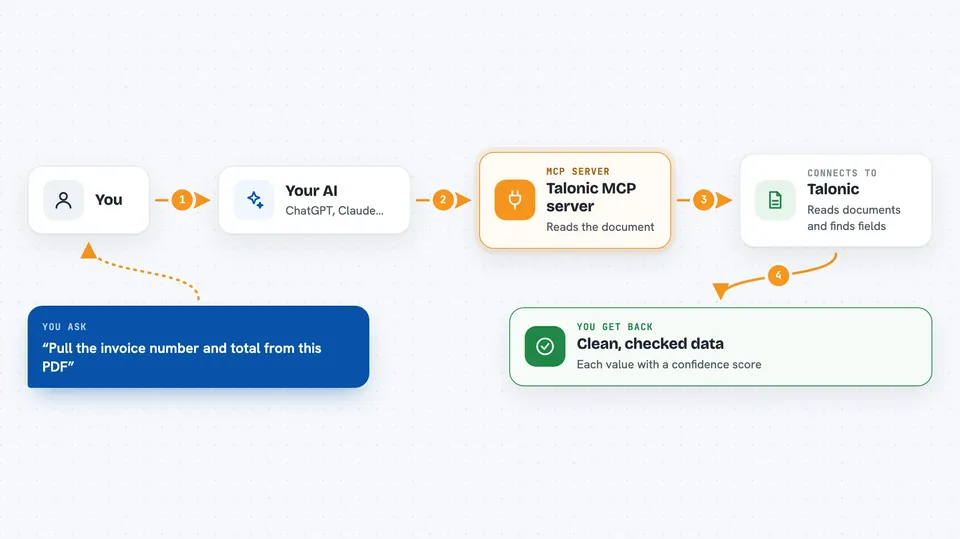
On its own, your AI can only chat. It cannot open a PDF on your computer or look inside your Talonic account. An MCP server is a small helper program that gives your AI a new skill or a connection to another service. This one connects your AI to Talonic, so when you ask about a document, the AI can reach Talonic, have it read the file, and bring the answer back to you.
What this MCP server does
You ask your AI something like "pull the invoice number and total from this PDF". The AI passes your request to this helper, which talks to Talonic. Talonic reads the document, finds the fields you asked for, and checks them against a schema (a kind of form that says which fields should exist and what type each one is). You get back clean, structured data with a confidence score for each field, plus a document type and an ID you can use in follow-up questions.
 Click to zoom
What you can do with it
- Pull specific fields out of a PDF, scan, invoice, contract or form
- See a confidence score for each extracted value so you know what to double-check
- Convert a scanned document into clean markdown text
- Search across all your past documents, fields and schemas
- Filter documents by extracted values, like totals above a number or dates in a range
- Save a reusable schema so the same document type is read the same way every time
- Ask a plain question over your documents and get a cited answer
Try asking your AI
- “Extract the invoice number, date and total from this PDF”
- “Find every contract from last year where the renewal date is in the next 60 days”
- “Turn this scanned receipt into clean text I can copy”
- “What is the total amount across all invoices from Acme in March”
What it gives back to you
You get answers in the chat, usually as a small table or list of fields with their values and confidence scores. For searches and filters you get a list of matching documents with the relevant values. For questions you get a written answer with citations pointing back to the document. When Talonic makes a change, like saving a schema, it tells you it was saved.
Before you start
What you need
- A free Talonic account at app.talonic.com
- An API key from your Talonic settings (a kind of password for apps; the site creates one for you in a few clicks)
- Node.js installed if you are using a desktop app like Claude Desktop or Cursor
- Nothing extra for Claude.ai, where you sign in through the browser instead
Good to know
Talonic reads the documents in your workspace and uses credits for each job, so check your balance and pricing before running large batches, and treat extracted values as a first pass to review rather than a final answer.
Install it with your AI
Add Talonic MCP server to your AI, no technical skills needed
You don't install anything by hand. You copy one prompt, paste it into an AI that can work on your computer, and it checks, installs and connects the server for you, asking you when it needs something.
Sign in to get the install prompt
Members get a ready-made prompt that lets the Claude desktop app check Talonic MCP server, install it and connect it for them, step by step. You don't need any technical skills: you copy, paste and answer a few questions. Your connected AI can also find and install any of the 4,361 MCP servers here for you.
Who it's for
Anyone who handles paperwork, like bookkeepers, accountants, operations staff, legal assistants and small business owners who deal with invoices, contracts or forms.