
MCP server · Analytics
ThinAir Data MCP server
Ask your AI questions about your PostgreSQL, MySQL or SQL Server databases and get read-only answers back.
ThinAir Data is a helper that lets your AI look inside your databases and answer questions about them. It works with PostgreSQL, MySQL and SQL Server, and it is built to only read, never change your data. It is handy if you often need quick answers from a database but do not want to write SQL yourself.
What is an MCP server? The 30-second version
On its own, your AI can only chat with you. An MCP server is a small helper program that gives your AI a new skill or a connection to another app. This one connects your AI to your databases, so it can look up tables, run safe read-only queries and report back. You stay in the chat, and the helper does the database work behind the scenes.
What this MCP server does
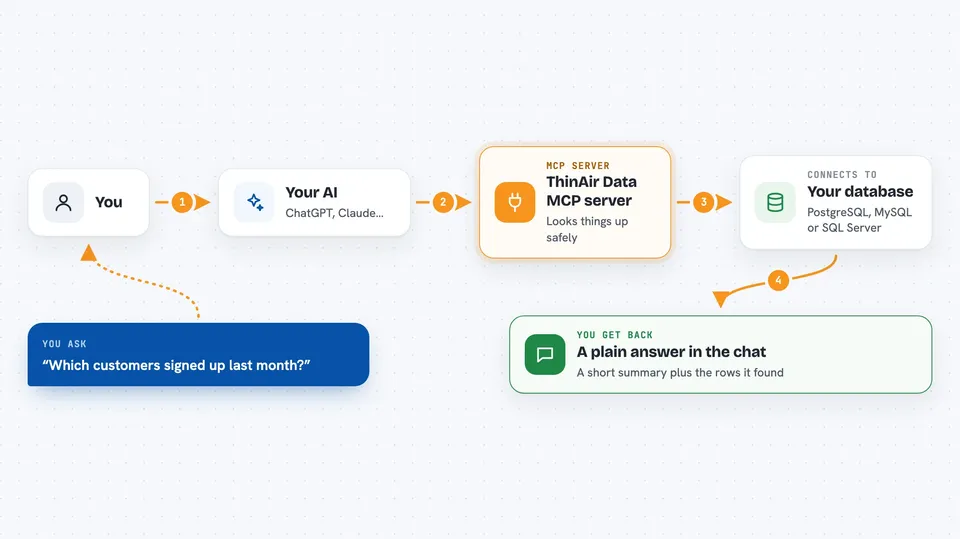
You ask your AI a question in plain words, like which customers signed up last month. Your AI passes that to the ThinAir Data helper. The helper talks to your database using the connection you set up, runs a read-only query, and sends the results back. Your AI then turns those results into a normal answer in the chat. It can also describe your tables, check for slow queries and scan for personal data patterns.
 Click to zoom
What you can do with it
- List the databases you have connected
- Describe the tables, columns and indexes in a database
- Run a safe read-only SQL query and see the rows
- Compare the same query across two or more databases
- Scan a table for personal data like emails or phone numbers
- Find slow or repeated query patterns in recent history
- Add or remove a database connection during your session
Try asking your AI
- “Show me all rows that have not updated in the last 24 hours across staging and prod”
- “What are the top 10 slowest queries this week?”
- “Scan the customers table for PII patterns”
- “Which tables have the most N+1 query exposure?”
What it gives back to you
You get answers in the chat, usually as a short summary plus a table of rows or a list of names. For schema questions, it returns table and column details. For scans and checks, it returns findings like flagged columns or slow queries. It does not change your data, so nothing in your database is edited.
Before you start
What you need
- A ThinAir account (sign in through the hosted product at data.thinair.co)
- An MCP client that supports remote servers, like Claude Desktop, Cursor or Windsurf
- A connection string (DSN) for the database you want to look at, added later with the add_connection tool
Good to know
It is meant to be read-only, but you should still use a database account with the least permissions possible and avoid connecting tables with sensitive data you do not want the AI to see.
Install it with your AI
Add ThinAir Data MCP server to your AI, no technical skills needed
You don't install anything by hand. You copy one prompt, paste it into an AI that can work on your computer, and it checks, installs and connects the server for you, asking you when it needs something.
Sign in to get the install prompt
Members get a ready-made prompt that lets the Claude desktop app check ThinAir Data MCP server, install it and connect it for them, step by step. You don't need any technical skills: you copy, paste and answer a few questions. Your connected AI can also find and install any of the 4,609 MCP servers here for you.
Who it's for
Anyone who needs quick answers from a database without writing SQL, such as analysts, support staff, product managers and developers doing read-only checks.


