MCP server · Research
Weather MCP server
Lets your AI look up hourly and daily weather forecasts for any city you name.

This is a small helper that connects your AI assistant to AccuWeather, a weather data service. Once it is set up, you can just ask your AI about the weather in a city and it will fetch a real forecast for you. It is handy if you plan trips, commutes, or outdoor work and want quick answers without opening a weather site.
What is an MCP server? The 30-second version
On its own, your AI can only chat with you using what it already learned. An MCP server is a small helper program that gives your AI one new skill, in this case the ability to look up live weather. You install it once, connect it to your AI, and from then on your AI can ask this helper for forecasts. The helper then talks to AccuWeather and brings the answer back into your chat.
What this MCP server does
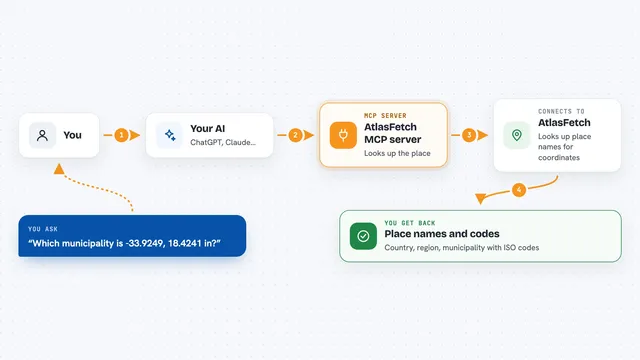
You ask your AI something like what the weather will be in a city. Your AI passes that request to this weather helper. The helper looks up the location, calls the AccuWeather service, and gets the forecast data. Then your AI shows you the result in the chat, in plain words or a list. You can ask for the next few hours or for up to 15 days ahead.
 Click to zoom
What you can do with it
- Get an hourly forecast for the next 12 hours in any city
- Get a daily forecast for 1, 5, 10, or 15 days
- Choose Celsius or Fahrenheit for the temperatures
- Check temperature, conditions, and precipitation for a location
- Compare weather across several cities by asking one at a time
- Plan a trip or commute by asking about the days ahead
Try asking your AI
- “What's the hourly weather forecast for New York City?”
- “Give me the 5-day forecast for London.”
- “What will the weather be like in Tokyo this week in Fahrenheit?”
- “Will it rain in San Francisco tomorrow?”
What it gives back to you
You get a forecast back in the chat, usually as a short list or table with times or days, temperatures, and conditions like rain or sun. If you asked in Celsius, the numbers come in Celsius; if you asked in Fahrenheit, they come in Fahrenheit. Sometimes your AI will summarize the forecast in a sentence or two instead of listing every value. Nothing is changed anywhere; it only reads weather data.
Before you start
What you need
- Node.js version 18 or newer on your computer
- A free AccuWeather API key (a kind of password for apps; you get one by signing up at developer.accuweather.com and creating an app)
- An AI app that supports MCP servers, like the Claude desktop app
Good to know
It only reads weather data, so it cannot change or delete anything, but it does use your AccuWeather key, so keep that key private.
Install it with your AI
Add Weather MCP server to your AI, no technical skills needed
You don't install anything by hand. You copy one prompt, paste it into an AI that can work on your computer, and it checks, installs and connects the server for you, asking you when it needs something.
Sign in to get the install prompt
Members get a ready-made prompt that lets the Claude desktop app check Weather MCP server, install it and connect it for them, step by step. You don't need any technical skills: you copy, paste and answer a few questions. Your connected AI can also find and install any of the 4,361 MCP servers here for you.
Who it's for
Anyone who wants quick weather answers in their AI chat, like commuters, travelers, event planners, or people who work outdoors.