MCP server · Design tools
ReftrixMCP web design analyzer
by TKMD
Let your AI study real websites and pull out their layouts, animations, and design quality for you.
ReftrixMCP is a helper that lets your AI look at real web pages and describe how they are built: their sections, their fonts and spacing, their animations, and how good the design is. It is made for frontend engineers, designers, and people building AI agents who want to reuse good UI patterns. If you have ever wanted to ask your AI "what makes this page feel polished?", this is the tool that answers it.
What is an MCP server? The 30-second version
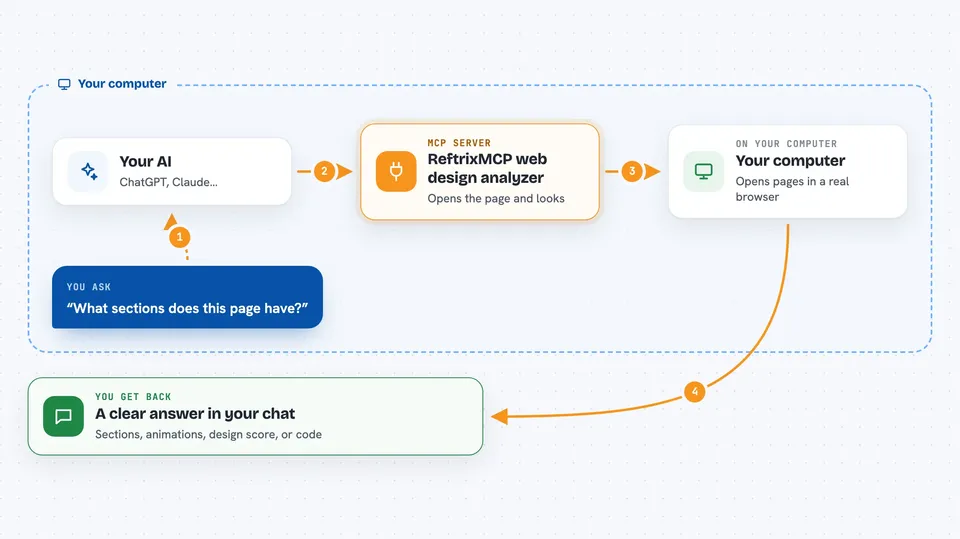
On its own, your AI can only chat with you using what it already learned. An MCP server is a small helper program that gives your AI a new skill or a connection to another app or service. This one connects your AI to a web design analysis engine that runs on your own computer. When you ask about a website, your AI talks to this helper, the helper visits the page and studies it, and then your AI tells you what it found.
What this MCP server does
You give your AI a web address and a question, like "what sections does this page have?" Your AI passes that to ReftrixMCP. The helper opens the page in a real browser, takes screenshots, and reads the page's structure and styles. It sorts what it sees into sections like hero, feature, or call to action, and it can also spot animations and score the design. Then your AI shows you the results in plain language, and can even turn a section into React, Vue, or HTML code.
 Click to zoom
What you can do with it
- Analyze a web page and list its main sections
- Detect CSS and JavaScript animations on a page
- Score a design on originality, craftsmanship, and contextuality
- Search your saved design patterns by plain-language description
- Compare UI parts like buttons or headings across different sites
- Generate React, Vue, or HTML code from an analyzed section
- Run a full page analysis covering layout, motion, quality, and responsive behavior
Try asking your AI
- “Analyze https://example.com and tell me what sections it has”
- “What animations are on this landing page?”
- “Score the design quality of this homepage and explain the score”
- “Find me saved layout patterns that use a large hero image with a centered headline”
- “Compare the buttons on these two sites and tell me how they differ”
What it gives back to you
You get back structured answers in the chat: lists of sections with their types, notes on the fonts and grid, a list of animations with timing details, and a quality score with suggestions. For parts and patterns, you get matching results from your saved library, ranked by how close they are to what you asked for. If you ask for code, you get a ready-to-paste React, Vue, or HTML snippet. Everything comes back as text and small tables you can read right in the conversation.
Before you start
What you need
- A computer with at least 16 GB of RAM (32 GB is better)
- Node.js 20 or newer, pnpm 10 or newer, and Docker
- Ollama installed with the llama3.2-vision model pulled
- About 1.5 GB of extra disk space for the AI models it downloads
Good to know
It visits real websites and stores what it finds in a local database, so be mindful about analyzing pages you do not have permission to study.
Install it with your AI
Add ReftrixMCP web design analyzer to your AI, no technical skills needed
You don't install anything by hand. You copy one prompt, paste it into an AI that can work on your computer, and it checks, installs and connects the server for you, asking you when it needs something.
Sign in to get the install prompt
Members get a ready-made prompt that lets the Claude desktop app check ReftrixMCP web design analyzer, install it and connect it for them, step by step. You don't need any technical skills: you copy, paste and answer a few questions. Your connected AI can also find and install any of the 4,361 MCP servers here for you.
Who it's for
Frontend engineers, designers, and AI agent builders who want to study real websites and reuse good UI patterns.