
MCP server · Finance and crypto · official
Facturolia MCP server
by toomasgutman-blip · official
Let your AI read European e-invoices and check them against the EN 16931 standard.
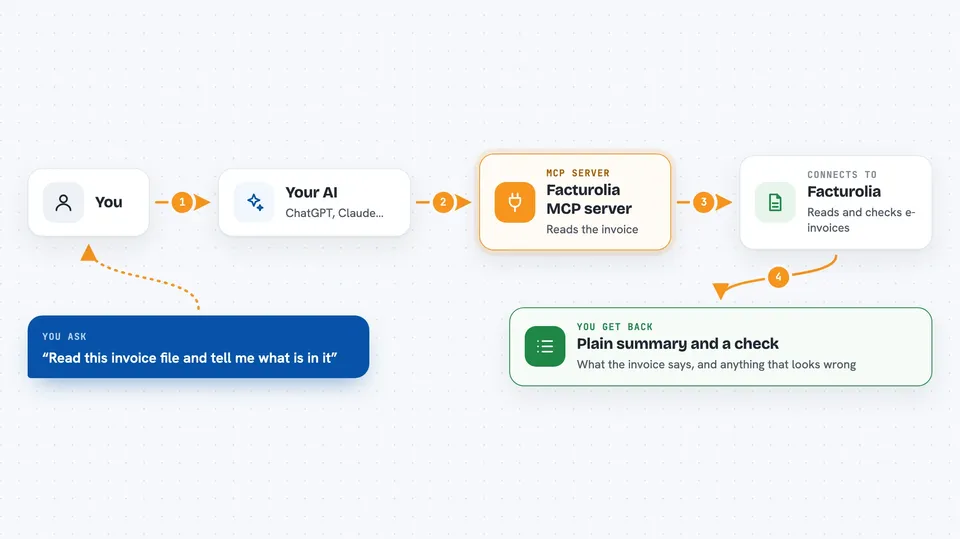
This is a small helper that lets your AI assistant open a European electronic invoice and tell you what is inside it. It works with the common e-invoice formats used in Europe: Factur-X, ZUGFeRD, XRechnung, UBL and CII. It is handy if invoices in these formats land in your inbox and you want a plain-language answer instead of a wall of XML.
What is an MCP server? The 30-second version
On its own, your AI can only chat with you. An MCP server is a small helper program that gives your AI a new skill or a connection to an app or service. This one connects your AI to Facturolia, a service that reads European e-invoices. Once it is set up, your AI can ask Facturolia to open an invoice file and check it, then explain the result to you.
What this MCP server does
You point your AI at a file on your computer, either a PDF or an XML invoice. Your AI passes the file to this helper, and the helper sends it to the Facturolia service to be read. Facturolia pulls out the supplier, the customer, the dates, the line items, the VAT and the totals, and checks everything against the European EN 16931 standard. Your AI then tells you, in plain words, what the invoice says and whether anything looks wrong.
 Click to zoom
What you can do with it
- Read a Factur-X or ZUGFeRD PDF and show what is really inside it
- Check an invoice against the EN 16931 European standard
- Spot when the visible PDF page and the hidden XML data do not match
- List the supplier, customer, dates, lines, VAT and totals from an invoice
- Get just the compliance verdict and any anomalies, without the full detail
- Ask for the answer in French instead of English
Try asking your AI
- “Read ~/Downloads/invoice.pdf and tell me what is in it”
- “Is this invoice correct? Check /Users/me/invoices/F-2026-0148.xml”
- “What is the total including VAT on this Factur-X file?”
- “Does the PDF page match the XML data inside this invoice?”
What it gives back to you
You get back a plain-language summary of the invoice: who issued it, who it is for, the dates, the line items, the VAT breakdown and the totals. You also get the EN 16931 check, which either says no anomalies found or lists what looks wrong. If you only want the verdict, the check tool gives you just the compliance result and the anomalies.
Before you start
What you need
- Python 3.10 or newer on your computer
- A free API key from Facturolia (a kind of password for apps; you get one at facturolia.fr/en/pricing)
- An MCP-compatible client, such as the Claude desktop app
- The facturolia_mcp.py file downloaded to your computer
Good to know
Your invoice file is sent to the Facturolia service to be read, so do not use this if your policy says invoices must stay inside your own network.
Install it with your AI
Add Facturolia MCP server to your AI, no technical skills needed
You don't install anything by hand. You copy one prompt, paste it into an AI that can work on your computer, and it checks, installs and connects the server for you, asking you when it needs something.
Sign in to get the install prompt
Members get a ready-made prompt that lets the Claude desktop app check Facturolia MCP server, install it and connect it for them, step by step. You don't need any technical skills: you copy, paste and answer a few questions. Your connected AI can also find and install any of the 4,361 MCP servers here for you.
Who it's for
Anyone who receives European e-invoices and wants a quick plain-language read and a standards check, such as bookkeepers, small business owners and finance assistants.




