
MCP server · Notes
Agent Memory MCP server
by tverney
Give your AI a long-term memory that it can read, add to, and search across chats.
This is a small helper that gives your AI assistant a memory that survives between conversations. It stores that memory as simple text files on your own computer, so your AI can look things up and add new notes when you ask. It is handy if you keep repeating the same context, like your preferences, your projects, or how you like things done.
What is an MCP server? The 30-second version
On its own, your AI can only chat inside the current window and forgets everything when you close it. An MCP server is a small helper program that gives your AI one extra skill or a connection to something. This one connects your AI to a folder of memory files on your computer, so it can read your notes, add new ones, and search them. You just talk to your AI like normal, and it uses this helper behind the scenes.
What this MCP server does
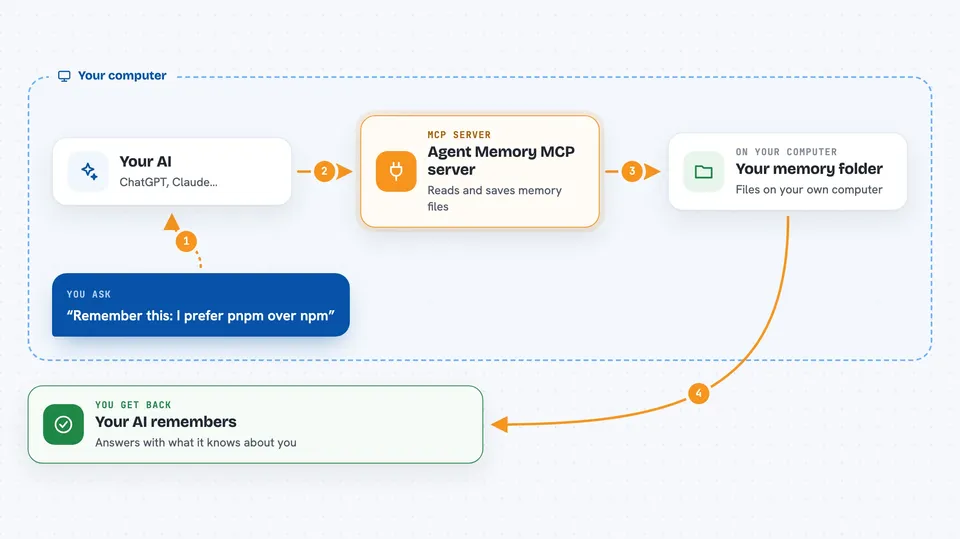
You ask your AI something, or tell it to remember something. The AI uses this helper to open your memory folder and look at the index file, which is a short list of what it knows. If you asked about a specific topic, it can open that topic file in full. When you tell it something worth keeping, it writes a short summary into a sessions folder. A separate background program can later tidy those summaries into clean, lasting memories.
 Click to zoom
What you can do with it
- Load your memory index at the start of a chat
- Open a specific topic file for full details
- Search all your memory files for a word or phrase
- Save a short summary of what you discussed
- Tag a saved summary with where it came from
- Check whether the background memory program is running
Try asking your AI
- “Read my memory index.”
- “What do you remember about my preferences?”
- “Search my memory for pnpm.”
- “Remember this: I prefer pnpm over npm.”
What it gives back to you
You get answers in plain chat. When it reads memory, you see a short list of what it knows or the full text of a topic file. When it searches, you get the matching lines from your memory files. When it saves, it quietly writes a new summary file and tells you it is done.
Before you start
What you need
- Node.js installed on your computer
- A folder for your memory files (the setup wizard creates one for you)
- An MCP-compatible app like Claude Desktop, Cursor, or Kiro
Good to know
It reads and writes files in your memory folder, so anything you tell your AI to remember is saved on your computer in plain text.
Install it with your AI
Add Agent Memory MCP server to your AI, no technical skills needed
You don't install anything by hand. You copy one prompt, paste it into an AI that can work on your computer, and it checks, installs and connects the server for you, asking you when it needs something.
Sign in to get the install prompt
Members get a ready-made prompt that lets the Claude desktop app check Agent Memory MCP server, install it and connect it for them, step by step. You don't need any technical skills: you copy, paste and answer a few questions. Your connected AI can also find and install any of the 4,066 MCP servers here for you.
Who it's for
Anyone who uses an AI assistant every day and is tired of repeating the same background about themselves and their work.




