
MCP server · Notes
mnemostack memory server
by udjin-labs
Give your AI a long-term memory it can search, so it remembers past notes, decisions, and chats.
mnemostack is a memory helper for your AI. It stores your notes, documents, and past conversations in a searchable place, then lets your AI look things up when it needs them. It is handy if you work with a chat assistant or coding helper that keeps forgetting what you told it earlier.
What is an MCP server? The 30-second version
On its own, your AI can only chat with what is in front of it right now. An MCP server is a small helper program that gives your AI a new skill or a connection to another service. This one connects your AI to mnemostack, a memory store that runs on your own computer. Once connected, your AI can ask mnemostack to remember things and to find them again later when you ask.
What this MCP server does
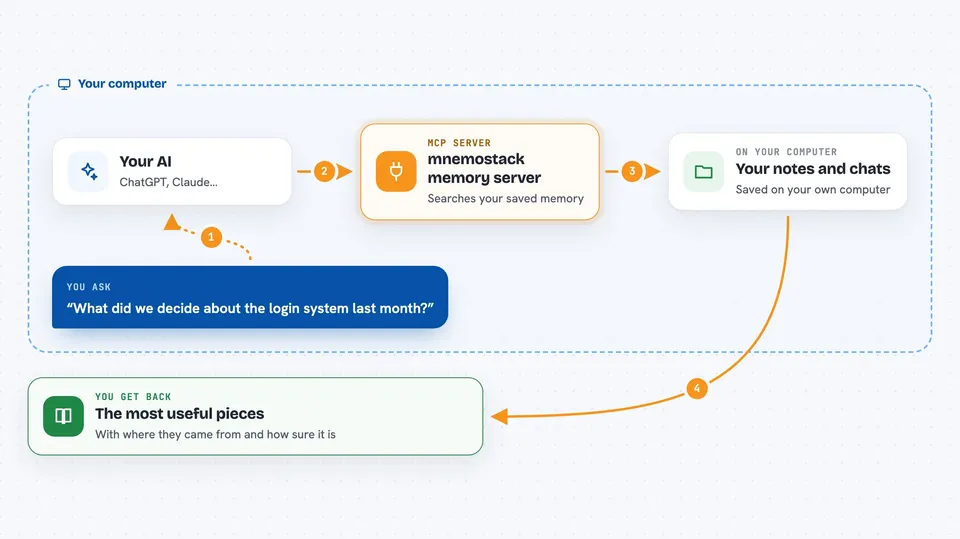
You point mnemostack at a folder of your notes, docs, or chat logs, and it saves them into a searchable memory. When you ask your AI a question, the AI calls this helper, and the helper searches that memory using several methods at once, not just word matching. It looks for similar meaning, exact words, timing, and links between facts. Then it hands back the most useful pieces so your AI can answer you with the right details.
 Click to zoom
What you can do with it
- Save a folder of notes or documents into a searchable memory
- Ask your AI what you decided about a topic earlier
- Search your memory by meaning, not just exact keywords
- Find things by when they happened, like what changed last week
- Get answers with sources and a confidence level
- Keep separate memories for different people or projects
- Store new messages as they arrive so nothing is lost
Try asking your AI
- “What did we decide about the login system last month?”
- “Search my notes for anything about the budget review”
- “What changed in the project plan last week?”
- “Answer this using my saved documents and show me the sources”
What it gives back to you
You get back a short list of the most relevant pieces from your memory, each with a snippet and where it came from. If you ask for an answer, you get a written reply with a confidence level and citations pointing to the source notes. You can also see which search methods were used and whether any part was unavailable.
Before you start
What you need
- Python installed on your computer
- A free Qdrant program running locally (a small database for search)
- An API key from Google Gemini (a kind of password for AI apps; the site gives you one)
Good to know
It stores your notes and documents in a local database, so be careful about what private or sensitive files you point it at.
Install it with your AI
Add mnemostack memory server to your AI, no technical skills needed
You don't install anything by hand. You copy one prompt, paste it into an AI that can work on your computer, and it checks, installs and connects the server for you, asking you when it needs something.
Sign in to get the install prompt
Members get a ready-made prompt that lets the Claude desktop app check mnemostack memory server, install it and connect it for them, step by step. You don't need any technical skills: you copy, paste and answer a few questions. Your connected AI can also find and install any of the 4,066 MCP servers here for you.
Who it's for
People who use AI assistants or coding helpers for long projects and are tired of re-explaining everything after each restart.




