
MCP server · Analytics
dbridge MCP server
by ugurcl
Ask your AI questions about a SQL database in plain words and get safe, read-only answers.
dbridge is a small helper that lets your AI look inside a SQL database and answer questions about it in plain language. You do not need to write any SQL yourself. It is handy for anyone who has data in SQLite, PostgreSQL, or MySQL and wants quick answers without poking around the database by hand.
What is an MCP server? The 30-second version
On its own, your AI can only chat. It cannot see your database or know what is inside it. An MCP server is a small helper program that gives your AI a new skill or a connection to an app or service. Here, it connects your AI to your SQL database, so the AI can look things up and answer your questions for you when you ask.
What this MCP server does
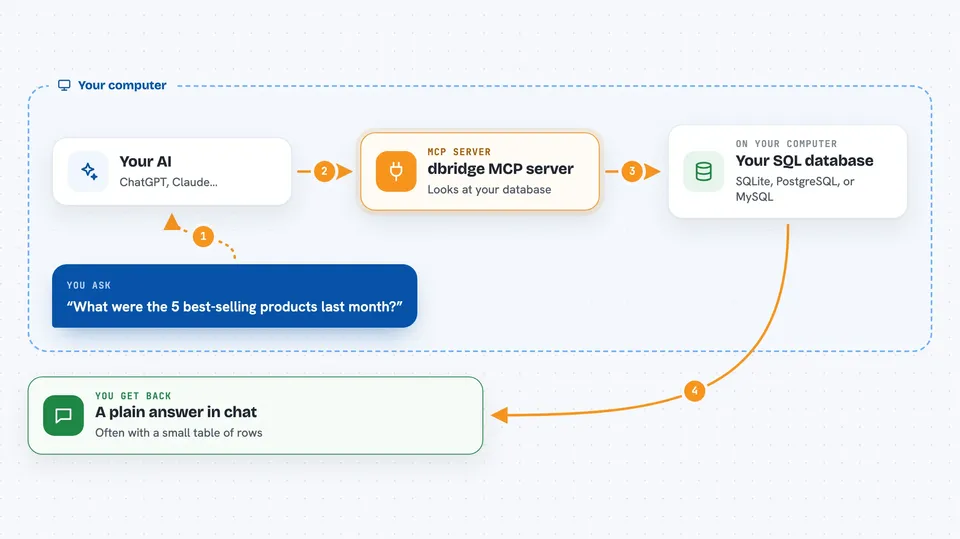
You ask your AI a question about your data, like which products sold best last month. The AI uses this helper to look at your database structure, figure out the right tables and columns, and write a read-only query. The helper runs that query against your SQLite, PostgreSQL, or MySQL database and sends the rows back. Your AI then turns those rows into a plain answer for you. It can only read, never change or delete anything.
 Click to zoom
What you can do with it
- List all the tables in your database
- Describe a table's columns, keys, and rough row count
- Preview the first few rows of a table
- Run a read-only query and get results as a table or list
- Check which columns have many distinct values and which are mostly empty
- See which indexes exist and which ones are never used
- Find the slowest queries that have been recorded
Try asking your AI
- “What were the 5 best-selling products last month?”
- “How many customers signed up in each country this year?”
- “Show me the first 10 rows of the orders table”
- “Which tables have columns that are mostly empty?”
What it gives back to you
You get back a plain answer in the chat, often with a small table or a list of rows. It can also return results as CSV or Markdown if you prefer. For database health questions, it gives you summaries like column value counts, index usage, or the slowest recorded queries. Everything comes back as text you can read, not as a file you have to open.
Before you start
What you need
- Node.js 22.5 or newer
- A connection to your database: a file path for SQLite, or a connection string for PostgreSQL or MySQL
- The connection string or file path added to your AI app's settings
Good to know
It is built to be read-only and safe, but you should still point it at a database account with only the access you are comfortable giving an AI.
Install it with your AI
Add dbridge MCP server to your AI, no technical skills needed
You don't install anything by hand. You copy one prompt, paste it into an AI that can work on your computer, and it checks, installs and connects the server for you, asking you when it needs something.
Sign in to get the install prompt
Members get a ready-made prompt that lets the Claude desktop app check dbridge MCP server, install it and connect it for them, step by step. You don't need any technical skills: you copy, paste and answer a few questions. Your connected AI can also find and install any of the 4,609 MCP servers here for you.
Who it's for
Anyone who has data in a SQL database and wants quick answers without writing SQL, especially analysts, support teams, and small business owners.


